10 Best ActivTrak Alternatives for Easy Project Time Tracking
Time tracking tools are supposed to *save* you time. But sometimes they feel like they were specifically designed to do just the opposite.
If you’ve been using ActivTrak, you’ve probably wanted visibility into how work happens, the ability to track project hours, and maybe to figure out why that “quick task” always takes half the afternoon.
And to be fair, ActivTrak does a good job of monitoring productivity and analyzing work patterns. But when your main goal is effective project time tracking, there are other tools that make such tracking pretty simple.
Luckily for you (and me!), today’s time tracking tools are much more flexible than the old, annoying timers. Many offer automatic tracking (like ActivTrak), detailed project reports, integrations with tools you already use, and clean interfaces.
So, if you’re ready to ditch ActivTrak and are looking for something different, you’re in the right place.
Below, you’ll see 10 of the best ActivTrak alternatives for easy project time tracking. These tools help you understand where your time goes without making you feel like you’re being audited by your own software. 🙂
We’ve got no time to waste, so let’s roll.
Oh, and before we dive into the alternatives, we’ll spend a quick minute recapping what ActivTrak actually is and what it does. If you’re not interested in that part, just skip ahead to land straight on the alternatives.
Key Takeaways:
- ActivTrak is great for workforce analytics and productivity monitoring, but it can feel heavy if all you want is simple project tracking.
- Modern alternatives offer automatic tracking, clean reports, and integrations with the tools you already use.
- Some tools track your work quietly in the background, so you can focus on getting stuff done instead of starting and stopping timers all day.
- If your goal is clear project hours, billable work, and simple insights, there are plenty of options that do exactly that.
- We’ve ranked the top 10 ActivTrak alternatives by automation, from fully automated trackers to semi-manual tools, so you can find your perfect fit.

So, what is ActivTrak?
ActivTrak is a workforce analytics and productivity monitoring app. It’s designed to help companies understand how work happens across their teams.
The app tracks employee activity on work devices and turns that data into reports, dashboards, and insights about productivity, engagement, and work habits.
The platform was founded in 2009 and is now headquartered in Austin, Texas. Interestingly, ActivTrak started under the name Birch Grove Software, with the goal of building tools that could help organizations better understand employee productivity. Over time, the product evolved from a simple monitoring app into a workforce analytics platform.
Today, ActivTrak has thousands of organizations and users worldwide. Remote and hybrid work teams tend to use it the most. It’s typically used by:
- HR and People Operations teams who want to monitor productivity and engagement.
- IT departments responsible for monitoring software usage and compliance.
- Operations managers who lead distributed or remote teams.
- Team managers who want insights about team performance.
That all said, because ActivTrak focuses heavily on monitoring and workforce analytics, it sometimes feels like overkill for teams that want straightforward project time tracking.
How ActivTrak works
ActivTrak is all about insights.
To present you with those insights, ActivTrak collects data on app usage, website activity, working hours, and general computer activity. This information is then analyzed to identify productivity trends, focus patterns, and workflow inefficiencies.
And the best thing about it? You don’t have to rely on manual time logs or rough estimates when tracking time; the platform automatically captures activity data (thanks to a small background app called ActivTrak Agent) and transforms it into analytics and productivity insights.

Once installed on a device, ActivTrak runs quietly in the background and collects activity data. According to the company, the software does not record keystrokes, access webcams, monitor emails, or record video; there’s no invasive surveillance.
The collected data is then processed by the analytics engine, and it gets you dashboards, reports, and productivity metrics. ActivTrak also supports multiple environments, including Windows, macOS, Chrome OS, virtual desktop infrastructure (VDI), and terminal services.
ActivTrak features
ActivTrak comes with a set of workforce analytics and productivity management tools. Here are some of its key features:
- Employee activity monitoring.
- Application and website usage tracking.
- Automatic time tracking and time auditing.
- Productivity classification (productive/unproductive/neutral).
- Productivity reports and trend analysis.
- Focus and engagement insights.
- Scheduling adherence tracking.
- Alerts and policy compliance monitoring.
- Workforce planning and capacity insights.
- AI-based productivity recommendations
- Data benchmarking and performance comparisons.
And this list of features brings us to ActivTrak’s pros and cons.
Pros of ActivTrak
ActivTrak is a popular workforce analytics app for a reason. Its mix of monitoring, productivity insights, and reporting tools gives you a pretty detailed view of how your team works.
Here are some of the biggest pros of using ActivTrak:
- You get true workforce analytics. The platform collects activity data and converts it into clear dashboards and reports to show you productivity trends, app usage, and workflow patterns.
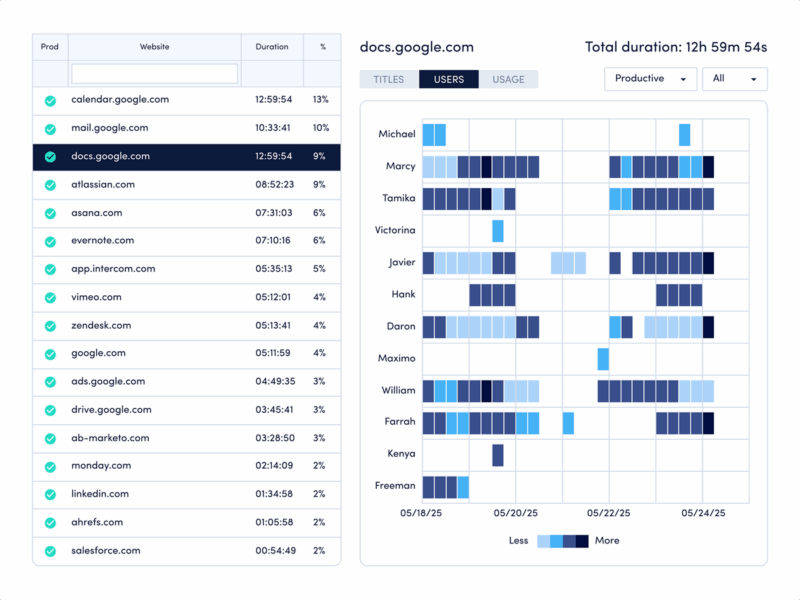
- You get automatic activity tracking. ActivTrak runs in the background and automatically tracks user activity, so there’s no need for manual time logging.
- You get productivity insights and classification. You can classify apps and websites as productive, unproductive, or neutral, and over time, the app will generate productivity insights, so you can identify opportunities for improvement (for yourself and your team).
- You get good reporting. ActivTrak provides lots of dashboards and visual reports, including productivity trends, team comparisons, and workload distribution charts.
- You get workforce planning insights. There are also insights into team capacity and workload balance.
- It integrates with various tools. You can connect ActivTrak with project management, HR, and productivity tools.
- There’s a free plan. ActivTrak offers a free tier that includes basic monitoring and reporting features for small teams.
Cons of ActivTrak
Now, let’s talk drawbacks. Some people find that the platform is overly complex for basic time tracking, and mention that there are some limitations related to pricing and flexibility.
Here are some of the most commonly mentioned cons of ActivTrak.
- You may feel it’s “too heavy” for simple time tracking. As you know, ActivTrak is primarily designed as a workforce analytics and monitoring platform, not a simple project time tracker. Because of that, you can find yourself dealing with dashboards, classifications, and analytics that you don’t actually need.
- Limited mobile support. ActivTrak works on desktop (Windows, macOS, and Chrome OS), so mobile monitoring features are pretty limited.
- Advanced features require high-tier plans. Particular advanced features are locked behind higher-tier plans or add-ons (which is understandable, by the way). Users have reported that some useful functionality requires upgrading to more expensive packages.
So, why do some teams look for ActivTrak alternatives?
Well, you tell me.
You already know what I’m gonna say… No tool is perfect.
ActivTrak is, undoubtedly, a powerful platform, but it’s not the best fit for every team.
If you need simple project-based time tracking (just logging hours, tracking billable work, or managing project timelines), not full-scale workforce monitoring, you don’t need ActivTrak.
There are a bunch of tools designed specifically for project time tracking, team collaboration, and simpler reporting.
And that’s exactly what we’ll look at next. 👀
Top 10 best ActivTrak alternatives
Now comes the good part.
If your main goal is easy project time tracking, automation is key.
Manually starting and stopping timers—or remembering to log hours later—doesn’t exactly scream easy project tracking. Manual time tracking leaves too much room for error. (I bet you already knew this.)
That’s why I highly suggest you consider fully private, fully automatic tracking for project tracking. Such tracking lets you see exactly how much time you spend on each project, task, or client, so you can focus on work instead of constantly tracking it.
That said, for this list, we decided to rank the alternatives based on how automated their time tracking is.
In other words, tools that track activity automatically with little or no manual input rank higher, while tools that rely mostly on manual timers or timesheets rank lower.
Here are the 10 best ActivTrak alternatives, ordered from most automated to most manual:
- Memtime. Memtime is a fully automatic desktop time tracker that records your activity timeline in the background and lets you assign the captured time to projects later. It ranks #1 because it runs completely passively, capturing all programs, docs, and browser activity without timers or manual input.
- DeskTime. DeskTime is an automatic employee productivity tracker that monitors app usage, websites, and activity levels and creates productivity reports. It ranks high because the software automatically records your activity and work hours.
- Insightful. Insightful is a workforce analytics platform that automatically tracks productivity, activity levels, and time spent across projects. It ranks near the top because it collects work activity data and turns it into dashboards and timesheets.
- TimeCamp. TimeCamp is a project-focused time tracker that combines (semi-)automatic background tracking with manual time entries. It ranks here because it can track time automatically in the background or through manual timers.
- Hubstaff. Hubstaff is a time tracking and workforce management tool that gives you activity monitoring, screenshots, and productivity reports. It sits in the middle because it supports automatic activity tracking but still relies heavily on start/stop timers.
- Time Doctor. Time Doctor is an employee monitoring and productivity analytics platform that tracks time, app usage, and employee activity levels. It ranks a bit lower because you need to start and stop timers manually.
- Monitask. Monitask is a workforce monitoring tool that tracks time, captures screenshots, and generates productivity reports. It ranks here because it automatically logs active time after employees clock in, but the tracking session still needs to be started manually.
- Apploye. Apploye is an employee monitoring and time tracking tool that captures activity, screenshots, and project-based time logs. It ranks lower on automation because it relies mainly on manual timers and monitoring features (no passive activity tracking).
- Toggl Track. Toggl Track is a popular time tracking tool for tracking billable hours and project time. It ranks near the bottom because it primarily uses simple start/stop timers, although it offers some background tracking and idle detection.
- Clockify. Clockify is a widely used free time tracking platform that lets you track billable hours, generate timesheets, and manage projects. It ranks last in automation because it focuses mostly on manual timers and timesheet entries, with some automatic activity tracking.
All in all, if you want fully automatic, hands-off time tracking, tools like Memtime, DeskTime, and Insightful are the closest alternatives to automated workforce analytics.
Also, see a tool you like? Just click its name to check it out.
#1 Memtime
Want a tool that tracks your and your team’s project hours?
That does so silently? No interruptions whatsoever?
Well, you’ve found one, and it’s Memtime.
Memtime is our desktop-based automatic time tracking app.
It tracks all your digital activity in the background—think apps, meetings, docs, and websites—and lays them in a chronological, automatic timeline in chunks (1-60 minute intervals). This is a long way of saying you get to see what you’ve worked on throughout the day, minute-level zoom. Like this:
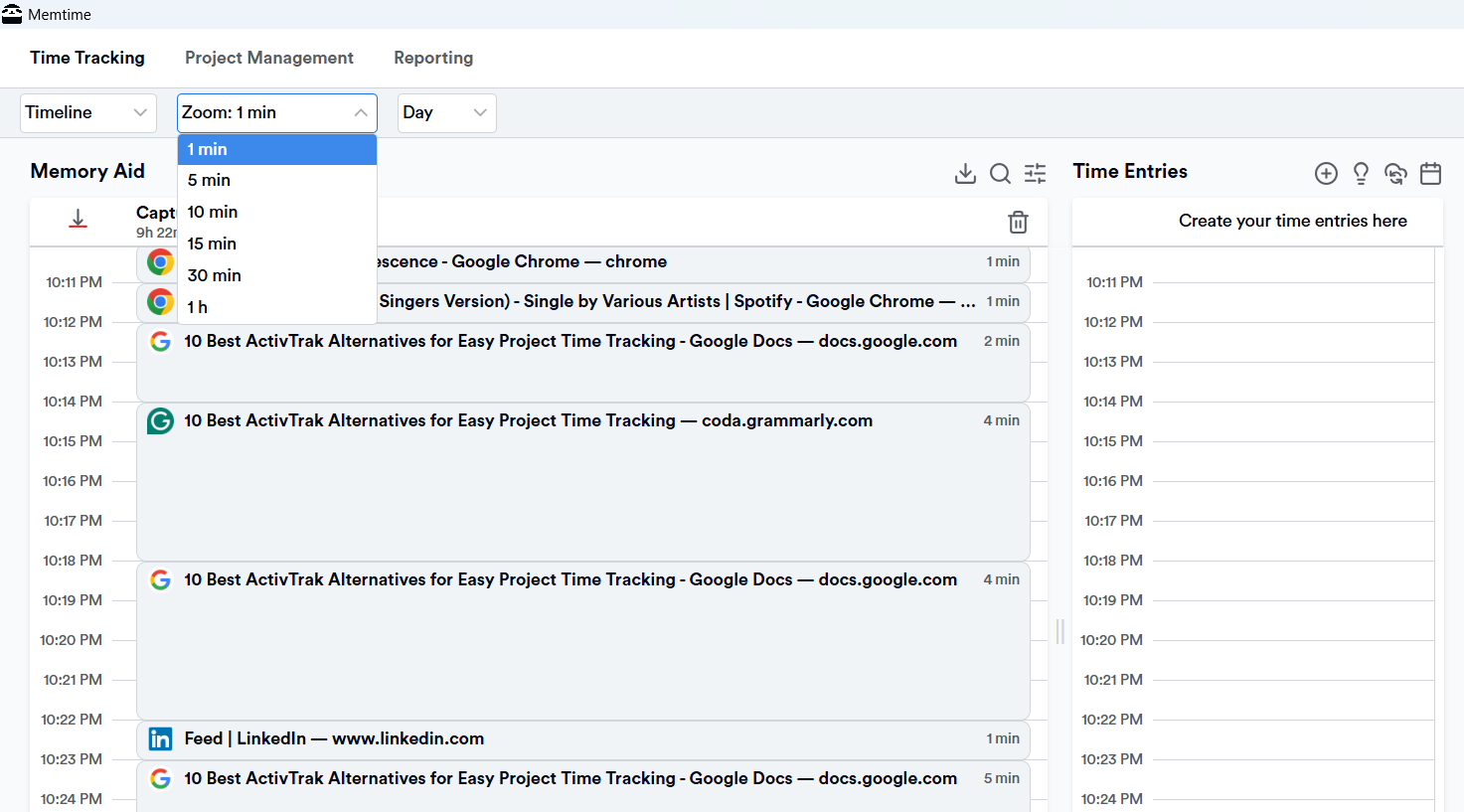
And once you see all your activity, you reconstruct your day, and take the next step. You can export those tracked activities as time entries to your project management/billing software of choice (more than one).
How does that sound?
Hopefully, as expected, ‘cuz that’s just the beginning.
Here are some other Memtime features you need to know about:
- The app can automatically track phone call duration via popular VoIP services or your iPhone.
- You can turn any captured activity into a time entry quickly.
- You don’t have to convert activities into time entries by yourself. You can set automation rules, so Memtime provides time entry suggestions. When Memtime suggests a time entry based on the rule you've set up, you have the option to either accept the suggestion, make edits to it, or decline it.
- You can export time entries & sync with your favorite tools, including Asana, Jira, ClickUp, and more via a 2-way sync. You import projects (and tasks) into Memtime and then export time entries back to those projects and software.
- Memtime is 100% private. All your data stays local, as it’s stored offline on your computer (never uploaded to a cloud server). Plus, no raw activity data (like URLs or file names) is ever shared with another user, unless you explicitly choose to share or log a time entry in a project management app.
- Strong reporting. With Memtime, you get timeline reports (a chronological view of all logged entries), project reports (group hours by project and task), utilization and productivity insights (like total recorded activity with logged project hours), and program and activity breakdowns (which tools, sites, and apps you spent the most time in).
Now, what do you think?
With Memtime, you get true insights into how you (and your team) spend time, with no distractions. It really does get better than that.
If you’re on board, book a quick demo, and we’ll show you just how effortless Memtime is. The call is 15 minutes long, but I’ll feel like 5; I promise (we’re all about efficiency). 🙂
Oh, and if you’re not ready for a book-a-call type of commitment, try the tool yourself for 2 weeks. It’s on us.
#2 DeskTime
DeskTime is a time tracking and productivity tool. It’s all about automatic time tracking, no manual timers or extra effort from team members.
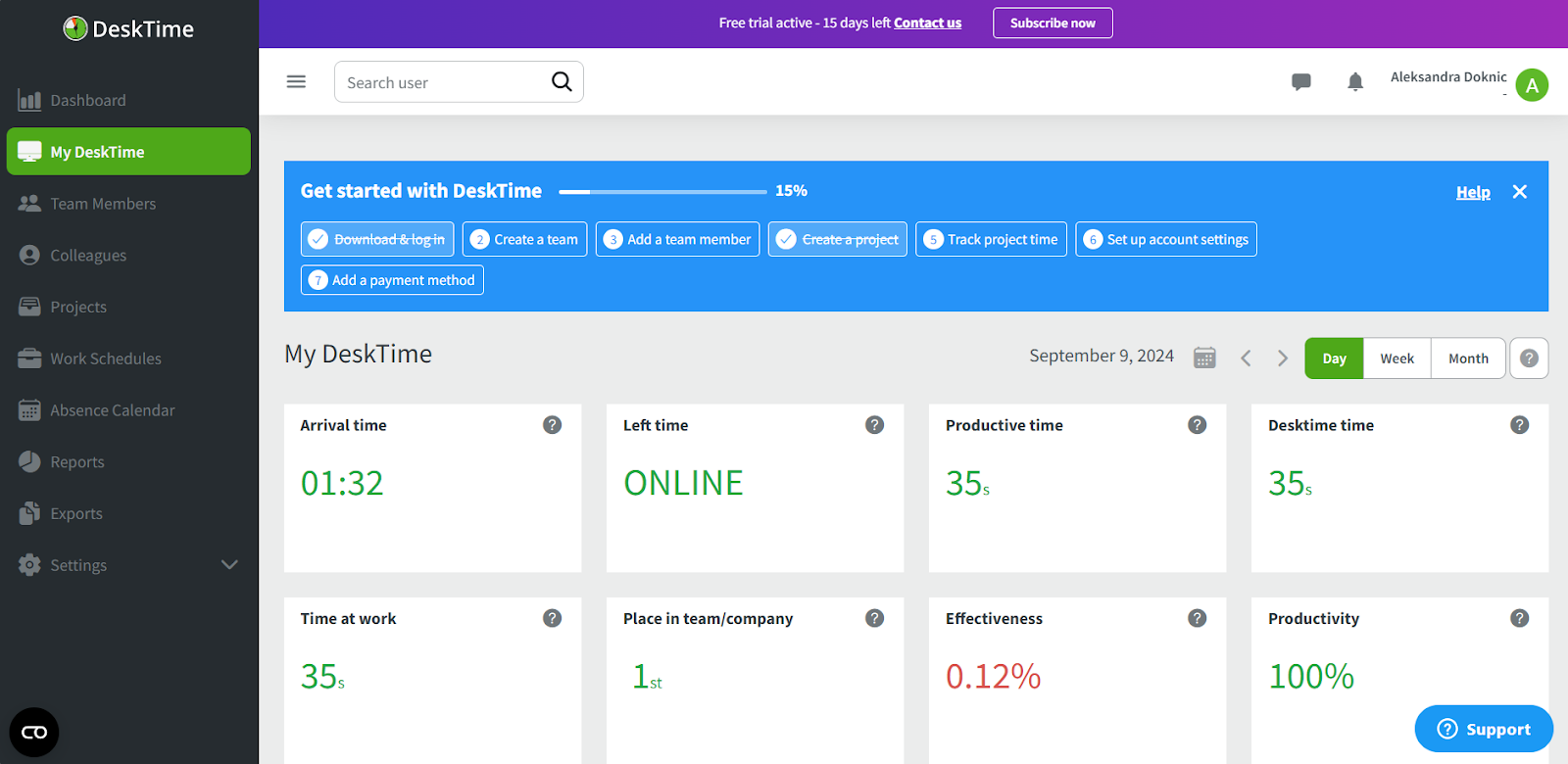
Like ActivTrak, it collects activity data from the user’s computer and uses it to generate insights. However, DeskTime focuses primarily on tracking hours and project productivity, not necessarily on workforce monitoring.
So, DeskTime runs quietly in the background and logs time based on the apps, websites, and docs you use throughout the day. It gives you a timeline of work and uses that raw activity to provide productivity analysis; it can identify your most productive hours and show which apps or task categories take the most time.
In terms of features, DeskTime includes:
- Automatic time tracking.
- Classification of apps and sites as productive, unproductive, or neutral.
- Project and task tracking, as you can assign tracked hours to specific projects and tasks.
- Reports and dashboards show hours worked, productivity patterns, and task breakdowns for individuals or teams.
- Offline tracking, as logged time is recorded even when the device is offline and synced later.
When you compare DeskTime to ActivTrak, the biggest difference lies in focus and simplicity.
ActivTrak is more of a workforce analytics system; it’s built to monitor employees and analyze productivity trends across a company. DeskTime is primarily a time tracker with automatic capture and productivity insights.
So, put shortly, ActivTrak allows you to focus on productivity analytics and monitoring at scale. DeskTime loves automated time tracking, productivity insights and project reporting.
#3 Insightful
Insightful (formerly Workplus) is a workforce analytics and time tracking platform. It’s designed primarily for monitoring team productivity and activity.

Like ActivTrak, it focuses on providing managers with detailed insights into how employees spend their time. The difference is that it combines automatic time tracking with productivity scoring and team-level analytics, so it’s all slightly more streamlined.
Here’s how the app works:
- Insightful runs a small background agent on users’ computers that automatically logs active time, apps, websites, and project-related activity.
- This data is then processed into dashboards and reports that show productivity trends, focus periods, and workload distribution across teams.
- It also provides project-based time tracking, so hours can be assigned to specific tasks and projects for reporting or billing purposes.
When comparing Insightful and ActivTrak, the main difference lies in focus and usability.
ActivTrak is a strong workforce monitoring platform with organizational analytics, alerts, and compliance features. Insightful is a bit easier to use for teams, as it offers automatic time tracking, productivity insights, and project reporting without a complicated monitoring setup.
Overall, I’d say that with Insightful, you get automatic tracking, productivity scoring, and team dashboards in a more project-friendly way. I can imagine that’s something you want.
#4 TimeCamp
TimeCamp is a time tracking tool that gives you options: you can choose between (semi-)automatic activity capture and manual time tracking. It’s designed to track how time is spent on tasks and projects, with options to automatically record usage in the background or manually log or adjust hours when needed.
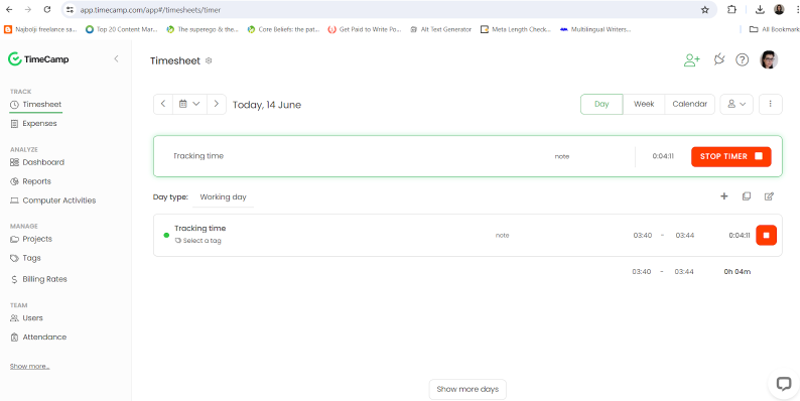
Once installed on a computer or device, TimeCamp can start tracking time.
Manual time tracking is done using a Start/Stop timer or by typing a time entry.
Automatic tracking is available on desktop and is done through:
- Keyword-based tracking, where you can assign specific keywords to tasks or projects. The application monitors active window titles, URLs, and application names, automatically logging time when these keywords are detected.
- Activity monitoring, when the software tracks computer activities and provides insights into productivity patterns.
Some other TimeCamp’s key features include:
- Project and task assignment. You can link tracked time to specific projects and tasks for billing or reporting.
- Timesheets and reporting. You can generate detailed summaries of hours worked, project costs, and utilization.
- Budgeting and project estimates. You can compare actual time spent with planned budgets.
- Integrations with popular tools. You can sync with project management and accounting apps.
When compared with ActivTrak, TimeCamp’s focus is *very* different. ActivTrak is built primarily as a workforce analytics and monitoring platform. TimeCamp is more of a classic time tracking and project reporting tool.
If you want pretty accurate billing, budget comparisons, and project-level insights, TimeCamp can get you that. You’ll also get simple productivity reporting without heavy monitoring.
#5 Hubstaff
Hubstaff is a time tracking and workforce management app. With it, you can log hours, track project work, and do GPS tracking (that’s why it works well for remote and distributed teams). It combines (semi-)automatic time capture with optional activity monitoring features like screenshots and app usage.

Once installed, Hubstaff lets you start a timer for tasks or let the app automatically log active time based on your work patterns. This means that you can set up automatic start/stop times based on predefined schedules or shifts, so time tracking begins and ends without your manual intervention.
Hubstaff’s system can also detect periods of inactivity (when there’s no keyboard or mouse movement) and asks you to confirm whether to keep or discard the idle time. Activity levels are calculated as the percentage of active seconds (keyboard or mouse use) within a 10-minute interval.
Some of Hubstaff’s key features are:
- Activity levels and optional screenshots. You can see how active a user was during tracked time and capture optional screenshots.
- Project and task tracking. You can assign hours to specific jobs, tasks, and clients.
- Reporting and timesheets. You can get summaries of work hours, payroll reports, and project costs.
- GPS/mobile tracking. You can track field teams’ hours and locations via mobile devices.
- Integrations. Hubstaff integrates with tools like Asana, Trello, QuickBooks, and more.
The biggest difference between Hubstaff and ActivTrak is their purpose and primary audience.
ActivTrak is mainly a workforce analytics and productivity monitoring platform. Its features are focused on dashboards, productivity classification, and analytics.
Hubstaff is focused more on your projects. Its features are built around logging hours, managing projects, and running payroll. That’s why Hubstaff is popular with remote teams and freelancers.
#6 Time Doctor
Time Doctor is a time tracking and productivity platform. It can help you understand how time is spent on projects and at the activity level. It combines manual timer controls with automatic productivity monitoring.
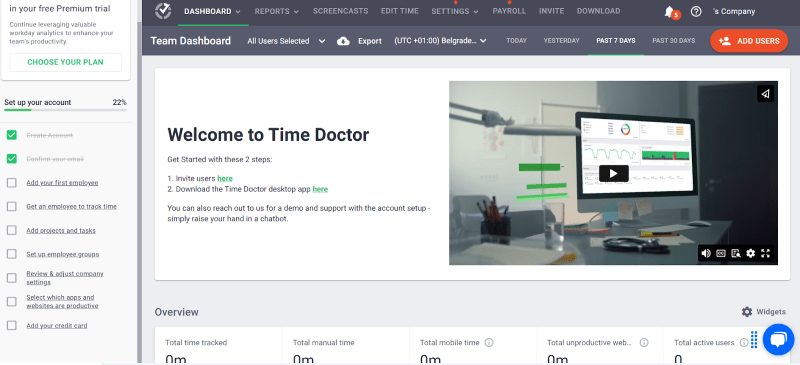
Time Doctor works by running a lightweight app on your computer or mobile device.
You start a timer for a specific task, and the app logs time along with details about app and website usage. Time Doctor also tracks idle time, sends reminders to stay on task, and offers optional screenshots and activity level reports.
Some of Time Doctor’s key features are:
- Productivity insights and activity data. App and website usage reports come in handy.
- Optional screenshots and activity levels. The tool captures screenshots and activity metrics (configurable by admins).
- Project and task assignment. You can link tracked time to specific projects, tasks, or clients.
- Reporting and timesheets. You can generate summaries of hours worked, productivity patterns, and project time.
- Good integrations. You can connect Time Doctor with tools like Asana, Jira, Trello, and others.
When comparing Time Doctor to ActivTrak, the biggest difference is in workflow style. ActivTrak is all about workforce analytics and productivity monitoring. Time Doctor is built more around practical time tracking with productivity context. It comes with manual timers and project‑linked hours.
So, if you want a tool that focuses on project time tracking and comes with manual control, Time Doctor is it. Also, Time Doctor sits toward the middle of the automation spectrum: it doesn’t track every second silently in the background like fully automatic tools, but it can still capture hours.
#7 Monitask
Monitask is a time tracking and employee productivity tool. It can give you visibility into your team’s work hours and activity with minimal manual effort.

Monitask provides automatic time tracking once someone clocks in. The software runs silently in the background, like fully automatic trackers, but only tracks activity when an employee has started their session.
Once the clock‑in button is pressed, Monitask records:
- Time worked, generating automatic timesheets.
- App and website usage, so you can see what tools are used during tracked hours.
- Activity levels based on mouse and keyboard movement (not actual keystrokes).
- Screenshots taken at random or scheduled intervals for proof of work.
This blend makes the system semi‑automatic: employees must initiate tracking, but after that, Monitask automatically handles the logging and monitoring (until they stop the session).
So, Monitask combines time tracking, productivity monitoring, and proof‑of‑work features in one app. You can review tracked hours and activity through a live web‑based dashboard that updates in real time.
In short, Monitask is not truly passive like some background tools, but it is still automatic once tracking is started.
When comparing Monitask to ActivTrak, the biggest difference is in how and when tracking happens. ActivTrak is primarily focused on workforce analytics and passive productivity monitoring.
Monitask is not that automated. It offers automatic time and activity tracking once someone clocks in, but it doesn’t run silently all day in the background. So, if you want a tool that gives you clear time tracking with the option to collect activity data and proof of work, Monitask could be for you.
#8 Apploye
Apploye is a team time tracking and productivity platform. It relies on manual time tracking and activity tracking features like screenshots and idle detection. This basically means that your time won’t be tracked unless you start the timer.

Here’s how the tool works:
- You begin a session by clicking “Start Tracking” on the desktop, mobile, or browser app.
- Apploye then logs total time worked, idle time (detecting inactivity), app/URL usage, and optional screenshots.
- Time can be linked to specific projects and tasks for billing, reporting, and project analysis.
- The dashboard shows detailed timesheets (daily to monthly) and activity reports that can be exported as PDF or Excel files.
- Screenshot captures and real‑time live views provide visual proof of work when needed.
When comparing Apploye to ActivTrak, the biggest difference is in how tracking starts and what’s monitored.
ActivTrak focuses on passive workforce analytics, collecting activity data for productivity insights, without manual timers.
Apploye uses a manual time tracking system. So, if you want time and activity tracking tied to a timer, Apploye is a solid choice.
#9 Toggl Track
Toggl Track is a time tracking app that can help you measure work hours, track project time, and analyze where your work effort goes. It’s available via web, desktop, mobile, and browser extensions.
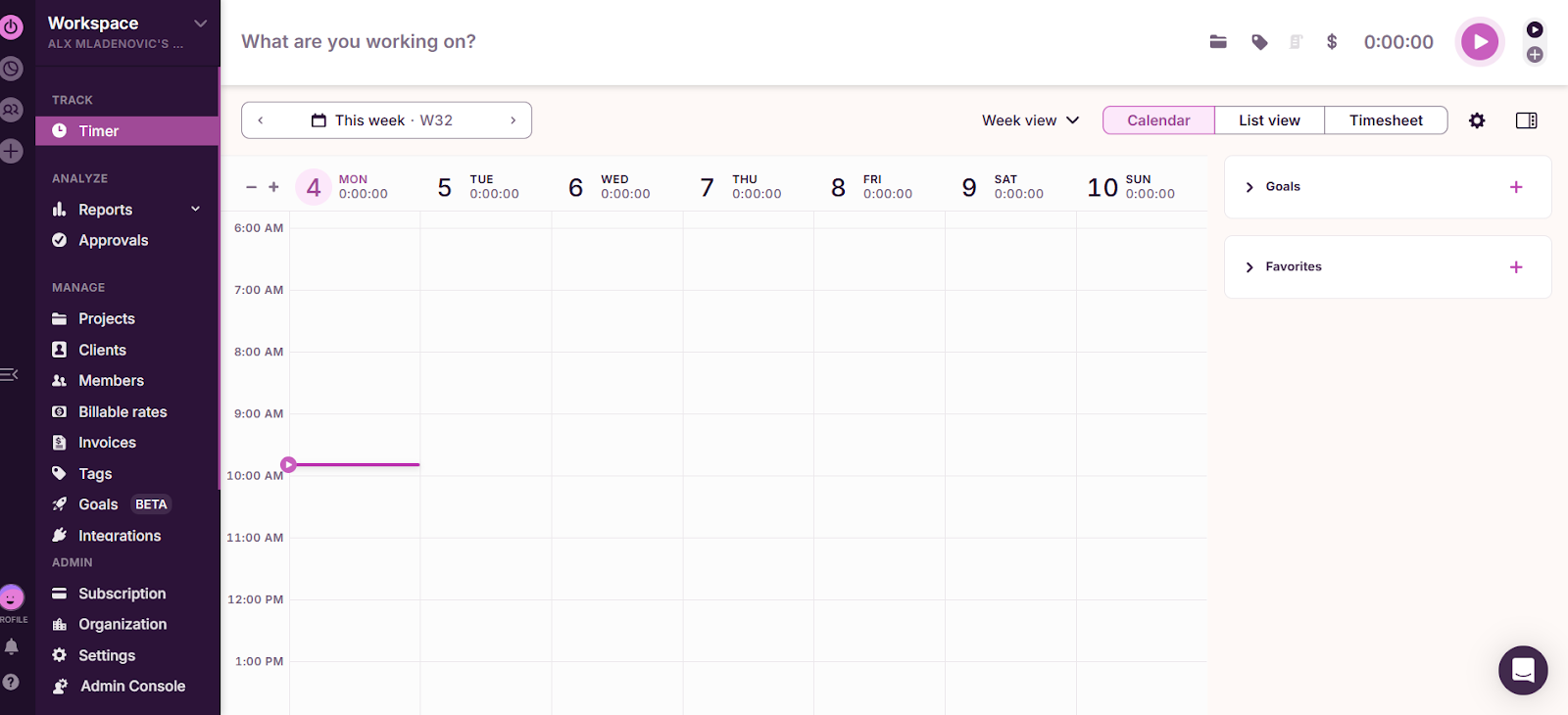
Toggl Track is built around manual time tracking: you click a timer button when you begin work or you manually log or edit time entries afterward. However, there’s also background tracking.
Such tracking is done through its Timeline feature that passively monitors computer activity (specifically, any app or website you use for more than 10 seconds), and you can later convert that activity into time entries. This data is visualized in 15-minute increments.
Here are some other Toggl features:
- You get detailed reports that can be filtered by project, client, team member, billability, and time period.
- You can set billable rates on projects and export time data for client billing.
- You can add workflows to review and approve entries before they’re finalized.
- You can connect Toggl with 100+ tools, including Jira, Salesforce, Asana, and more.
- There’s also Pomodoro mode as a built‑in focus tool.
When comparing Toggl Track to ActivTrak, the key difference is the focus and workflow.
ActivTrak is centered on workforce analytics and passive productivity monitoring.
Toggl Track focuses on manual tracking and project reporting. So, if you want clear timesheets, project insights, and customizable reporting, Toggl Track is a good alternative to ActivTrak.
#10 Clockify
Clockify is a time tracking and timesheet software. It’s available via web, desktop browser extensions, and mobile apps.
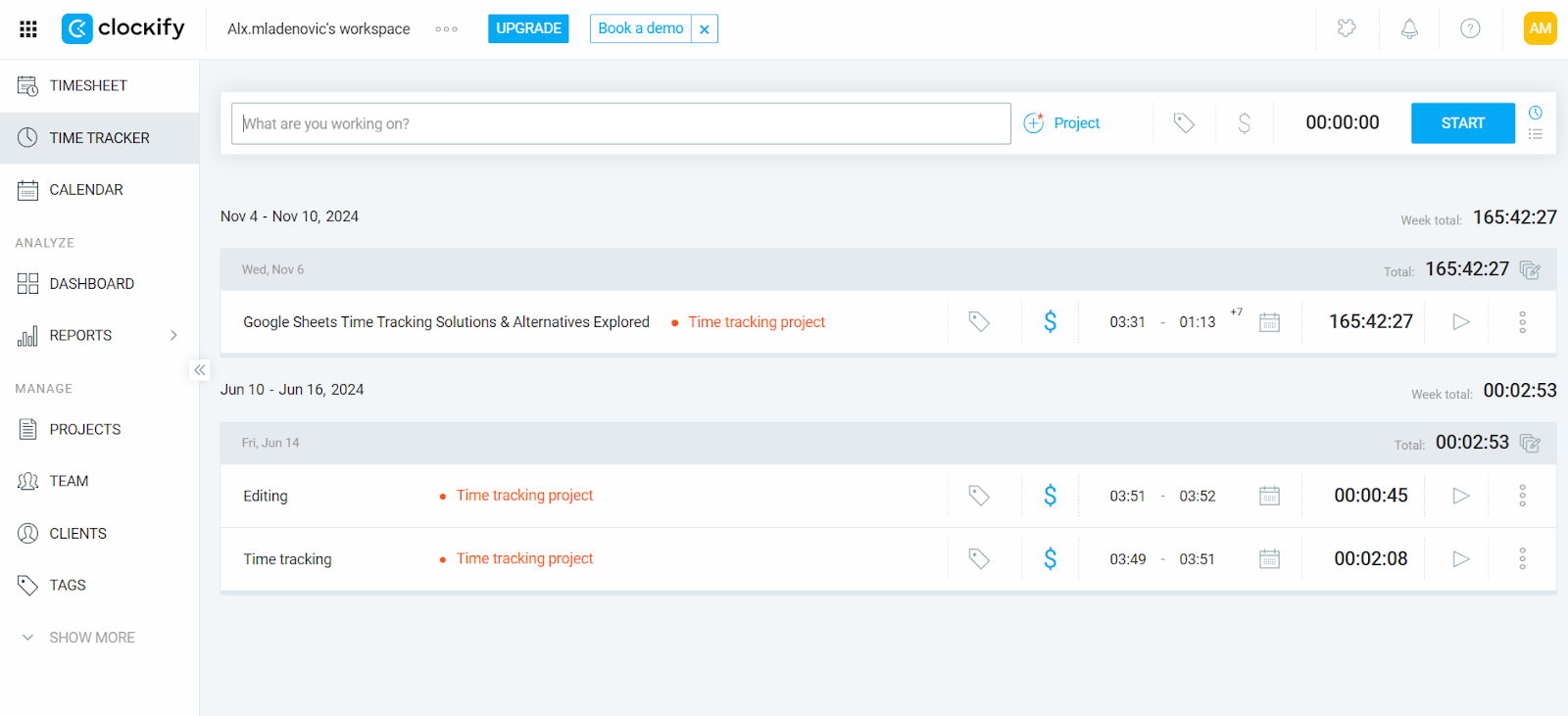
At its core, Clockify relies on manual time tracking via a timer or manual entry. Besides manual time tracking, there’s also the Auto Tracker, which records your app and website usage in the background locally. You can convert all captured activity into time entries later.
Here are some other Clockify features worth mentioning:
- You get reports by project, client, team member, billability, and time period.
- You can assign billable rates and generate invoices based on tracked time.
- You can set project budgets and get notified when time is close to limits.
- You get a centralized view of who’s working, billable totals, and activity summaries.
- Clockify connects with popular tools like Asana, Trello, Jira, and more.
- You can track time even when offline, and data syncs once you’re back online.
When comparing Clockify to ActivTrak, the primary difference is the type of tracking and insights.
ActivTrak focuses on passive productivity and workforce analytics.
Clockify is more about time tracking and project reporting (similar to Toggl). So, if you want a tool that delivers project time tracking, billing insights, and team timesheets instead of ongoing background tracking, Clockify can help you.
Wrapping it up
Phew, that was a ride. So, let me keep it short.
ActivTrak is powerful, sure… but sometimes you want to try other tools.
If you want simple, fully automatic time tracking, I highly recommend Memtime. It won’t bother you (it won’t ask a single question about your cat videos), and it will capture all your work minutes and hours accurately.
You know what to do. Talk soon on our call! 😉
FAQs
Will switching to an ActivTrak alternative mean losing insights?
No, not at all. Tools like Memtime provide automatic activity tracking and detailed project reports, giving you all the insights you need without unnecessary clutter. You’ll see exactly where your (and your team’s) time goes.
Are automatic trackers really worth it?
Oh, yes, definitely. With Memtime, your work is captured silently in the background, turning hours into ready-to-use project entries. No timers, no interruptions.
Can I still track billable hours with these alternatives?
Yes, absolutely. Most options let you assign time to clients, tasks, or projects. Memtime even offers rules-based suggestions, so your billable hours are accurate and effortless.
Will my team hate it if I switch?
Probably not (and who knows, they might actually enjoy it?). Tools like Memtime remove the “we’re watching you” vibe. Productivity should give all of you peace of mind, which is what the tool is about.
How do I know which tool is right for me?
Well, that’s where the automation ranking helps. Fully automatic trackers like Memtime silently capture every moment of work, while others give you a bit more manual control. Pick what fits your workflow; you know your team best.

Aleksandra Mladenovic
Aleksandra Mladenovic is a copywriter and content writer with six years of experience in B2B SaaS and e-commerce marketing. She's a startup enthusiast specializing in topics ranging from technology and gaming to business and finance. Outside of work, Aleksandra can be found walking barefoot in nature, baking muffins, or jotting down poems.







