Offline Time Tracking Benefits & Top Self-Hosted Apps

If you’re looking into self-hosted time tracking solutions, you’re serious about time tracking.
- You understand the superiority of desktop apps over web tools.
- You appreciate the lack of distractions and manual input.
- You care about data quality and the accuracy of time reporting.
- You need reliable time tracking even without an active internet connection.
At Memtime, we understand the importance of offline time tracking better than anybody. Our whole philosophy is built around self-hosted, privacy-first time tracking with no friction. Because in time tracking, there can be no compromises around user privacy and data accuracy.
Key takeaways
- Self-hosted time tracking apps give users full control over their data, recording all work activity locally without uploading any data to the cloud.
- Offline time trackers are ideal for users who prioritize privacy, data accuracy, and reliability in environments with lower connectivity.
- Unlike stopwatch-based tools, automatic offline trackers, like Memtime, record time continuously without manual timers or start/stop buttons.
- A quality self-hosted time tracker captures activity across all desktop, web, and system apps, including local files and browser tabs.
- Full data ownership means only one copy of your activity exists, securely stored on your device, and visible only to you.
- Offline tracking ensures uninterrupted recording of tasks even without an internet connection, preventing data loss during travel or outages.
- Memtime leads among offline time tracking tools, offering fully automatic, privacy-first recording with no cloud sync and cross-platform support.
- Other self-hosted tools like Jibble, TimeCamp, DeskTime, and Toggl Track offer partial offline features, but many still rely on manual timers or cloud sync.
- Choosing an offline tracker improves time reporting accuracy, enhances focus, and builds trust by keeping work data private and under user control.
Let’s get to it.

Memtime privately captures every minute of your day while you work. Visible only to you, free to use for 14 days.
Why use an offline time tracker?
The absolute majority of time tracking apps available on the market today are hosted in the cloud. So why look into offline time tracking at all? Well, the fact that there’s a lot of something doesn’t mean it’s the best option there is 🙂
If you identify with any of the points below, you’re right to consider self-hosted time tracking.
You value privacy above all else
In the age of remote work and employee monitoring solutions, data privacy is of paramount value and importance. If your time and activity data is uploaded to the cloud, you need to have full control of which data that is.

How do you know if you have full control over your data when many time trackers claim they guarantee privacy? By answering a simple question: do I need an Internet connection to see my activity timeline, i.e. what’s recorded by your time tracking app?
You may have a desktop app that captures everything you’re doing and arranges it in a timeline of activities but can you see this data when you’re disconnected from the Internet or do you need to log on to a web interface? There's your answer to the data privacy question.
You’re done with the stopwatch
We won’t stop ranting about the stopwatch for tracking time until the day running timers are abolished. Offline time tracking needs a desktop app and a desktop app relies on automatic computer activity recording. This means there’s an option to not set a timer for every task.
The catch is that some self-hosted time trackers still require users to press a button to start and stop activity tracking for the day, even if they spare you the headache of running a timer for every small task. This is definitely something to confirm before you commit to an offline time tracker.
The good news is that there’s more than one self-hosted time tracking app that offers fully automated activity recording. No stopwatch, no start/stop buttons, no need to keep the app open.
You work a lot with local files
Your average cloud-hosted time tracker will capture your time in online tools and websites – most commonly via a browser extension with an embeddable timer. But if you work in local documents and files, you need an offline time tracker that captures your time in system apps.
Let’s say you work a lot with Word documents or Excel spreadsheets saved locally on your computer. At the end of the workday or week, you need a reliable record of your time in each so you can remember your work and log hours on respective projects.
A self-hosted time tracking app will keep track of all local files you worked on, as well as for how long. Your time in all system apps is captured down to the minute, just like your time in web tools.
You have unstable internet connection
If you work from a remote location with an unstable internet connection, self-hosted time tracking is a must. The biggest perk of having a desktop app that records computer activity is that you never have to worry about having an active internet connection.

Whether you’re working remotely from an off-grid location or stuck with an unstable network during a layover, offline time tracking is the answer. Every minute you’re active on your computer is recorded with precision whether you’re online or offline.
If any of the points above apply to you, you’re in the right place. We’ll now go over the non-negotiables of self-hosted time tracking for maximum privacy and accuracy of data.
Offline time tracking standards
Many tools claim offline time tracking on their websites but it can mean different things. Use the checklist below to match marketing promises to standards of self-hosted time tracking.

Everything is recorded
Offline tracking means that ALL computer activity is recorded. We spoke about local files above, but let’s review once again the types of activity your self-hosted time tracker needs to be able to pick up on.
The reality of working for most of us is multitasking, which is where self-hosted time tracking really comes through. Even as you’re switching between tabs and programs, an offline time tracker will follow your mouse and keyboard to pick up on the program running in the foreground and track your exact time in it.
You own the only copy of your data
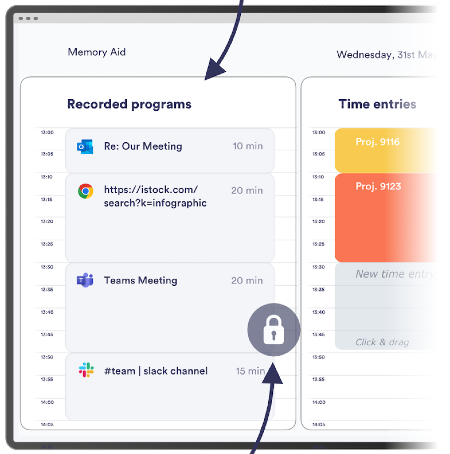
What’s recorded on your device stays on your device. Your activity and time in all programs should be private and visible only to you – this is the only way to guarantee privacy.
Self-hosted time tracking makes this possible. In the case of Memtime, the only copy of your computer activity data lives offline on your device. You can erase your data at any time and never worry about a copy of it living somewhere in the cloud.
When users own all their data, they feel safe with time tracking software running on their machines and can submit hours on time by simply consulting their locally stored activity data.
No manual input is required
If you consider self-hosted time tracking software, make sure there are no traces of manual time tracking in it. The usual suspects are task timers, even if they’re seamlessly embedded into your project software tools, or start/stop activity recording buttons for the day.
Offline time tracking should be fully automated time tracking. If you’re still left with a stopwatch, you might as well keep exploring other options 🙂
5 best offline time trackers
Finally, let’s quickly review the best tools for offline time tracking for tasks and projects.
1. Memtime (Windows, macOS, Linux)
Memtime is #1 on the list not because you’re reading this on the Memtime blog. But because it’s the only fully automatic self-hosted time tracking app that keeps all activity data offline on the device it’s recorded on.
2. Jibble (Windows, macOS)
Jibble is a suite of manual time tracking apps for desktop and mobile. For the purposes of this article, we’re looking at Jibble’s desktop apps for offline time tracking.
Jibble solves the problem of project time tracking with a manual timer available through a desktop app. In order to track your hours, you need to clock in, select an activity and project, and then start the timer on each task. Eventually, you can see all tracked activities in the desktop app interface, so this part remains offline.
3. TimeCamp (Windows, macOS, Linux)
TimeCamp is a set of desktop and mobile apps offering a running timer for project and task tracking. Its offline mode allows users to record time on tasks even without an active internet connection, with the option to sync tracked activities as soon as you’re back online.
TimeCamp has a free plan but also offers paid features with annual or month-to-month billing.
4. DeskTime (Windows, macOS, Linux)
DeskTime is a suite of desktop and mobile apps with manual and automatic time tracking features. DeskTime’s desktop apps run in the background 24/7 and track time of uninterrupted activity. Automatic time tracking stops if a user is idle for more than 3 minutes.

DeskTime offers a single-user free plan that can be upgraded to paid subscriptions with premium features like screenshots and shift scheduling. A free 14-day trial is available to test out DeskTime’s premium features.
5. Toggl Track (Windows, macOS)
Toggl Track is a set of desktop and mobile apps for time tracking that rely on a manual start/stop timer. Offline time tracking is available for a limited time. This mode is automatically activated whenever you lose internet connection.
Toggl Track has a free version but offers monthly and annual contracts for paid subscriptions with premium features like time rounding or Jira integration.
Final thoughts
There are many benefits to offline time tracking – from user privacy to data accuracy. The trick is to find the right self-hosted time tracking software that meets all of your needs.
In this blog post, we discussed the benefits and standards of self-hosted time tracking, as well as looked at the time trackers that advertise offline tracking features. You can compare the solutions they offer and choose the tool to support project time tracking for your ops.
If you’re ready to try fully automated, privacy-first offline time tracking with Memtime, make sure you start your free trial now. There’s no risk to creating an account and trying out self-hosted time tracking.
What is an offline time tracker, and how does it work?
An offline time tracker records your computer activity directly on your device without needing an internet connection. It tracks time spent across apps, files, and websites, even when you’re offline. Unlike cloud-based tools, offline time trackers keep everything private and stored locally; they are perfect for people who value security and data ownership.
Why should I use a self-hosted time tracking app instead of a cloud tool?
Self-hosted time trackers give you complete control over your data and don’t upload your work activity to the cloud. They’re ideal for privacy-focused professionals, remote teams, or anyone with an unstable internet connection. With tools like Memtime, you get automatic tracking that works anytime, anywhere, without compromising your privacy.
Can offline time trackers track local file activity like Word or Excel documents?
Yes! A good offline time tracker logs time spent in local applications and files just as accurately as online tools. For example, Memtime records every minute spent in desktop programs like Word, Excel, or Photoshop, so you always have a full picture of your work, even without cloud access.
Do I still need to start and stop timers with offline time tracking apps?
Not necessarily. The best offline time trackers, like Memtime, run automatically in the background. They record your activity without you ever needing to press Start or Stop, saving you time and eliminating the stress of remembering what you worked on.
What are the main benefits of using an offline time tracker?
Offline time trackers make your life easier by keeping your time logs accurate and your data completely private, even when you’re offline. They show your entire workday in one place (think apps to local files), without needing an internet connection. If you’re tired of manually entering hours, give an offline tracker a go.
Which offline time tracking app is best for privacy and automation?
Memtime is a top pick if you care about privacy and want time tracking that runs on autopilot. It keeps all your data safely stored on your device (never in the cloud), and works smoothly on Windows, macOS, and Linux. You can always check your activity timeline and log hours accurately, without compromising security or ease of use.

Yulia Miashkova
Yulia Miashkova is a content creator with 7 years of hands-on experience in B2B marketing. Her background is in public relations, SEO, social listening, and ABM. Yulia writes about technology for business growth, focusing on automated time tracking solutions for digital teams. In her spare time Yulia is an avid reader of contemporary fiction, adamant runner, and cold plunge enthusiast.




