Work from home time tracking doesn't have to mean employee monitoring. Memtime automatically records work activity to help employees remember their day, while keeping all activity data stored locally on each user's device.
Managers only see the time entries employees choose to share. That's how you build trust and achieve high adoption across remote teams.
No credit card required

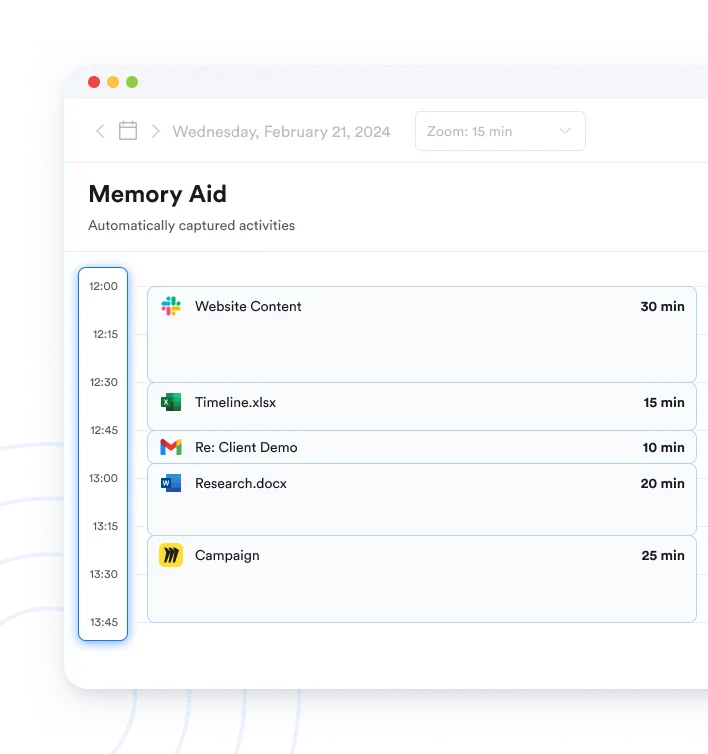


Not entirely. Automatic time tracking doesn't replace timesheets, but it replaces the need to reconstruct your day from memory. Instead of trying to remember meetings, emails, and documents, remote employees review an automatically captured activity timeline and create accurate time entries with just a few clicks.
Yes, it really tracks all computer activities. Every program, document, email, video call, meeting and every browser tab. But you can try it for 14 days for free to be sure.
Memtime only records time in the window that is currently in the foreground. That is, where you were last active with your mouse or keyboard. As soon as you switch to another window its time will be recorded and shown in your timeline.
Memtime is able to read out information like file names, email subjects or titles of browser tabs for you. So you will know exactly what project you worked on.
Memtime cannot be used for employee monitoring: It is an offline tool. All tracking data is stored exclusively on the user's device - and never on a server. That means no one else can gain access to it. Neither bosses, nor colleagues - and certainly not us at Memtime.
A typical remote workday involves constant context switching. Meetings, email, chat, browser tabs, and documents compete for attention, making it easy to forget small tasks by the end of the day. That's why manually recreating a workday often results in incomplete timesheets and inaccurate project records. Memtime captures work activity automatically, making time records more complete and accurate.
Yes. Memtime is not billed per device, but per user. This means that every user can install Memtime on as many devices as they like. However, only devices with the operating systems Windows (incl. Windows Server 2016, 2019, 2022 and 2025), macOS, and Linux are compatible - so no Chromebooks, cell phones, and tablets yet. As soon as ChromeOS, iOS and Android allow activity tracking, we can release mobile apps.
Yes, Memtime can also be installed on Windows Server 2016, 2019, 2022 and 2025.
Create a Memtime account and simply select your project software from a list during configuration. Then, you only need to log in to your software once when you install Memtime. Learn more about the process on the integrations page.
Yes, our free trial lasts 14 days and doesn’t require a credit card. You won’t be charged automatically after your trial expires.
Hear it from our customers