Maker vs Manager Schedule: Which One Is Running Your Day?
I like to say there are three types of professionals: Managers, makers, and those stuck between the two stools. For managers, time is quicker. They can touch off three to five different things within the space of an hour. Makers, on the other hand, need at least half a day, or more, to make any impact on their work. And then, there are those poor unfortunates straddling the two modes.
Typically, you're a knowledge worker/team leader. You’re expected to lead projects, brainstorm conceptual ideas, and subsequently figure out how to bring those snippets of possibilities to fruition, while also overseeing those who can get it there. Here’s the thing, though: you’re also expected to be on hand to be instantly reactive, constantly available, and also be the mind behind all future things. It’s a big ask, and – no – it isn’t sustainable.
In short, some people think the whole maker vs manager schedule is a choice. It’s not. Often, it’s something that surreptitiously hijacks your entire day. Either way, maker vs manager time means you’re stuck between long focus blocks and rapid-fire coordination, and most knowledge workers end up mode switching without realizing it.
The real question is what schedule is actually running your day, and how can you tell? It’s hard to see the similarities, the differences, the real-life examples hiding in plain sight until you look at real data.
In this article, you’ll learn how to find your schedule, spot the patterns, and start to shift your time to the mode that moves your work forward.
Key Takeaways
- Maker work only moves when attention stays uninterrupted long enough for ideas to compound, while manager work fragments that bandwidth through rapid context switching. In short, your bandwidth determines your real productivity.
- Interdependence changes your role to one of coordination. Of course, when you are waiting for approvals, clarifications, or responses from other people, your work turns into manager mode. Dependency chains affect your day more than your intentions.
- Your day shapes the way work moves. Long, continuous arcs let ideas build, while more scattered pockets break work into isolated fragments. The physical layout of your time affects the quality of your output just as much as the tasks themselves.
- You can redesign your schedule based on your real day-to-day behavior. Tracking how work moves (warm‑ups, momentum, interruptions) lets you protect the type of time your role requires; long maker blocks or more deliberate manager windows.

Maker time vs manager time and why the distinction matters
The difference between maker time and manager time comes down to bandwidth, which is why knowing the distinction between the two matters.
Maker time depends on high‑bandwidth attention. By that I mean, it's the mental/deep thinking capacity to hold multiple ideas in play, connect them, and push a piece of work into deeper territory. That bandwidth only exists when your focus stays uninterrupted long enough for your thinking to build.
Manager time consumes bandwidth in the opposite way. It’s built around rapid context switching, decision-making, updating, and coordination. So, all the plate spinning. While each interaction is small, the cumulative effect is bandwidth fragmentation. Once your attention is chopped into pieces, you lose the cognitive load required for complex work, even if you technically still have hours available.
If you can't distinguish the two modes, you're unable to protect the bandwidth your form of work relies on. You end up planning your day around available “time” instead of available “cognitive capacity”, and those two things diverge quickly.
For instance, a morning full of micro‑decisions can leave you with an afternoon that looks free on paper but is useless in practice because your bandwidth for deep work has already been spent, and there’s no chance of retrieving it. Maker time matters because it’s the lone mode where high‑bandwidth thinking can accumulate. Manager time matters because it keeps everything else moving – but it drains the very resource maker time needs.
Without naming the modes, you can’t see the trade‑off clearly. The result? You slip into an unintentional hybrid rhythm that feels busy but produces shallow output.
Clocking this distinction is what lets you defend the bandwidth – not just the hours – you need for more purposeful work.
Signs your day is optimized for management rather than creation
A day leaning toward management shows up in how your work behaves, not in how it’s scheduled. With that in mind, do any of the below sound familiar?
- You’re the focal point for decision-making. So you have people coming to you with questions. It’s nice to be needed, but hate to break it to you, your role has morphed into coordination rather than advancement.
- Your work depends on other people’s schedules. Progress hits the skids until someone else responds, approves, or clarifies something pivotal.
- Most tasks are under 30 minutes and are neatly contained in short windows. This indicates a management-heavy rhythm.
- Your calendar fills up with meetings, check-ins, and more meetings (HUZZAH!) without you steering the day.
- Email, chat, dashboards, and docs all vie for your eyeballs, again showing you’re deep in coordination work rather than creation.
- Your output is measured in updates. What you “produce” is a flow of information, not a tangible/cohesive piece of work.
- Equally, you find yourself unblocking others more than advancing your own work. Your value is in facilitating movement.

When your job continually pulls you into oversight, you seldom finish a task in one sitting. Once you can identify these patterns, the next step is to determine which mode you’re actually meant to be in.
How maker and manager work schedules behave inside a real workday
Again, maker time allows a project to move along in a straight line. This requires large blocks of time, usually at the edges of the day (early morning or late afternoon). Why? Because they rely on continuity.
Given the manager work schedule is broken into differentiated bursts and not a continuous arc, the order in which it occurs usually doesn't matter. You could technically add something new into the mix (another impromptu meeting, let’s say) without disturbing anything around it. In other words, the schedule is flexible as the tasks are not interdependent.
This difference becomes apparent when you compare the two modes. To see how these patterns play out in practice, here’s a typical hybrid day for knowledge workers:
- 8:00 – 9:00: Coordination work (manager mode)
This involves quick decisions, routing, and approvals. This is the bandwidth‑draining part that makes later deep work harder. - 9:00 – 11:00: Protected deep‑work block (maker mode)
This is the only stretch where complex work can realistically happen before fragmentation sets in. - 11:00 – 12:00: Reactive work (manager mode)
Slack threads, follow‑ups, etc. This is where the day starts pulling you back into coordination. - 12:00 – 1:00: Lunch and incidental catch‑ups
Light interactions that continue contributing to your bandwidth drain (speaking as an introvert). - 1:00 – 2:00: Meetings and check‑ins (manager mode)
Behold the “looks free on paper, useless in practice” zone. In reality, your bandwidth is pretty much spent. - 2:00 – 3:30: Attempted deep work (maker mode)
Again, you technically have time, but your cognitive load is shot. - 3:30 – 4:00: Operational drift (manager mode)
More context switching/fragmentation. - 4:00 – 5:00: Whatever your frazzled mind can muster
Loop closing, more follow-ups, something resembling prep for tomorrow, bleeuuuurrrgh…
How to find out your optimum schedule using real‑life examples
The easiest way to find your preferred schedule is to look at how your work behaves over a typical week, not how you want it to behave…
To start, pick at least three consecutive days that seem representative. Then, write down the order in which your work moved in actuality. You’re looking for patterns in momentum, so when work accelerates, decelerates, and when it needs uninterrupted space to progress.
One useful test is tracking which tasks require a “warm‑up.” So, if a piece of work only moves once you’ve settled into it, that’s a strong indicator of maker time.
Another handy test is to note which tasks you can pop into without preparation, as these largely belong to manager time. Give the below a quick scan, and you’ll see what I mean.
Maker-related examples
To reiterate, these tasks only progress if you get a chance to see them through, which means your preferred schedule is one of long, uninterrupted blocks. So, let’s say you’re…
Refining a product narrative: This work depends on staying in flow to develop a linear story. Given ideas tend to develop as you write, uninterrupted time allows this creative process to flourish.
Financial modeling: Long sessions let you keep all those pesky assumptions in your head. This way, the model has a chance of staying coherent.
Outlining a research report: If the structure only becomes apparent after you’ve been in it for some time, then nurturing this continuity is more important than “a quick catch-up”.
Debugging a tricky issue: Impromptu breaks will disrupt your mental map of the system. So, clearly, you need protected arcs of time to complete this type of work.

Manager‑related examples
Again, these tasks don’t require a warm-up, thus proving they naturally fit into flexible scattered intervals. Observe…
Incoming request triage: If you can assess and redirect items effectively, this work belongs in those small buckets that don’t break your momentum.
Vendor update coordination: Again, when overall progress hinges on others’ schedules, it can fall at any time during the day.
Logistics confirmation: If you can sort out the details right away, then – correct – it belongs in the manager‑style bucket.
Providing status summaries: If you can generate them without much/if any prep, they don’t necessarily call for dedicated focus time.
These examples should give you a clearer read on how your work behaves in practice. Once you see this behavior, you can pinpoint which mode your day falls into with more accuracy.
Creating a work schedule that protects the time you need
Most knowledge workers, by default, operate across a hybrid schedule. We’re expected to produce meaningful, maker-style work and also be responsive to fast-moving operational demands. As we’re now all too aware, this breaks your day into short, reactive intervals.
The only way to create more focus time in that reality is to stop assuming how your day will go and look at what actually happens. Only then can you create a work schedule that protects the time you need.
And whaddaya know; tools like Memtime reveal this! It shows, in real-time, how your day is far more fragmented than you imagine, with deep-work sessions continually disrupted by coordination work, micro-interruptions, and context switching.
Once you can see your real pattern clearly, you can start designing a schedule that protects the type of time your role requires – be they longer stretches for maker work when your job demands creation, or tighter, more deliberate manager‑style windows when your job leans toward coordination.
So, if you want a clearer picture of how your day behaves, start our 14-day free Memtime trial to get an overview of all your work modes.
It runs stealthily in the background and automatically reconstructs your timeline, so you can see where your focus time is being cut up, which tasks pull you into coordination mode, and how much uninterrupted space you have to work with – even down to which days of your working week tend to offer more maker time.
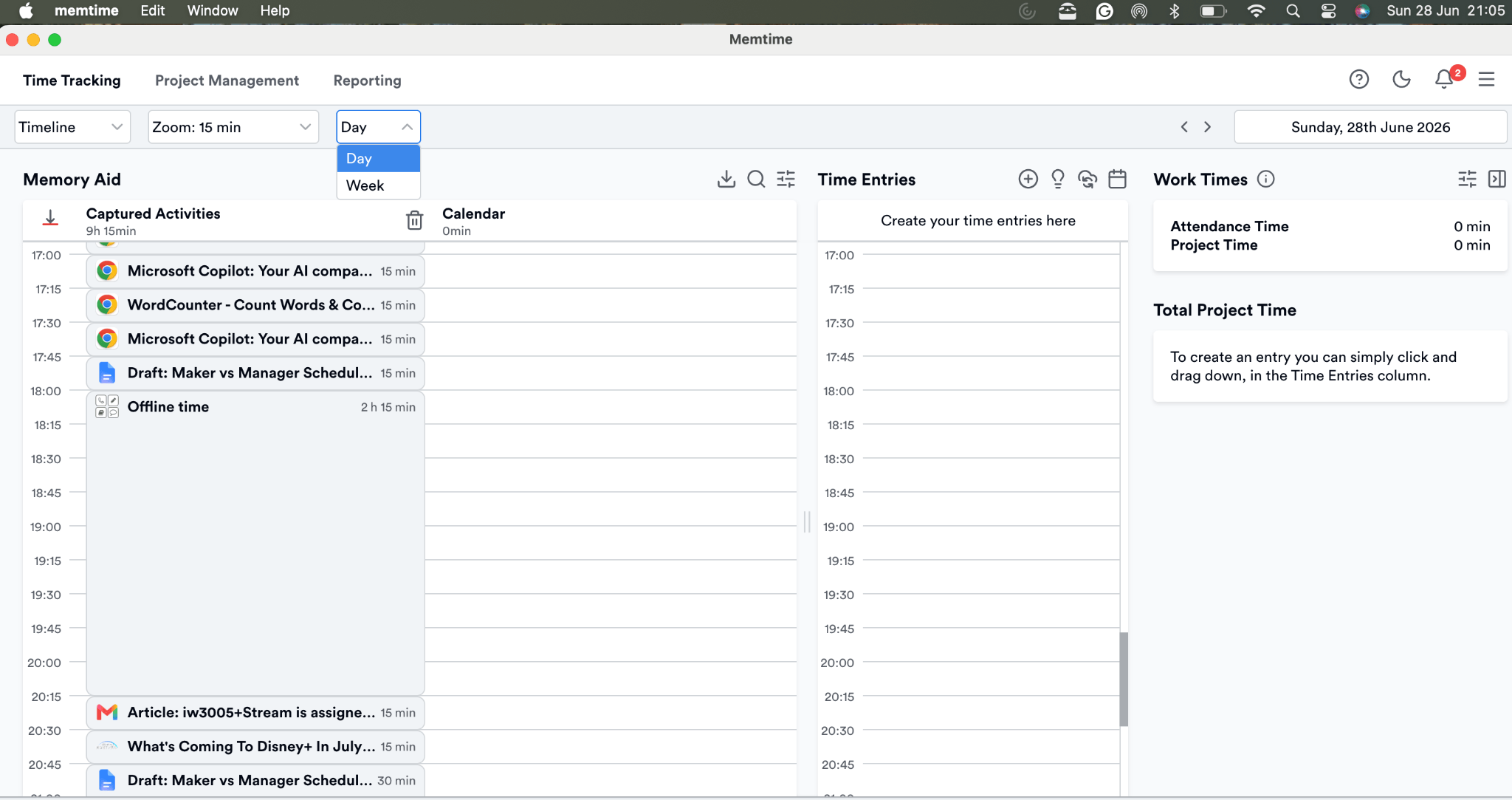
This high-level, non-intrusive visibility makes it far easier to redesign your schedule around the time you need – not the time you think you have.
FAQs
How does hybrid scheduling emerge even when you plan for deep work?
Hybrid days usually form unintentionally. Coordination tasks expand and reactive work fills gaps. Even well‑planned maker blocks get reshaped by external demands, turning a structured day into a mixed‑mode one.
Why do short tasks accumulate and reshape the rhythm of a workday?
Short tasks behave like micro‑interruptions. While each one seems harmless, they collectively break continuity and pull your attention into oversight. They convert available time into those fragments resembling manager‑mode scheduling.
How can you tell when coordination work is overtaking your role?
When progress depends more on others’ responses than your own output, your value shifts toward facilitation. This shows up as dependency bottlenecks and work measured in updates rather than completed projects.
What’s the most reliable way to detect your true work mode over a week?
Tracking the order in which your work moves (not the calendar version) reveals your dominant mode. Momentum patterns, warm‑up requirements, interruption points, and dependency cycles show whether creation or coordination is steering your week.

Sheena McGinley
Sheena McGinley is a columnist and features writer for the Irish press since 2008. She’s also a business owner that is conscious of how time tracking can foster progress. She wrote for SaaS companies and businesses that specialize in revenue optimization by implementing processes. She has the unique ability to digest complex topics and make them easy to understand. She shares this precious skill with Memtime readers. When she's not making words work for people, Sheena can be found taking (very) brisk dips in the Irish Sea.







