How Writers Track Time Without Breaking Their Flow (or Missing Work)
You’re a writer—and so am I—so I know you google everything. So, do me a favor and search how writers track time.
What came up?
My guess is that most results are about tracking time while writing novels or stories. Then there’s a bit about timing writing sprints, using the good ol’ Pomodoro technique for drafting sessions, and measuring writing progress and productivity during storytelling sessions. And that’s pretty much it.
IMO, none of that scratches the itch.
Because when people talk about writers tracking time, they almost never account for all the work that modern writing actually involves. And by all the work, I mean the full picture: researching topics, verifying information, building outlines, writing first drafts, editing and rewriting, doing SEO optimization, communicating with clients, doing revisions, publishing, and formatting. All that jazz.
Each of these tasks is cognitively different.
Each one requires a different level of attention and focus, and you need a tool that captures all these efforts. Something that won’t mess with how your brain works or pull you out of deep research mode to log something. Ideally, something that won’t interrupt you AT ALL.
Seems impossible, right?
Yeah, sure.
But I’m willing to bet that we’ll find you a tool that works the way you do: quietly, in the background, without bothering you. And as a bonus, once you find that tool (hi, Memtime 👋), billing, reporting, and project management will stop feeling like a second job.
We’ve got no time to waste, so let’s roll.
Key Takeaways:
- Most time tracking advice for writers focuses on novel writing, completely ignoring research, client emails, SEO, revisions, and everything else the job actually involves.
- Switching tasks mid-flow is just how writing works. Research slides into drafting, a client email derails everything, and it’s difficult to reconstruct each task individually.
- Skipping time tracking has a real price tag: untracked hours can add up to thousands of dollars per year in work you do but never invoice for.
- Automatic time tracking records every app, tab, document, and meeting in the background, so there’s no clicking, no logging, and no interruptions.
- Memtime is an automatic time tracking app that stores all captured activity locally on your machine; not even the Memtime team can access your raw data.
- After a few months of tracking, you stop estimating project hours and start quoting based on what similar projects actually took.

Let’s talk about your writing workflow
Time tracking and writer’s workflow. Oil and water.
Most time tracking apps treat your work like it’s this one big, linear activity. You sit down, words come out, you stop. Done and done.
But anyone who actually writes for a living (myself included!) knows that’s not how it works.
Writing is a collection of very different cognitive states that happen to be bundled under one job title:
- Researching a topic is almost a meditative state; you’re absorbing, connecting, and going down rabbit holes.
- Structuring an outline is strategic and architectural.
- Drafting is something close to a controlled, focused sprint.
- Editing is almost 100% analytical.
- SEO optimization is pretty mechanical.
- Client communication is social.
Each of these requires your focus and a clean mental slate. But, on a typical writing day, you’re shifting between ALL of them, usually within the same hour. Research slides into drafting, drafting gets interrupted by a client notification, a random email leads to a revision request, and before you know it, it’s 4 pm and you have no real idea what you actually did that day. And there’s no shame in that; that’s just the reality of being a writer.
Was Stephen King right about inspiration and productivity?
You know that Stephen King quote.
Amateurs sit and wait for inspiration; the rest of us just get up and go to work.
The implication here is that the conditions for good work aren’t accidental but created. And for a writer like yourself, this means protecting your flow.
I feel like he was right about conditions for great work, and—believe it or not—studies back it up.
Research from the University of California, Irvine found it takes over 23 minutes to fully regain focus after a single interruption. Meaning, once your flow is interrupted, it takes more than 20 minutes to regain full immersion, or it may not happen again at all in that session. That’s scary. And for a writer in the middle of a drafting session, that’s NOT a minor inconvenience, that *is* the session. So, the implication here is that you need to protect your flow.
Now, the reason you need to preserve the flow state is that it’s where the actual work happens. When you’re hyper-focused, your ideas connect, sentences land, and structure makes sense. You need that uninterrupted cognitive continuity.
Could tracking time help?
At this point, you know 2 things for sure:
- Your work doesn’t move in a straight line; instead, it loops, backtracks, and takes detours you never really plan for.
- The thing that makes it work anyway is your ability to drop into deep focus when you need to.
And these 2 things together make tracking your time as a writer genuinely tricky. This is why any time tracking approach that asks you to do something, like click a button, switch to another app, or log what you just did, is working against you. That act of tracking becomes the interruption.
Don’t believe me?
Let’s say you decide to use a manual timer.
You open a new document to start a research session. You start the timer. You find a source, follow a link, and end up on a tangent that turns out to be actually useful. You open 7 tabs. You switch to your notes app. You go back to the document.
Twenty-eight minutes later, a client emails you a question about a different project. You answer quickly.
You come back to your research.
Did you remember to keep the timer running? Did you pause it for that client email? Was that email billable anyway? Yes? No?
Who knows??
And what’s even worse is that by the time you sit down to reconstruct your day, all those details are already gone. You know you worked, and you know it was a lot. But the specifics, like which client, task, or for how long, are all fuzzy.
And it’s not your fault. You need something that can keep up with you, no matter how fast you jump between tasks.
Can you just opt out of tracking?
Yes, sure! You can always choose not to track at all. Sign up for simple, flat-rate work and estimate. Be my guest.
Just know that it will cost you. 🙂 And I mean literal money.
A QuickBooks Time 2018 study revealed that 44% of business owners (you are a business owner, my dear writer!) struggle with timesheet errors on a weekly or even daily basis. That’s almost half of business owners losing their earnings because they couldn’t reconstruct their Tuesdays and Wednesdays from memory at 5 pm on a Friday.
Now, here’s what that means for you.
Let’s say you charge $80 per hour for a particular client project and have worked 7 hours on a Tuesday. By Friday, you can only reconstruct 5 of them (if you’re lucky), so that’s $160 that never makes it onto the invoice. Now, do that across 3 clients a week, and you’re looking at $480 gone. Every. Week. Now, multiply that by 52 weeks per year, and that’s close to $25,000 a year in work you ACTUALLY DID but never got paid for.
So, you can give up on time tracking, but it’ll cost ya. Much more than you would pay yearly for a time tracking tool.

Automatic time tracking is where it’s at
So, now you know you need to track time. We just need to find you a tool that works exactly like you do.
My suggestion?
An automatic time tracking app. Something that records your activity in the background, across every app, file, meeting, and browser tab, without asking you to do anything.
You do research. It watches.
You write. It watches.
You edit. It—you guessed it—watches.
At the end of the day, it gets you a complete, chronological record of everything you worked on and for how long. All your research sessions in Chrome, your drafting and editing in Google Docs, your client email in Gmail, and Slack messages, your revisions in a shared document, and so on. All laid out for you to review.
And because you’re not being asked to do anything during the day, there’s no interruption to your flow. The tool is invisible until you decide to look at it.
Meet Memtime
Memtime is our desktop automatic time tracker built specifically for fragmented, and cognitively varied work. Your type of work that simply can’t be reconstructed from memory.
It runs quietly in the background on Windows, Mac, or Linux. The moment your computer is on, Memtime is capturing and jotting down. Every app, every document, browser tab, meeting, call (yep, that too); it’s all captured down to the minute and displayed in 1-60-minute intervals in the Memory Aid, a clean, chronological timeline of your entire day.
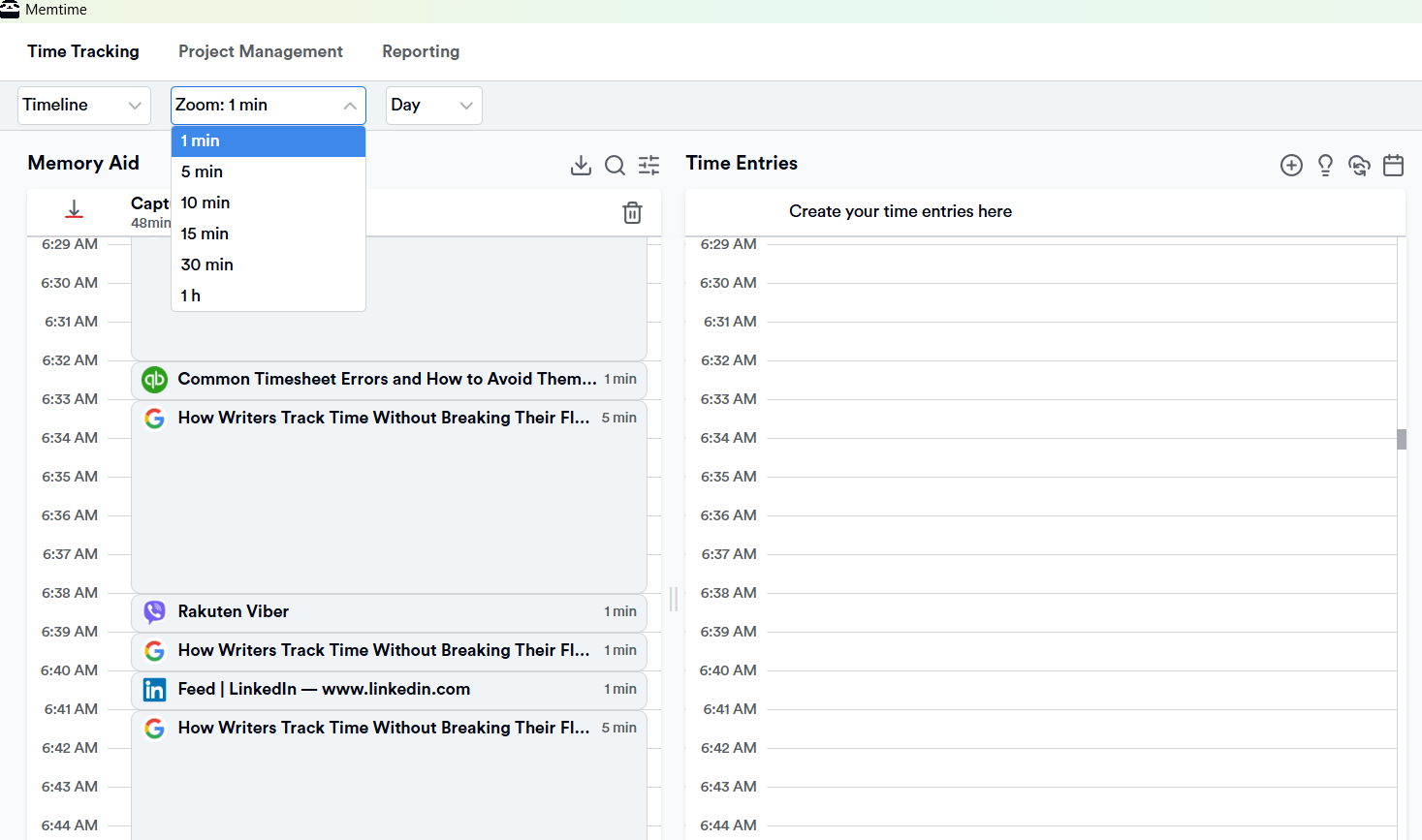
Thanks to your Memory Aid, you can see whether that client email took 10 minutes or 25; just scroll back and find out. Similarly, instead of guessing how long the research phase of a project took, you have the data. You can zoom in or out, scroll back to any past day, and see exactly what happened, when, and for how long.
And that’s not all. Memtime can also:
- Turn all your captured activities into real time entries (or let you do it yourself), and this is important for project management and billing. When you’re ready to log time, you create entries directly alongside your timeline, assign them to the right project, and they sync automatically to whatever tool your client uses. You can also set up rules to automate this: tell Memtime that time in a specific document or app always belongs to a particular client, and it handles the rest going forward.
- Connects to over 100 project management and billing tools. And it does so via a 2-way sync, meaning any time entries you log in Memtime flow straight into your client’s preferred tool (think Jira, Asana, etc.), and any project or task updates they make there reflect back in Memtime automatically. No copy-pasting between tools and tabs.
How cool, ha?
Just one more thing.
I’m sure you work with sensitive client material, where privacy is non-negotiable. So, just know that every captured activity stays on your machine. Nothing is uploaded to the cloud, and no one else can see your raw activity data, not even the team at Memtime. You control what gets shared by choosing what to turn into time entries and export.
So, how does Memtime sound?
If your gut just said “that’s exactly what I needed”, congrats. You can just do your thing with the storytelling, and Memtime will do the rest. No more guessing, no more undercharging.
The trial is 14 days, no credit card and no plot twists.
What you get when you automatically track time
Well, the first week of automatic time tracking tends to be a bit of a revelation.
You’ll probably discover that particular types of writing take longer than you thought. Research, in particular, has a way of expanding; what felt like 30 minutes can end up lasting 90. Editing often takes less time than you assign to it because it feels harder than it is.
You’ll start to see which clients generate the most back-and-forth, and which projects consistently overrun, and which types of work you consistently underestimate when quoting.
Over a few months, your time data becomes genuinely useful for pricing. There won’t be no “I think this should take about 8 hours” but “The last 3 projects of this type took 11, 12, and 10 hours respectively, so I’ll quote 12.”
Victor Hugo wrote:
He who every morning plans the transactions of the day and follows out the plan carries a thread that will guide him through the labyrinth of the most busy life.
I feel like automatic time tracking is a version of that thread. Not necessarily a plan imposed on your day, but a record of what your day actually was, so you can make better decisions about the next one.
Wrapping it up
Writers are just built different.
Your non-linear brain, your spiraling (and then producing your greatest work), the flow state you can stay in for hours… Your work is chaotic, deep, wildly productive, and completely untrackable by any normal standard.
That’s why manual time tracking was never built for you; it was built for someone who does one thing at a time.
Memtime gets that. That’s why it tracks everything automatically, so you know where your time actually goes, without stopping to log a single thing. No ick, no admin work. And honestly, you have no excuse not to try it. 😉
FAQs
Does time tracking actually work for freelance writers, or is it just extra admin work?
It depends on the tool. Manual timers and spreadsheets do add friction, since you have to stop and log, causing you to lose your train of thought. Automatic time tracking runs in the background and captures everything without asking you to do anything. So instead of adding to your workload, it just quietly builds a record of it.
What’s the difference between automatic time tracking and a regular timer app?
A timer app needs you to start it, stop it, and remember to switch it when you change tasks, which, for a writer jumping between research, drafts, and client emails, is basically a full-time job on its own. Automatic time tracking doesn’t ask you for anything. It records every app, document, and browser tab you touch throughout the day and stitches them into a timeline. You only look at it when you’re ready to.
Can I use time tracking data to set better rates as a freelance writer?
Yes, of course, and this is one of the most underrated benefits. Once you have a few months of data, you stop quoting based on gut feeling and start quoting based on what projects like this one actually cost you in hours. That shift can change what you charge.
Is it safe to use a time tracking tool when I’m working with confidential client material?
It’s a fair concern, and the answer depends on the tool. Memtime, for example, keeps all captured activity stored locally on your machine; nothing goes to the cloud, and nobody else can see your raw data, including the Memtime team. You decide what gets shared by choosing which activities to turn into time entries and export.
Do I need to track time if I charge flat rates instead of hourly?
You don’t have to, but it’s still worth it. Flat rates that aren’t grounded in real data are really just educated guesses, so over time, those guesses can work against you. Knowing how long a project type actually takes helps you set flat rates that are competitive but not quietly losing you money.

Aleksandra Mladenovic
Aleksandra Mladenovic is a copywriter and content writer with six years of experience in B2B SaaS and e-commerce marketing. She's a startup enthusiast specializing in topics ranging from technology and gaming to business and finance. Outside of work, Aleksandra can be found walking barefoot in nature, baking muffins, or jotting down poems.