How to Handle Redundant & Repetitive Tasks Before You Burn Out
Wanna play a game? I promise it’ll be quick. Please!
All you need to do is think about your past Wednesday.
Now, here’s my question: do you know how much of that day was actually deep, meaningful work vs. how much of it was you updating a status, retyping the same client update, or manually copy-pasting numbers between 2 tools (all repetitive work, btw)?
I struck a nerve here, didn’t I?
But the good news is that if this question makes your eye twitch, you’re just a normal knowledge worker in 2026.
The bad news is that you’re also a prime candidate for burnout. I don’t mean this in a dramatic, crying-in-the-company’s-bathroom kind of way (though, no judgment). It’s more of a slow burnout that comes from doing the same small, soul-sucking, boring tasks over and over until your brain simply stops engaging.
So, this article is for you, and for your slow but sure way to burnout.
Let’s talk about the recurring tasks, the difference between repetitive tasks and redundant tasks, why both are taking your energy, and what to do about them.
No cliché, vague tips like “just prioritize better”, I promise, those help absolutely no one.
Let’s roll.
Key Takeaways:
- Repetitive tasks (invoicing, status reports, and onboarding) have to be done but are boring; redundant tasks (like duplicate data entry or recap meetings) shouldn’t exist at all.
- The fix differs by type: repetitive work should get automated, templated, or batched, while redundant work should simply be eliminated.
- A 2025 survey found 85% of workers cite repetitive tasks as a top contributor to burnout, occurring around 200 times a year.
- Expecting sameness in upcoming work lowers engagement before the task even starts, according to research from the University of Georgia.
- Tracking your actual time for at least 2 weeks (with a tool like Memtime) reveals which recurring tasks are draining the most hours.
- A 5-part framework—automate, delegate, batch, simplify, or eliminate—can help you decide what to do with each repetitive or redundant task.

Repetitive vs. redundant tasks
People throw these 2 terms around interchangeably, but they’re not the same.
Repetitive tasks are work you have to do again and again because the job requires it. Think invoicing clients, weekly status reports, onboarding new team members, or responding to the same 3 categories of client emails. These tasks are necessary and pretty boring, so doing them manually every single time is where the pain comes from. This type of work isn’t inherently bad.
Redundant tasks are a whole different story. They are work that shouldn’t exist at all, or shouldn’t exist in its current form. Think of a meeting that recaps an email that recapped a Slack thread or double data entry because your CRM and your invoicing tool don’t sync. These tasks aren’t boring because they’re necessary—just the opposite. They make your eyes roll because they are pointless, and your brain knows it.
Now, this distinction matters because the fix is different: repetitive work in the workplace gets automated, templated, or batched. Redundant tasks should get eliminated.
But I’m getting ahead of myself.
Let’s talk about the effects of those monotonous tasks.
How boring tasks ruin your mind (and soul)
Dealing with redundant tasks is annoying, no doubt about it, but the real damage runs deeper than simple annoyance. Here’s how they ruin your focus, attention, and honestly, brain:
- They ruin your focus due to constant context switching. Every time you break from deep work to tackle a 5-minute admin task (think updating a CRM field, replying to a status-check email, copying numbers into a spreadsheet), you’re losing those 5 minutes and most likely 20 more. This research at UC Irvine found it takes an average of 23 minutes and 15 seconds to fully refocus after an interruption, meaning that frequent switching can significantly decrease your productive time. So, there’s no such thing as a quick repetitive task, no matter how short it is. It’s never quick—it has a 23-minute tax that needs to be paid.
- They are mood killers but also burnout triggers. A 2025 survey conducted by Talker Research found that 85% of workers said repetitive tasks are a top contributor to burnout, with respondents reporting these tasks triggered stress about 4 times a week (more than 200 times a year). Do with that information what thou wilt.
- They lower work satisfaction before you even start working. University of Georgia marketing professor Julio Sevilla and his colleagues found that anticipation itself shapes how quickly we mentally check out of a task. Meaning, when people expect variety in what’s coming next, they stay engaged with what they’re doing right now for longer. If you flip that around, the implication for repetitive work is this: if you already know tomorrow’s status report looks exactly like today’s, some part of your brain checks out before you’ve even opened the laptop. Consider this your brain doing the math on how much sameness is coming.

All in all, the real cost of recurring tasks is in the lost hours, but also lost focus, and lower-quality output.
(And if you’re a manager or business owner, this cost doesn’t stay contained to one person’s mood. Multiply that lost focus and those extra hours across a team of 10, 20, or 50 people, and you get more than just annoyed employees. It’s a real mark on output, delivery speed, and margin. Redundant tasks in particular are sneaky here, because they often look necessary simply by the fact that they exist. So, the drain compounds quietly, week after week, until it’s just accepted as normal. Although it’s anything but normal.)
How to handle repetitive and redundant tasks
Okay, so I’m pretty sure you’re with me on this: we need to find you a way to deal with all these tasks. Boring tasks can truly be the sword of Damocles, torching your focus and the will to show up to work on a Monday.
So, now what?
Well, first we need to do some groundwork. And by groundwork I mean finding ways to measure those repetitive and redundant tasks, ‘cause you can’t fix what you don’t measure. Once you know which tasks drain you the most, you can remove them.
So, handling repetitive tasks in the workplace really comes down to 2 moves:
- First, you get honest, data-backed visibility into your redundant tasks.
- Then, you run each task through a simple decision framework.
Let’s go through these 2 steps together.
Step #1: Identifying repetitive work
The first step is about getting an honest inventory.
You may *think* that email takes 20 minutes a day, but it’s probably closer to 2 hours.
You also may *think* that recurring status meeting is quick, but it’s probably eating multiple hours of your morning (plus the 23-minute refocus tax).
So, you need a redundant tasks audit. For 2 weeks minimum, you need to track your work, like what you actually spend time on, minute by minute.
And coincidentally, you can do that with Memtime. 🙂
Memtime runs quietly in the background on your machine (Windows, Mac, and Linux) and automatically captures a visual timeline of every app, doc, call, meeting, and website throughout the day.
Instead of relying on memory, you get a record of where your time actually goes, including all those recurring admin loops, the tool switching, the too many meetings, and so on.
Here’s what makes Memtime useful for a redundant tasks audit specifically:
- Automatic activity timeline. Every app, file, browser tab, email, and call gets logged the moment it happens.
- 1-60 minute zoom levels. You can view your day in broad strokes or zoom down to the minute. This is useful when you want to see exactly how many separate touches a “quick” recurring task actually took.
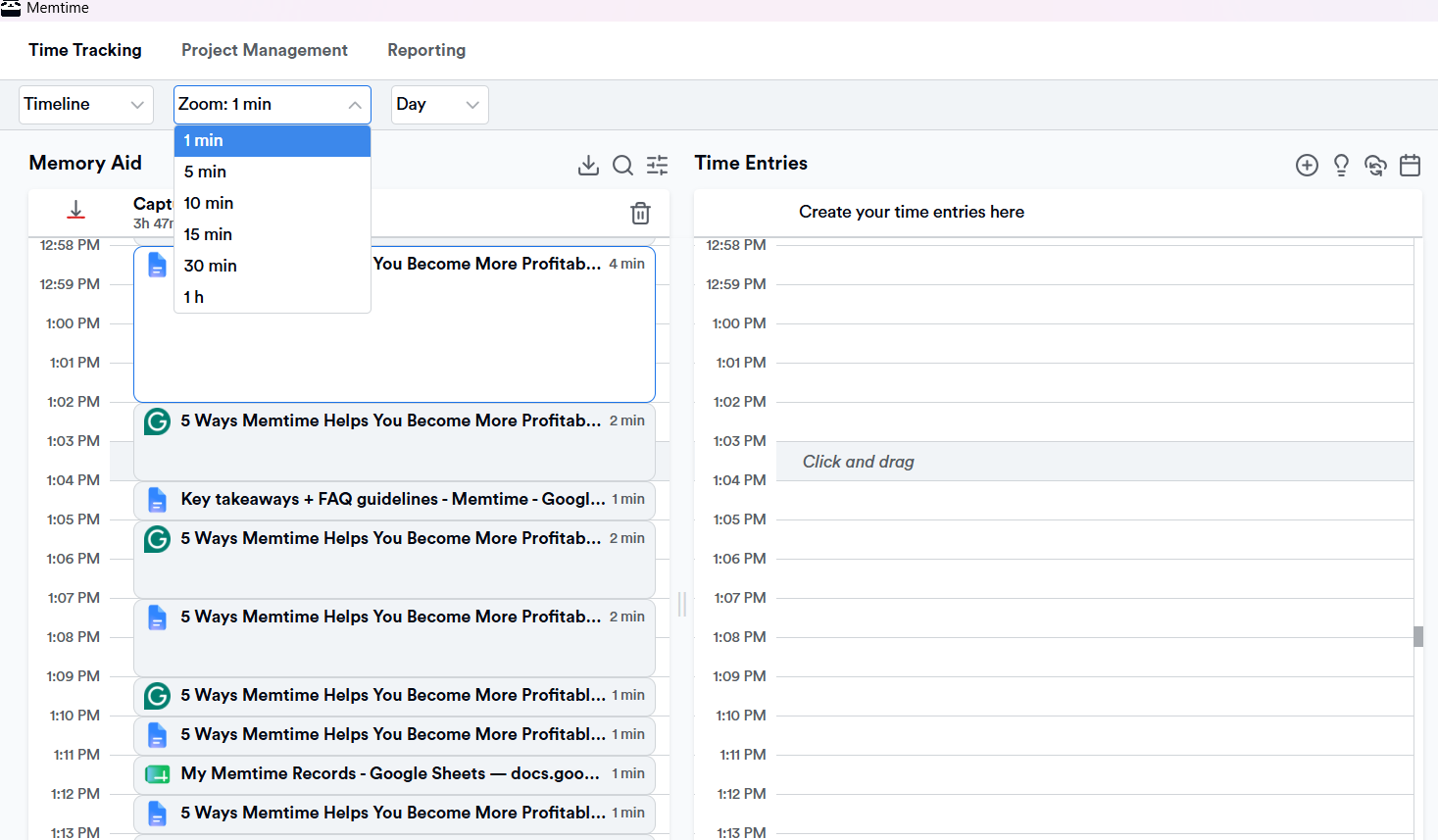
- Activity grouping. Related activities get grouped together automatically, so a task audit doesn’t turn into scrolling through 200 individual browser tabs.
- Search across your history. You can look up a specific app, email subject, or document to see every time you touched it.
- 100% offline, on-device storage. Activity data stays on your machine and isn’t uploaded anywhere (there’s no cloud). Nothing is shared with managers or colleagues unless you turn it into a time entry yourself.
- Export to 100+ tools. Once you’ve spotted the patterns, you can send relevant time entries straight to your existing project management, accounting, or practice-management software.
Don’t just take my word for it. Thomas Baumgartner, Managing Director of the architecture firm Baumgartner + Partner AG, described his pre-Memtime days as so fragmented that by evening, he could barely reconstruct what he’d worked on or when. After switching, he said “with Memtime we are faster, more precise and more relaxed”.
Now I think one thing is clear: Memtime doesn’t tell you what to change; you have to figure that out. It just shows you the raw pattern:
- Frequency spikes. Tasks that show up daily or near-daily.
- Time-draining tasks. The things you assumed took 5 minutes but actually took 20, repeated across the week.
- Fragmentation. This is work that’s constantly interrupted by smaller recurring tasks.
You really have to see for yourself just how Memtime works.
So, allow me to invite you to try it for just 2 weeks (the entire process takes less than 10 seconds, no credit card required). If you end up liking it, we can extend your trial before you fully commit.
And if you end up not liking Memtime, crucify me on social media; I’m here for it. 🙂
Step #2: Make decisions
Now that you know what’s eating your week, it’s time to declare war on those tasks. But not equally on each one, as not every repetitive task deserves the same force.
So, here’s a quick decision framework you can use:
- Automate if the task is rule-based, repetitive, and doesn’t require your judgment. Think of recurring invoices, calendar scheduling, standard email replies, and data syncing between tools.
- Delegate if the task is repeatable but does require a human, just not necessarily just you. The rule of thumb here is that anything procedural, operational, or supportive, like meeting scheduling, standard report prep, inbox triage, and file organization, can be delegated, while anything that falls under strategic judgment, sensitive relationships, or your specific expertise should stay with you.
- Batch if the task is necessary and can’t be automated or handed off, but doesn’t need to happen the instant it occurs to you. Email, invoicing admin, expense logging, CRM updates; you won’t lose anything by grouping them into 2 or 3 windows a day instead of interrupting you 15 times.
- Simplify if the task feels bloated. Think of a weekly report that recaps 4 other reports. Ask yourself if such a task needs to exist in its current complicated form or not.
- Eliminate when you’re dealing with redundant tasks. If a task exists only because 2 systems don’t sync, or because someone once asked for something and nobody’s dared to cancel it since, kill it. Basically, I’m saying: cancel that redundant meeting.
Now, how does this look in real life? Well, like this:
- Making a template for your top 5 recurring emails.
- Batching admin into 2 fixed windows a day.
- Killing 1 recurring meeting this week.
- Setting a consistent file naming convention.
- Syncing tools where you can.
- Reviewing your audit data monthly.
Wrapping it up
Dealing with redundant and repetitive tasks is your reality. It’s everybody’s reality.
But you can change that a bit, mostly by making sure your hours go toward work that actually needs your brain. The way you can do that is with the right tool (cough, Memtime), an audit, and being more decisive with automating, delegating, batching, simplifying, or eliminating.
So, consider this article an invitation to be more ruthless and protective when it comes to your time (management). Cut, hand off, and streamline any task that feels agonizing.
After all, time is already leaving. Might as well decide where it goes.
FAQs
Why do repetitive tasks feel so exhausting even when they’re not physically hard?
It’s not really about the effort you put into them; it’s more about engagement. When your brain already knows what’s coming (the same reply, the same report format, etc.), it starts checking out before you even begin. That mental disengagement is what makes an easy task feel so draining by the end of the day.
Can repetitive tasks be fully automated, or do they always need a human?
It depends on the task. Anything rule-based, like recurring invoices, calendar scheduling, or syncing data between 2 tools, can usually be automated. But anything involving judgment, sensitive client relationships, or your specific expertise still needs a living person, even if parts of it can be streamlined or batched.
How much time do employees actually lose to repetitive work each week?
More than you would think. Tasks that feel like they take 5 minutes routinely can take over 20 minutes once you factor in the mental reset time after each interruption. Without tracking, this time is nearly invisible, since it hides in small chunks across the day rather than one obvious time block.
What’s a first step to reduce repetitive work without overhauling everything?
Start small: pick your top 3 or 4 recurring tasks (like email replies, status updates, or file searching) and template or standardize just those. That’s enough for starters. You just need to stop reinventing the same task from scratch every time.
Are redundant meetings a real productivity problem, or just an annoyance?
Oh, they are a real problem. A meeting that only exists to recap an email or a Slack thread adds no new information; it just costs everyone attending another chunk of focused time. If a meeting’s purpose has disappeared over time, canceling it usually returns more time than people expect.
How can a manager tell if their team is overloaded with repetitive tasks?
The clearest signs are complaints about “no time for real work”, missed deadlines despite full calendars, and visible fatigue around admin. Since this kind of overload is hard to see from the outside, the most reliable fix is looking at actual time data.

Aleksandra Mladenovic
Aleksandra Mladenovic is a copywriter and content writer with six years of experience in B2B SaaS and e-commerce marketing. She's a startup enthusiast specializing in topics ranging from technology and gaming to business and finance. Outside of work, Aleksandra can be found walking barefoot in nature, baking muffins, or jotting down poems.