Reprioritization: What to Do When Your Plans Go Out the Window

"The best laid plans of mice and men often go awry." Even when Robert Burns committed this line to the page, circa 1786, plans had a reputation for going for a hop. They get made, and then reality inevitably intervenes, rendering a schedule that looks manageable in the morning pretty much obsolete within hours.
Among the more familiar plan thwarters that you may encounter are a client who might suddenly need something sooner, or work you've already started that turns out to be waaaay more complex than expected. The result is the same; the hours you thought you had have disappeared.
This is why, instead of turgidly sticking to plans (and subsequent contingency offerings), people across the employment spectrum can benefit from embracing fluidity. I know that sounds scary, but it's possible. You just need the means to reassess your workload, adjust your priorities, and make more realistic decisions based on the time and resources you have remaining.
So, in this article, we'll explore how to reprioritize tasks when priorities change, and practical reprioritization techniques you can use in the moment.
Key Takeaways
- Reprioritization starts with reassessing reality, not working faster. When a plan is no longer viable, take a minute to identify exactly what has changed and how much time you have left before attempting to reshuffle your workload.
- Urgent tasks and important tasks are not always the same thing. Focus first on commitments with hard deadlines, dependencies, or wider consequences if delayed.
- Clear communication can prevent reprioritization from becoming a bigger problem. Whether you're dealing with a colleague or a client, relaying your revised timeline early is better than missing a deadline without explanation.
- Small adjustments can preserve momentum when time is limited. Reducing scope, creating a holding list for postponed work, and protecting uninterrupted focus time can help you adapt without rebuilding your entire schedule.
- Time-tracking data leads to better reprioritization decisions. Reviewing how long work has already taken and comparing it with similar tasks can help you avoid unrealistic plans and allocate your remaining time more effectively.

Reprioritizing tasks when priorities change
The instinctive response to disruption is often nurturing the notion that if you work faster, you can somehow catch up. Unfortunately, speed rarely solves a workload problem when the underlying plan is no longer viable. Instead, the first logical step is to pause for a minute and evaluate what has actually changed.
Kick things off by identifying any commitments that you can't move. These are typically hard deadlines, things that depend on you specifically, or a team member awaiting your input before they can move things on. Then, look at everything else through the lens of “what still matters today and what can reasonably wait.”
It's important to differentiate urgency from importance; the most urgent thing is not always the most important. Similarly, it’s usually better to postpone a low-priority task for a day or two than to miss an important deadline or compromise on quality because your attention was divided.
Reprioritizing isn’t about saving your original to-do list. It's to build a new plan that fits the circumstances you're now faced with. Sometimes that means reshuffling tasks and/or renegotiating expectations. And sometimes it means accepting the often unthinkable… that something will need to wait so that the more important work gets done to a decent standard.
Work reprioritization in real-life situations
So far, we've established that reprioritization isn't about forcing your original plan to work, but rather adapting to changing circumstances and making intentional decisions about where your time and attention will create the best impact.
The challenge, of course, is the other mitigating factors involved, as real-world work comes with deadlines, client expectations, competing commitments, and limited hours, all of which can make it tricky to decipher what should take precedence.
Let's collectively imagine that we're a freelance designer. We've allocated the afternoon to completing a website mockup when a long-term client asks for some impromptu revisions to a project due the following morning. Rather than trying to tackle both simultaneously, it probably makes more sense to pause the mockup and focus on the time-sensitive work.
The same principle can apply when tasks take longer than expected. Perhaps we're a project manager or consultant who's budgeted three hours to prepare a report, only to discover halfway through that the underlying data needs cleaning. Instead of sacrificing quality or rushing through the remaining work, we may need to push less critical tasks into tomorrow's schedule.
Communication becomes particularly important at this juncture. For instance, if reprioritization affects someone else – be it a colleague or a client – it's obviously better to address it ASAP.
If it's a colleague, a simple message such as "An urgent deadline has come up, so I'll need to move this to [insert best time/day here]. I'll keep you updated if anything changes," tends to be more effective than staying silent, hoping for the best, and possibly missing an agreed deadline altogether.
Clients generally need a little more context and reassurance than colleagues, so you can make it feel more professional by saying:
"I wanted to let you know that I've had to reshuffle my schedule due to an unexpected deadline. As a result, I'll need a little more time to complete your work properly. As such, the revised delivery date is [insert best time/day]. In the interim, I'll keep you updated on progress. Many thanks for your understanding."
What you want to do is explain the change, reinforce your quality standards, and provide certainty around the new timeline.

Reprioritization techniques that help you adapt quickly
Once you've accepted that the original plan is no longer realistic – which, let's be frank, is more than half the battle – the next step is deciding how you'll reorganize the work that needs reprioritizing. Fortunately, reprioritization doesn't have to involve rebuilding your entire schedule from scratch. The key difference here is that your priorities have already been established. Your job now is to adapt the plan to fit a new reality.
A straightforward tack is to focus on consequences rather than preferences. If a task is postponed, what happens? Take some time to consider some likely outcomes. For instance, if you choose to delay a task, will it cause a project to stall, result in more than one deadline to be missed, or leave a chain of colleagues waiting on you before their respective workflows can progress? The answers to these prospective scenarios often make your priorities much clearer.
Once you've identified the consequences, you can move on to the following:
Spot the minimum viable deliverable
If a deadline has moved, or your available time has sadly shrunk beyond all recognition, ask yourself whether a task can still achieve its objective with a reduced scope. A finished draft, preliminary report, or first-round design can be more valuable than a perfect deliverable that arrives too late.
Create a temporary holding list
Rather than leaving postponed work scattered across your to-do list, move it into a dedicated "revisit later" category. This gives you confidence that nothing has been forgotten while keeping today's priorities clear and more manageable.
Use your remaining hours for deep-focus work
Another technique is to separate tasks that require deep focus from those that can be completed in shorter bursts. To put it another way, when your planned morning gets shattered to smithereens, it can be tempting to fill your remaining hours with quick tasks.
Instead, reserve any uninterrupted time for work that requires concentration, and save emails, admin, and other routine tasks for any shorter windows in your available schedule. You’ll need to send out a quick email to colleagues, and/or activate an Out Of Office reply to say you're engaging in deep focus work and will respond at the end of the day/following morning.
If you're struggling to determine whether a task should stay on today's list, move to a later date, or be dropped altogether, our guides to managing competing deadlines, handling ad-hoc work, and using a value vs. effort matrix can provide more detailed frameworks.
Making better reprioritization decisions with time data
Ultimately, you need to be realistic about the time you have left in your day. If an unexpected issue has consumed half of it, please resist the temptation to shoehorn eight hours of work into four. Reprioritization works best when it's tethered to reality.
That's where accurate, real-time time-tracking data can be invaluable. Before rebuilding your schedule, check how much time you've already spent and how long similar tasks have taken in the past. Memtime makes this easier by providing an accurate record of where your hours have gone down to the minute, helping you avoid overly optimistic estimates.
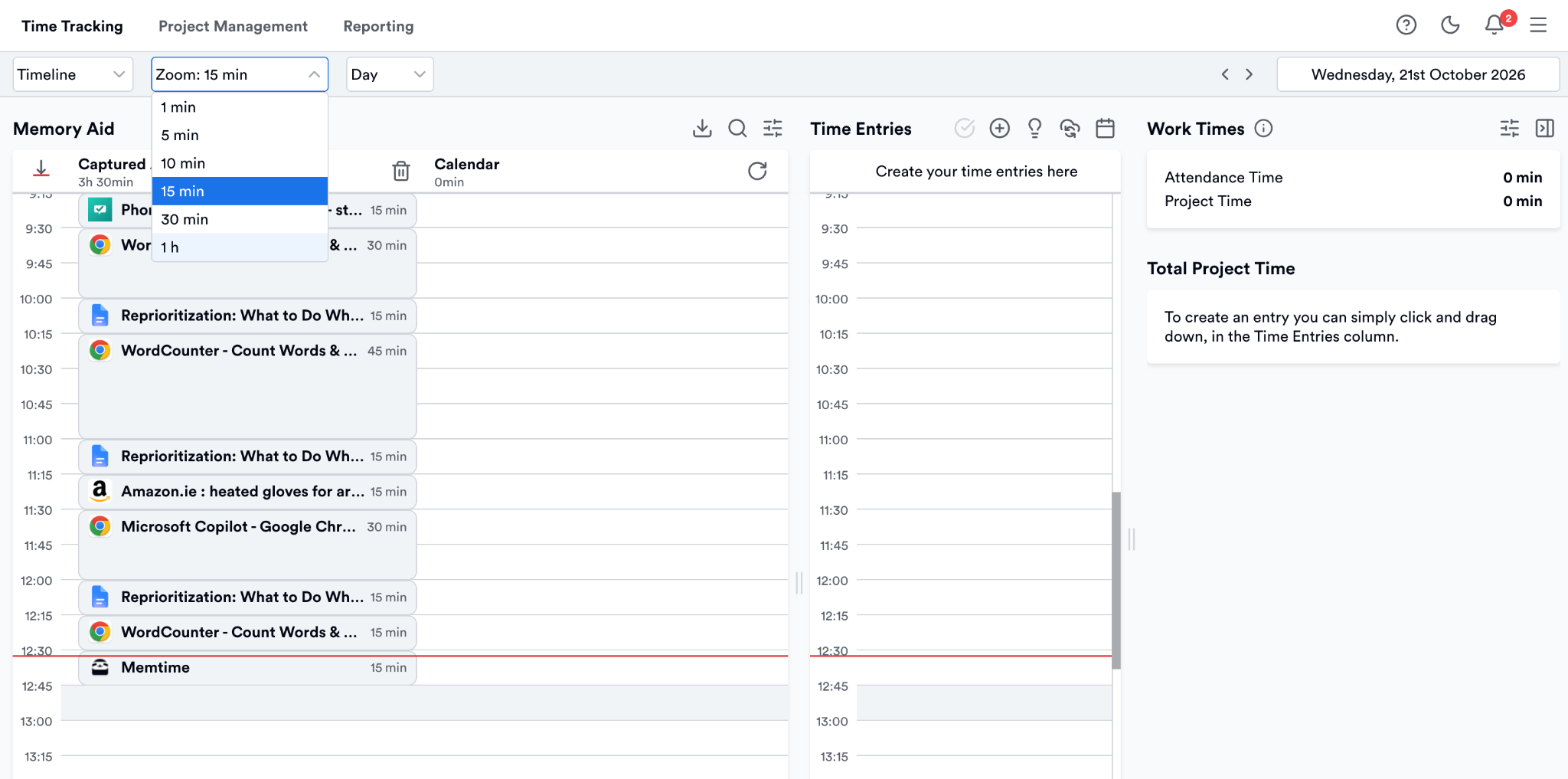
After all, when reprioritizing, decisions based on actual time data are almost always more reliable than decisions based on best guesses. So, just make your way here to take advantage of our 14-day free trial to see how Memtime can be your accountability partner with zero additional time required to be invested by you.
FAQs
How often should you reprioritize your workload?
There's no fixed schedule. Some people may only need to reprioritize occasionally, while others do so several times a week. The key is to revisit your plan whenever a significant change affects your available time, deadlines, or workload.
Can reprioritization improve productivity?
Yes. While it may feel disruptive in the moment, reprioritization helps ensure you're spending time on the most pertinent work under current conditions. Continuing to follow an outdated plan often leads to missed deadlines and squandered effort.
What are the signs that a task should be postponed?
Common indicators include shifting deadlines, new dependencies, reduced available time, or the emergence of work with greater business impact. If postponing a task has minimal consequences compared to other commitments, it may be a strong candidate for rescheduling.
How do you avoid constant reprioritization?
While some change is unavoidable, building flexibility into your schedule can help. Leaving buffer time between major tasks, keeping stakeholders informed, and using historical time data to create more accurate plans can reduce the need for continual adjustments.

Sheena McGinley
Sheena McGinley is a columnist and features writer for the Irish press since 2008. She’s also a business owner that is conscious of how time tracking can foster progress. She wrote for SaaS companies and businesses that specialize in revenue optimization by implementing processes. She has the unique ability to digest complex topics and make them easy to understand. She shares this precious skill with Memtime readers. When she's not making words work for people, Sheena can be found taking (very) brisk dips in the Irish Sea.