Using a Value vs. Effort Matrix in Client Work: Where Should Time Go
I see you. *tongue pop* You’re a great leader with a clear vision and exceptional strategic thinking. But you’re also great at pretending that your service business isn’t drowning in work that feels productive but isn’t.
You know what I’m talking about.
Proposals that go nowhere.
Status calls that recap last week’s status call.
Reports that a client requested once in 2023 and now live forever in the recurring calendar.
That’s simply what happens in a business. The work piles up, the hours disappear, and that’s why your profitability is a bit—how do I say this without being disrespectful?—welp, not great.
Luckily for you, there are tools and methods designed to make you stop, look this problem dead in the eye, and actually fix it. One of them is the value vs. effort matrix.
So, let’s talk about the matrix. Precisely, let’s talk about using the matrix in client work, not just as a prioritization tool. We’ll bring in an important dimension—time—and discuss where your team’s time actually creates value, and where it quietly eats your margins like you eat PB & J for breakfast.
We’ve got no time to waste, so let’s roll.
Key Takeaways:
- The value vs. effort matrix helps you sort tasks by impact and cost, so you can stop doing work that looks productive but isn’t.
- Billable doesn’t always mean valuable. In client work, high-effort tasks often deliver low returns, and most teams never stop to measure the difference.
- The matrix has 4 quadrants: Quick wins, Strategic projects, Fill-ins, and Time drains. You need to check which quadrant most of your work falls into.
- Most teams build their matrix on guesswork. Without real time data, you're estimating effort, which makes the whole framework unreliable.
- Automatic time tracking with Memtime helps you get the most out of the matrix and helps you view it as a profitability tool.
- Pairing the matrix with time data helps you benchmark effort against billing, catch scope creep early, and have more confident client conversations.

What is the value vs. effort matrix?
The value vs. effort matrix (also called the impact vs. effort matrix, or the priority matrix) is a simple two-axis prioritization tool.
On one axis, you place the value a task delivers. On the other, you plot the effort required. Every task gets placed somewhere on that grid, so that you can clearly see which things are worth doing, which aren’t, and which are actively destroying your time.
Here’s what the matrix looks like; consider it the value vs. effort template.
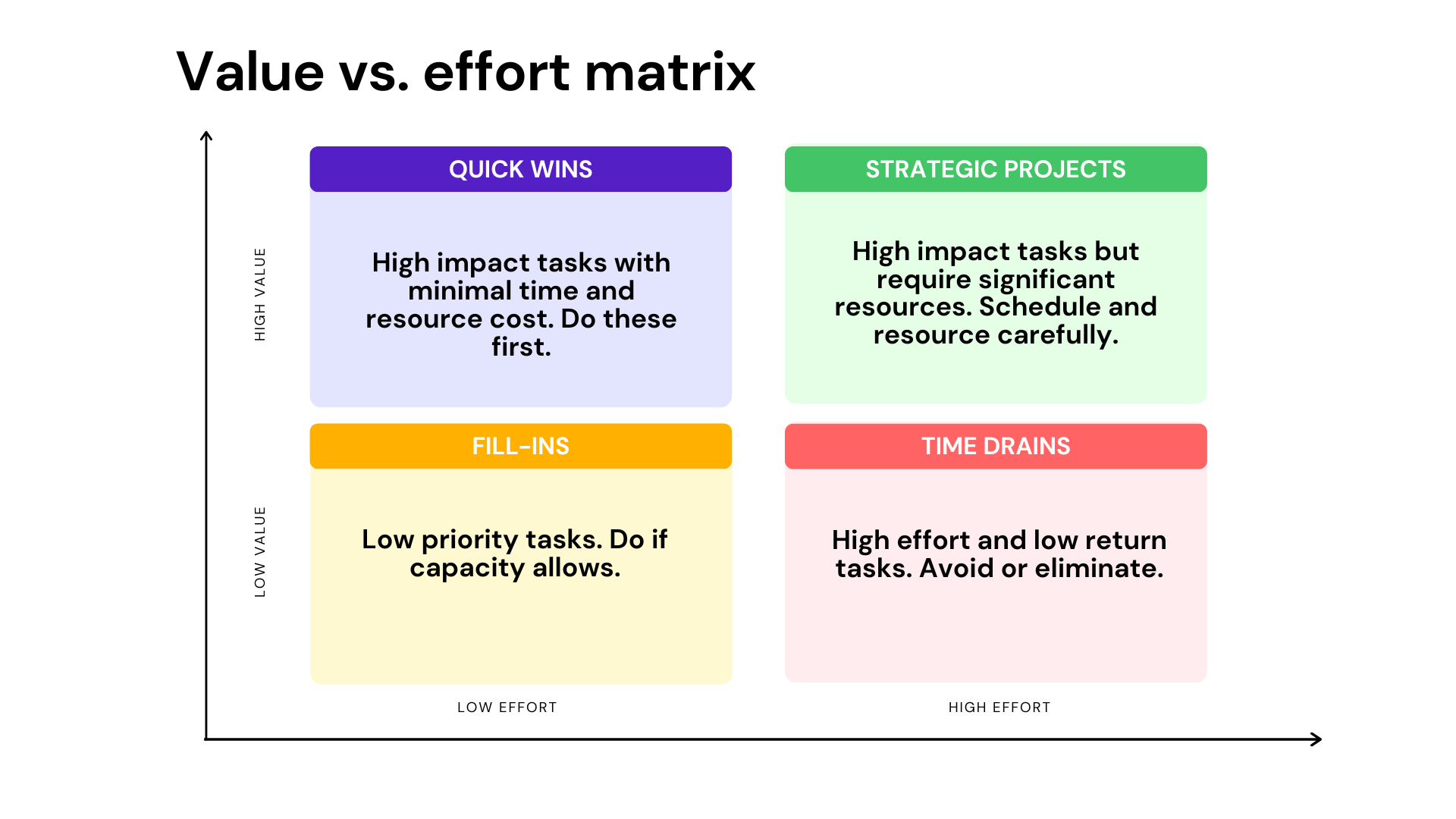
You’ve probably seen this matrix before. The framework is closely connected to lean and agile product management. It gained popularity in the 2000s and 2010s as teams needed a quick, visual way to sort through product backlogs. Nowadays, it’s a staple in product management circles and sits comfortably alongside tools like the Eisenhower matrix and MoSCoW method.
The 4 quadrants
When you place your tasks on the matrix, they land in one of 4 buckets:
- Quick wins (high value, low effort). These are the golden tasks because they have high impact and low cost, so you need to do them first. In client work, this might look like setting up a simple automated report that saves a bunch of hours a week, or updating a proposal template that’s been causing rework. Think of tasks that often get ignored because they don’t feel urgent.
- Strategic projects (high value, high effort). These are the big, important initiatives that are absolutely worth doing, but they require planning, resources, and realistic timelines. For a client services team, this could mean building a new service offering, investing in onboarding infrastructure, or developing a methodology for a complex deliverable.
- Fill-ins or nice-to-haves (low value, low effort). These tasks are low impact and low cost. Basically, they are fine to do when capacity exists, but they shouldn’t be anyone’s priority. In client work, this is often polish work, like minor formatting tweaks, extra data pulls no one asked for, and aesthetic revisions that can go unnoticed. They are not harmful, but not helpful either.
- Time drains (low value, high effort). Yikes. High effort, low value means excessive revision cycles, fully custom deliverables for low-fee clients, or meetings that could have been an email. These tasks look like work and they generate hours on a timesheet, but they simply don’t add value to the client or your margins.
It does. It’s genuinely useful when you know what you’re doing with it. Here’s what I mean by that.
If you google the matrix a bit, you’ll bump into several Reddit discussions on the framework. And 2 of which caught my eye.
The first one is posted in r/projectmanagement and titled Discussion regarding value vs effort. The discussion is basically about a common prioritization idea in project management: do the highest-value, lowest-effort work first. The OP understood the words individually, but was confused about why this is treated as such an important concept.

Most of the replies explained that the point isn’t to avoid big, difficult projects, but to look for quick wins that deliver a lot of value for relatively little effort. In software and product development especially, finishing several smaller, valuable improvements can be better than spending months on one massive feature because you deliver value sooner, and get feedback earlier. A few commenters also pointed out that businesses often waste time on low-impact work simply because no one stops to question whether the effort is actually worth it. Finally, one person noted that this mindset is much more useful in flexible, iterative fields like software than in fixed-sequence projects like construction (e.g., building a bridge), where work order is dictated by engineering constraints rather than prioritization.
Then, there’s the r/gtd thread, Has anyone tried using effort value matrix?. The OP asked whether anyone had tried using an effort vs. value matrix alongside GTD. They liked the idea of plotting tasks by how valuable they are vs. how much effort they’ll take, but weren’t sure whether it fit with the GTD methodology or whether anyone had practical experience using it.

The general response was that the 2 approaches solve different problems and can complement each other.
GTD is mainly about capturing, organizing, and keeping track of all your commitments so you don’t forget anything, while an effort/value matrix is more of a prioritization tool that helps you decide which tasks are worth doing first. Several commenters said they use some form of value vs. effort thinking during their weekly review or when deciding between projects, but they wouldn’t apply it to every single next action. The overall takeaway was that the matrix can be a useful layer on top of GTD for higher-level decisions, as long as you don’t overcomplicate your system or spend more time categorizing tasks than actually doing them.
Overall, the matrix has a practical value when used appropriately. It can’t replace your existing workflow or project management system, but it can help as a simple prioritization tool. It helps you focus on work with the greatest return, like making more intentional decisions about which client projects, requests, or internal improvements deserve your time, so you can deliver more value. The key is to use the matrix for high-level decisions, not to analyze every single task.
The issue with client work: Billable ≠ valuable
This is a big problem, so let’s sit with it for a minute.
In client work, billable has a way of becoming a synonym for absolutely worth doing. If the client asked for it and you can charge for it, it gets done, no questions asked.
The issue here is that this logic doesn’t hold water because it ignores profitability at the task level. Just think about these scenarios:
- Excessive revisions. A client asks for round 6 of revisions on a logo they approved in round 2. Each revision round takes 2-3 hours from a senior designer. All that work is billable, if the contract allows for it, but the value delivered to the client hasn’t changed since round 3. Meanwhile, your margins on that project are lying comfortably in a basement.
- Manual reporting. You have to generate a 20-slide deck every Friday afternoon, pulling data from at least 3 platforms and formatting it by hand. The client glances at it on Monday morning and emails back, “Looks good”. This report takes 5 hours a week to produce and influences zero decisions. It’s super high effort, yet low value.
- Recurring status meetings. The weekly check-in call which was supposed to be 30 minutes is now 75, although it has no agenda. It resolves nothing but the client uses it to think out loud. You can call this client service but it seems as if it’s just expensive babysitting. 🤷
- Custom requests from low-fee clients. The client paying your smallest retainer tends to have the most requirements (IYKYK). Think custom data formats, super-unique analyses, and wild deliverables. So, your effort is real, but the fee doesn't cover it, and because the work is billable, nobody flags it as a problem. Only when you decide to look at the project’s actual profit margin do you see some awkward numbers.
- Low-impact polish work. This suggests perfecting a deliverable that’s already excellent. Think of tasks like adding a fifth appendix to a report that the client reads the executive summary of. Updating the font on a slide deck that went out last week. Just a bunch of WTF tasks that for some reason need to get done.
I think you get the drill.
There’s nothing wrong with the listed tasks. They feel like work because they ARE work, but they just don’t create proportionate value.
Applying the matrix to client work
Now, we’re getting to the good stuff.
How do you actually use the effort vs. benefit matrix to evaluate client work? Welp, you start from the beginning.

First, redefine your axes. In a standard PM context, value means something like customer satisfaction or revenue impact. In a client services context, you need to ask 2 distinct questions for every task:
- What value does this create for the client? Does it move them toward their goal, address a pain point, or produce something they’ll truly use and notice?
- What value does this create for us? Is it profitable? Does it build a capability we can reuse? Does it strengthen the client relationship in a way that matters in the long term?
Now, what happens when, let’s say, a client submits a new request?
You don’t respond immediately. No—look at me—no. Like a true pro, you run it through a quick filter: How much will this actually help the client? How much time will it realistically consume? Is there a lighter version that achieves 80% of the outcome at 20% of the effort? Often, the answer is yes, and clients are surprisingly open to it when you frame it as efficiency.
Using the framework as a profitability tool
The value vs. effort matrix is a productivity tool, for sure. But it is also a profitability framework when you know how to use it. It helps you answer the real business question: Which work actually improves our profitability?.
Now, how do you use it to maximize your profitability?
Well, you audit your client engagements. Ask yourself these questions:
- Which clients consistently generate work that falls in the Quick wins quadrant?
- Which ones keep dragging your team into Time drains?
- Which service lines are full of Strategic project-level work that gets priced like Fill-in work?
By doing so, you start mapping effort to value at the client engagement level, so you can spot patterns quickly. You’ll likely find that a handful of clients or project types consume disproportionate hours relative to the value they generate (for them or for you). You’ll find service types that are underpriced because no one ever measured how long they actually take.
And you can spot these patterns only by using the matrix AND a time tracking tool.
Here’s why.
A nod to automatic time tracking
There’s a bit of a catch with the value vs. effort matrix: it assumes that you already know where your team’s effort goes. And that’s such a false assumption because most teams don’t.
Most teams estimate effort. They guess, based on experience, intuition, and optimism. They rarely measure it, which is why their matrix is built on shaky ground. The matrix is only as reliable as whoever is doing the estimating.
And you can’t allow that to happen.
So, this is where automatic time tracking comes in handy. In fact, we built Memtime specifically to solve this problem.
It runs quietly in the background on your computer—Windows, macOS, or Linux—and records every minute you spend across every app, doc, browser tab, and email, so you don’t have to guess what you worked on for the last 6 hours.
At any point, you can open Memtime and see your working day laid out as a chronological activity timeline (the Memory Aid), viewable in intervals as granular as one minute. Every file you had open, every browser tab, every app, it’s all there, stored privately on your local device. (Nothing goes to the cloud. Your data belongs to you; we made sure of it).
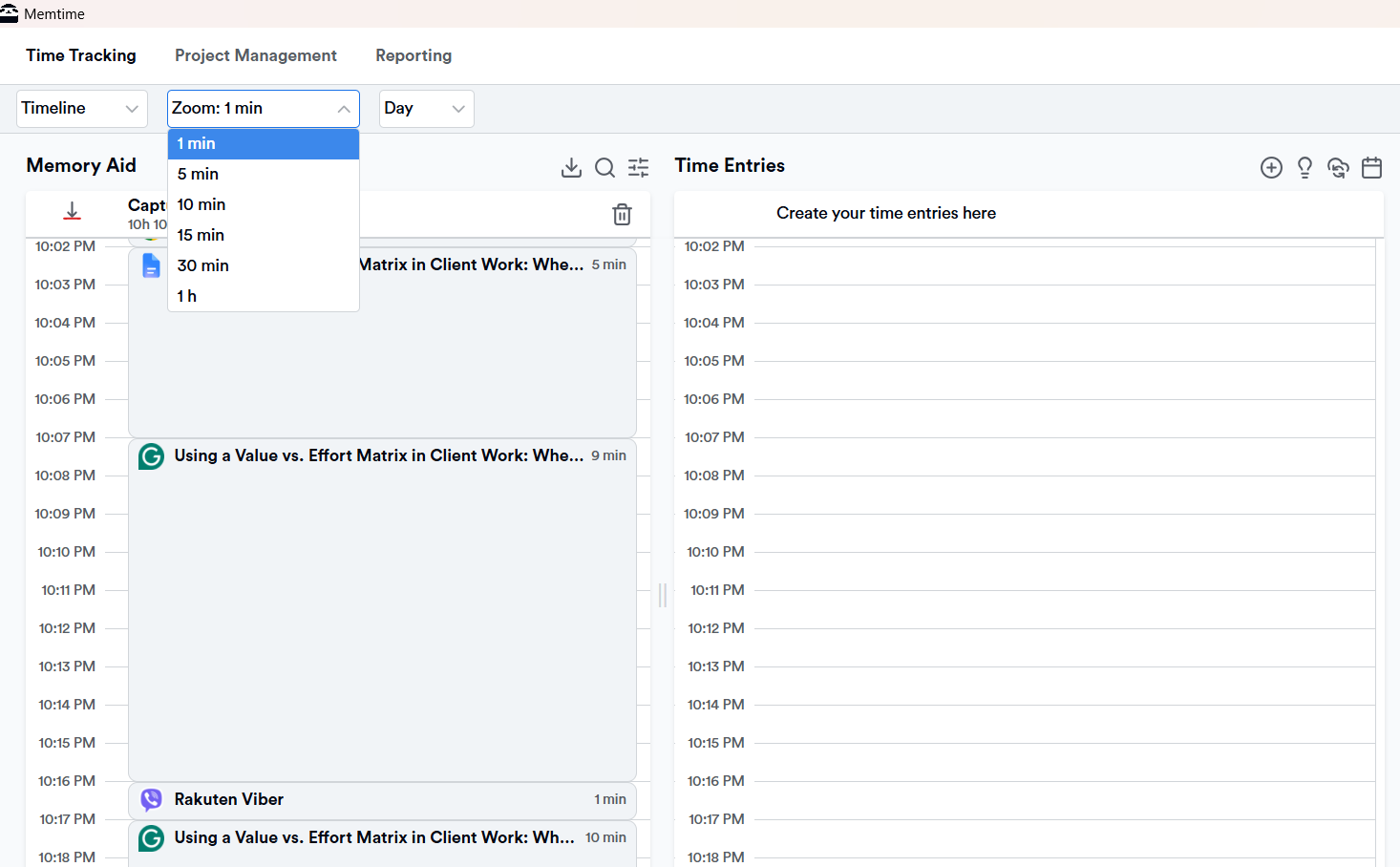
From that timeline, creating time entries is fast: you can transform captured activities into billable hours in 2 clicks, assigning them to the right client, project, and task (or let Memtime do it for you). Memtime syncs with over 100 project management and billing tools, like Jira, Asana, Harvest, Clockify, ClickUp, Zoho Books, and many more, so entries appear in your connected software automatically. No manual copying.
Now, I know what you’re thinking.
How the hell does Memtime fit in the matrix?
Allow me to explain using a simple example. Instead of estimating that the Friday report took a couple of hours, you now have 6 weeks of data showing it consistently takes 5.5 hours, which means it falls in the Time drain quadrant at current billing rates. Similarly, instead of assuming status meetings are “fine”, you can see exactly how much prep, attendance, and follow-up time each one is generating across the team.
That’s why Memtime also helps with the profitability analysis at the project level. When you can see how many hours are actually going into each client and each task category, you can benchmark effort against billing and identify where scope creep is happening. You can understand your true cost-to-deliver across different service lines and make pricing decisions accordingly.
The time data also makes your decisions more defensible in client conversations. Like, “We’ve been spending x hours per week on this deliverable, and based on how it’s being used, we think there’s a more efficient version that would take y hours and serve you equally well”. Doesn’t that make you sound more eloquent and confident?!
How can you say no to that? Start with Memtime’s 2-week trial to see just how well it works. It’s on us.
The value vs. effort matrix + Memtime = chef’s kiss
The value vs. effort matrix is painfully obvious and won’t lie to you.
When you start using it, you’ll see just how often you say yes to stay helpful, stay responsive, and keep clients happy. And that’s just part of the problem.
And the matrix isn’t a magic fix for all your business issues. It won’t suddenly make everyone prioritize better or stop clients from asking for small tweaks. But it does give you a shared way to point at the problem, and if you pair it with actual time or cost data, it gets even more interesting. It can basically serve as a profitability reality check for you.
If you take anything from this article, let it be this: spend time where it actually creates value, as everything else is just an expensive noise with good intentions. As they say, the road to hell is paved with good intentions. 🙂
FAQs
What types of businesses benefit most from the value vs. effort matrix?
Any service business juggling multiple clients, projects, or recurring deliverables can use it. It’s especially useful for agencies, consultancies, and professional services teams where time is the main resource being sold. If your team is always busy but margins are thin, the matrix gives you a structured way to figure out why, and a tool like Memtime gives you the actual numbers to back it up.
How often should you run a value vs. effort analysis on your client work?
A good starting point is once a quarter, or whenever you notice a project eating up more hours than it should. It doesn't have to be a big event; even a 30-minute team review of your recurring tasks can surface a lot. With automatic time tracking running in the background, you’ll already have the data ready when that conversation happens.
Can the value vs. effort matrix help with difficult client conversations?
Yes, definitely, and that’s one of its most underrated uses. Instead of saying “this is taking too long”, you can show a client exactly where their requests fall on the matrix and what the effort actually looks like. Pair that with real time data from a tool like Memtime, and you’ll come into the conversation bringing facts.
Is the value vs. effort matrix hard to implement with a team?
No, not really. The concept itself is simple enough that most teams get it immediately. The harder part is getting honest about effort, especially when estimates have always been rough guesses. Automatic time tracking removes that optimistic estimation, so your matrix reflects what’s actually happening, not what everyone believes is happening.
What’s the biggest mistake people make when using this matrix?
Applying it to every single task instead of using it for higher-level decisions. The matrix is a strategic tool, not a self-micromanagement checklist. If you’re putting every email and Slack message on a grid, you’ve missed the point. Use it for recurring work, client engagements, and service lines, where the patterns actually matter.

Aleksandra Mladenovic
Aleksandra Mladenovic is a copywriter and content writer with six years of experience in B2B SaaS and e-commerce marketing. She's a startup enthusiast specializing in topics ranging from technology and gaming to business and finance. Outside of work, Aleksandra can be found walking barefoot in nature, baking muffins, or jotting down poems.







