Legal Time Entry Descriptions: Practical Examples & Mistakes to Avoid
I bet that when you were in law school you dreamt about writing billing narratives. Right? Right?!
Nah, man…
But here you are, having to remember what that “call with opposing counsel” in your calendar from 3 days ago actually stands for. Was it about the deposition schedule? The settlement offer? Did the process server show up at the wrong address again? Who knows…
Well, technically, you should, ‘cause these legal time entry descriptions matter.
If you think about it, a clear entry is why a client reads your invoice and just pays it, instead of forwarding it to their counsel with a red pen and a lot of questions. It’s also why a judge signs off on your fee petition instead of cutting 40% off, because nobody can figure out what your “research” was spent on.
So, a part of your job is to make straightforward, easy to read time entry descriptions. And that’s easier said than done.
But luckily for you, we at Memtime know a thing or two about time entry descriptions. I’ll walk you through what a good legal time entry looks like, what a bad one looks like, and why the difference usually comes down to how much you actually remember about your day.
We’ve got no time to waste, so let’s roll.
Key Takeaways:
- Writing time entries close to when the work happened is recommended and seems simple, but a busy legal workday rarely leaves time to log one.
- According to psychologist Hermann Ebbinghaus’ research on the forgetting curve, memory fades within hours of an activity.
- The longer you wait to write a time entry, the more your brain reconstructs it instead of remembering it accurately.
- Confidence and memory don’t necessarily fade at the same rate, so a week-old entry can feel completely correct while still missing or misrepresenting details.
- Memtime tracks desktop activity automatically and lays it out as a private timeline, giving you an accurate record of your work.
- Memtime doesn’t write your time entries for you; it just gives you the raw material, like which files and calls happened when, so you can write them yourself.
- A good legal time entry doesn’t need to be long or fancy, just specific about the document, person, and purpose involved.

What makes a useful billing narrative
Okay, so you know you need to write good time entry descriptions.
But what makes them good? How detailed you are? How precise you are?
How do you know when you nailed them?
Conveniently, you can borrow a legal phrase as a rule of thumb here: res ipsa loquitur—the thing speaks for itself.
A good time entry doesn’t need you standing next to it explaining what you meant; it just tells the reader what happened, plain and simple. If a client, a partner, or a judge can read it 6 months from now and actually picture what you did, you nailed it. That’s it.
Courts apply a similar practical standard, and they’ll say it to your face, in an opinion, with your firm’s name on it. Judges handling fee-shifting cases regularly cut fee awards when billing records are too messy to review. One federal court called out a batch of entries where you couldn’t tell how much time went to which task, or what the task even was. That’s basically a judge saying, “I have no idea if this fee is fair, so I’m just going to trim it and not think about it”, and then trimming it.
But how do you write legal descriptions that actually speak for themselves? Is there a framework you can follow?
A simple framework for writing attorney billing entries.
Why yes, there is.
Here’s a formula that works for almost any legal billing description, regardless of practice area:
Good legal time entry = Action + What you worked on + Relevant context
- Action suggests you need to know what you physically did. Reviewed, drafted, revised, researched, called, emailed, negotiated, etc.
- What you worked on is the actual subject. Not “documents” but which document. Not “the issue” but which issue.
- Relevant context suggests you need to know why it mattered, or what it connects to. Think preparation for a hearing, response to opposing counsel, input for a client call, and so on.
So, an example of a bad legal time entry is Reviewed documents.
A good one is Reviewed and analyzed draft purchase agreement in preparation for client call.
That second entry took maybe 4 extra seconds to write, but it’s defensible, billable, and readable.
Now, let’s apply this formula across the tasks that fill most of your days.
Research
Legal research entries are notorious for vagueness, mostly because research feels so open-ended and hard to summarize in one line. But “Legal research, 3.5 hours” tells a client nothing except that you apparently spent 3 and a half hours somewhere in a law library, real or digital. So, be sure to name the issue and the purpose.
Drafting
Drafting entries benefit so much from naming the specific section or component you worked on. “Drafted motion” could mean anything from the opening paragraph to the entire filing, so specificity is what protects you later if a client questions why the drafting phase took several separate entries across different days.

Document review
Document review is where billing loves to hide.
“Reviewed documents, 6.0 hours” doesn’t mean anything. Reviewed which documents? For what purpose? A better entry names the document type, the volume if it’s meaningful, and the reason.
Calls
A phone call entry without a subject line shows that you were on the phone and nothing else. Name the topic, and if the call touched multiple subjects, name the main one or split the entry.
Emails
“Emails, 0.3” should not appear on the invoice more than once (if that). Group similar emails where appropriate, but always say what the emails were about.
Meetings
Revisions
Case strategy
Now, what do you notice among all these good legal time entries?
There’s a pattern: every “better” version names a document, a person, an issue, or an outcome. They are longer, for sure, but also more precise.
And that brings us to this simple legal time entries do’s table.
Legal time entries do’s
But what about the don’ts?
Legal time entries don’ts
- Vague wording. “Worked on case” or “Handled matter” don’t mean anything. These phrases could describe almost any task in any practice area. A client reading them has no way to judge value.
- Too much detail. Yep, this is also a mistake. A paragraph describing every sub-clause you considered while drafting an indemnification provision is tedious to read. Precision is not the same as a transcript.
- Block billing. Putting together several unrelated tasks into a single entry, such as “Reviewed contract, drafted email, attended meeting, prepared for hearing, 4.5 hours”, makes it impossible for anyone to tell how much time went where. Courts have reduced fee awards for this reason. In one case, a court ordered a 10% fee reduction because the attorney’s block billed time records made it too confusing to determine whether the fees were reasonable.
- Generic repeated descriptions. If every entry for 3 weeks reads “Reviewed documents”, a client will eventually ask what has been happening on their matter. You need to vary the description to match the actual task, because the actual task probably did vary.
- Unnecessary jargon. Your client’s accounting department shouldn’t need a portable rotor machine to encrypt your billing narratives. If the jargon can help you add precision, keep it, but when it’s there to make you sound impressive, cut it.

“Write entries close to when the work happened” is difficult to achieve
Now, one of the tips from the do’s list—write entries close to when the work happened—sounds so simple, and yet it’s the hardest one to pull off.
In theory, you finish a task, jot down what you did, and then you move on.
In practice, your day has no room for that. You’re on a call, then someone knocks on your door about a filing deadline, then you’re drafting an email while half-listening to a voicemail, then you’re back in a doc you opened 2 hours ago and forgot you’d left open. There’s no natural pause where you can log a time entry.
And even when you have a spare 5 minutes, billing is rarely the priority. A partner needs something reviewed, a client is calling, a deadline is closing in.
So the entry gets pushed to the end of the day, or the end of the week. By then, you’re reconstructing it from a calendar, a sent-items folder, and whatever memories still happen to be in your head.
And you’re not lazy for doing this. You just can’t remember the details to save your life. 🤷
Memory fades fast. Psychologist Hermann Ebbinghaus documented this back in 1885, showing that forgetting follows a steep curve, with most of the loss happening within hours of the original activity. Later research treats this pattern as close to a universal law of memory, applying it to verbal, visual, and even autobiographical recall.
And it’s not just old psychology research. More recent studies back this up in situations a lot closer to your daily grind. Take dietary recall surveys, for example: researchers found that the sooner someone logs what they ate after eating it, the easier it is to remember accurately. That’s exactly why nutrition researchers these days ask people to log meals the same day, instead of waiting until tomorrow.
Then, there’s another problem: your confidence and your memory don’t necessarily fade at the same rate.
Research on memory retrieval shows that confidence and accuracy don’t always move together. Feeling sure about a recollection doesn’t necessarily mean every detail is right. So, the entry you write from memory a week later might feel completely correct and still be missing a document, misnaming a call, or squashing two separate tasks into one.
This is the real root of most billing entry problems: you don’t sit down to describe your work as soon as it happens; you don’t have time, and that’s why you can’t rely on your memory.
So, what can you do about this? It’s not like you can change how you work or grow another brain.
Well, that’s not technically true… You could get another memory.
Meet your new memory
Meet Memtime. We built it specifically to serve you as your new memory. (MEMORY + TIME = MEMTIME)
Memtime is not a legal expert, and it doesn’t read or judge your billing narratives.
It’s a time tracking app that tracks your desktop activity across the day automatically, capturing which documents you had open, which apps you used, which emails you sent, and which calls you took, then lays that out as a private timeline (called the Memory Aid) only you can see.
That timeline is a chronological overview of your entire day, showing the duration of each activity and when it was recorded.
So, when it’s time to write your time entries, you can scroll back through an accurate record of what actually happened instead of piecing the day together from memory.
You can see the documents you worked on, the calls and meetings you attended, the apps you used, and when each activity happened. That gives you the raw material for a specific billing narrative because you’re describing work you can actually see rather than something you vaguely remember.
Here’s what that can look like in a legal workflow:
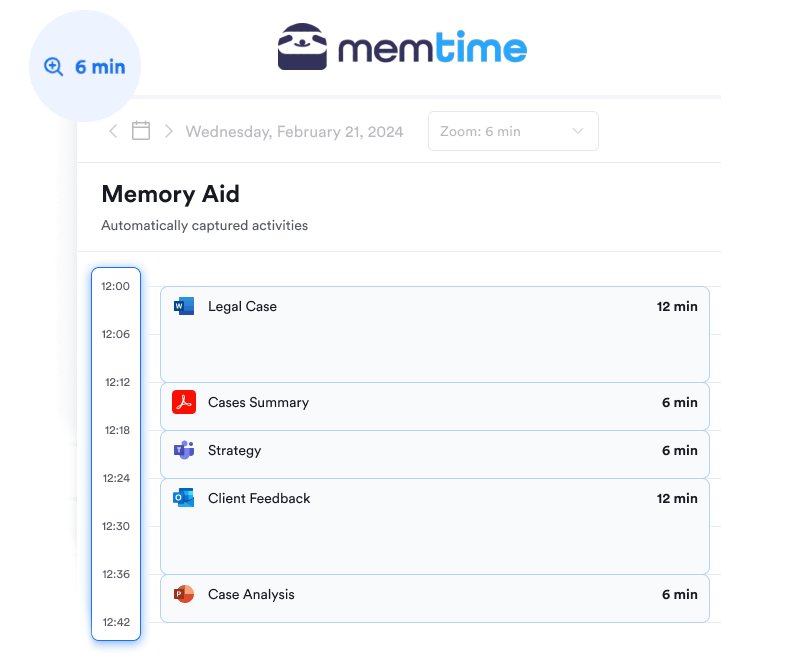
The timeline shows you what you worked on and when. You add the context and purpose that turn those activities into clear, defensible time entries.
Good legal time entries should just be specific
Good legal time entries aren’t longer, or fancier than bad ones. They’re just specific. Name the document. Name the person. Name the purpose, and you’ve done your job.
Now all you need to sort out is remembering the doc, the person, and the purpose, hours or days later, with enough detail to actually apply it. And you can use Memtime for that, an app that keeps a timeline for you. With it, the writing part gets a lot less painful.
FAQs
What makes a legal time entry description “good” or “bad”?
A good time entry isn’t longer or fancier; it’s just specific. Naming the exact document, the person involved, and the purpose of the task is usually enough to make an entry clear. A bad entry, like “Drafted motion” or “Call with opposing counsel”, is vague enough that nobody, not even the attorney who wrote it, can confidently say what actually happened.
Why do so many attorneys write vague time entries?
It’s not because they’re lazy but because billing almost never gets prioritized at the moment. Something more urgent always comes up, like a client call or a filing deadline. By the time there’s a spare minute to log hours, the details have already left their brain, so the entry ends up vague by default.
How soon after doing legal work should you write the time entry?
As close to the actual task as possible. Research on memory, including dietary recall studies, shows that shortening the gap between doing something and recording it reduces memory strain and improves accuracy. Waiting even a few hours, let alone days, means you’re reconstructing the task instead of describing it.
What can happen if a fee petition includes vague time entries?
A judge reviewing a fee petition can cut a significant percentage off the requested fees if the entries are too vague to justify the time claimed. Entries like “Research” with no further detail make it hard for anyone outside the attorney’s head to see what the time was actually spent on, which puts the whole petition at risk.
Can an app like Memtime write time entry descriptions for you?
No, Memtime doesn’t write or judge billing narratives; it’s not a legal expert. What it does is track desktop activity automatically, like which documents were open, which calls happened, and when, and lay that out as a private timeline. The attorney still writes the entry, but from something they can actually see laid out.

Aleksandra Mladenovic
Aleksandra Mladenovic is a copywriter and content writer with six years of experience in B2B SaaS and e-commerce marketing. She's a startup enthusiast specializing in topics ranging from technology and gaming to business and finance. Outside of work, Aleksandra can be found walking barefoot in nature, baking muffins, or jotting down poems.