5 Ways Memtime Helps You Become More Profitable (Without Working More)

You’ve seen what Memtime can do.
You know it can show you where your time actually goes, automatically, in the background. You've probably also seen our seamless project software integrations and that Memtime Projects is included with every subscription. And that’s pretty cool.
But the more interesting part is that it can make your business more profitable (I’m not even joking!).
Because it shows you where your time is going (like actual minute-by-minute reality), you can see where profitability is leaking and start doing something about it. For example, you might discover that a project you thought was pretty profitable is actually using 30% more team time than you budgeted for or that one client is sneakily taking up hours of senior people’s time that you’re not billing for. Or that your team is spending way more time on admin and meetings than you realized. You get the drill.
So, let’s look at 5 very real ways Memtime can help you become more profitable without adding more work to your plate.
Key Takeaways:
- Manual time logging captures only 36-67% of actual billable hours, since memory fades quickly; it’s a pattern documented since Ebbinghaus’ 1880s forgetting curve research.
- Memtime tracks work automatically in the background, capturing activity down to the minute so nothing gets missed when it’s time to bill for work.
- Memtime is helpful when a client or project is taking more hours than planned, making it easier to catch and stop overservicing.
- Accurate historical time data lets you price new projects based on what similar work actually took, not optimistic estimates.
- Comparing revenue to actual hours worked reveals which services are genuinely profitable, since equal revenue doesn’t always mean equal cost in team time.
- Visibility into how the team’s time is actually allocated shows real capacity, so you can take on new work or know when to hire.

#1 You start billing for every minute
You know that feeling when you start questioning your entire reality and your workday?
Like, “What the hell did I do between 10:17 and 11:43??”
Yeah. That one.
With Memtime, that question just... doesn’t happen anymore. 🤷
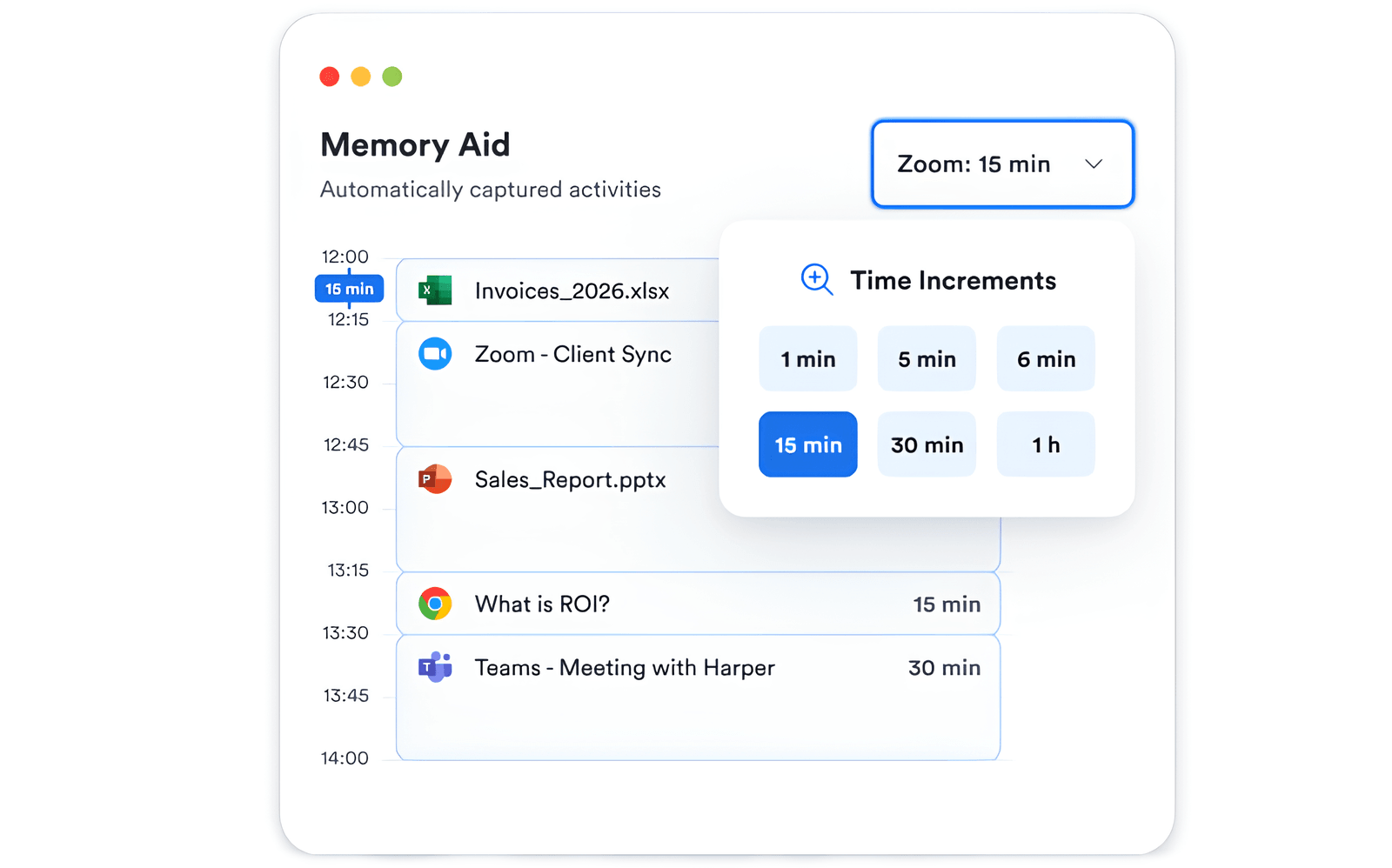
Memtime’s Memory Aid lets you zoom in and out of your day, from 1-minute to 60-minute intervals, while grouping activities so you can see the level of detail that makes sense for the work you’re doing. You can also search your history to find specific programs, email subjects, or docs. Basically, with Memtime, you see everything you’ve worked on, down to the minute. Every day, from the moment you install it.
And this matters because billable work doesn’t always come in neat, one-hour blocks, especially in service businesses. A client project might involve checking an email, jumping into a spreadsheet, reviewing a doc, having a quick call, going back to the spreadsheet, answering a Slack message, and then spending another 10 minutes fixing something that was supposed to last 2 seconds.
Ten minutes here, 14 minutes there, and slowly tasks pile up into hours of work, and those hours have a cost.
Once you actually see them, you can turn the relevant activity into time entries for the right project or client. Memtime lets you create those entries manually from your timeline or use automated suggestions, while keeping you in control of what gets logged and exported.
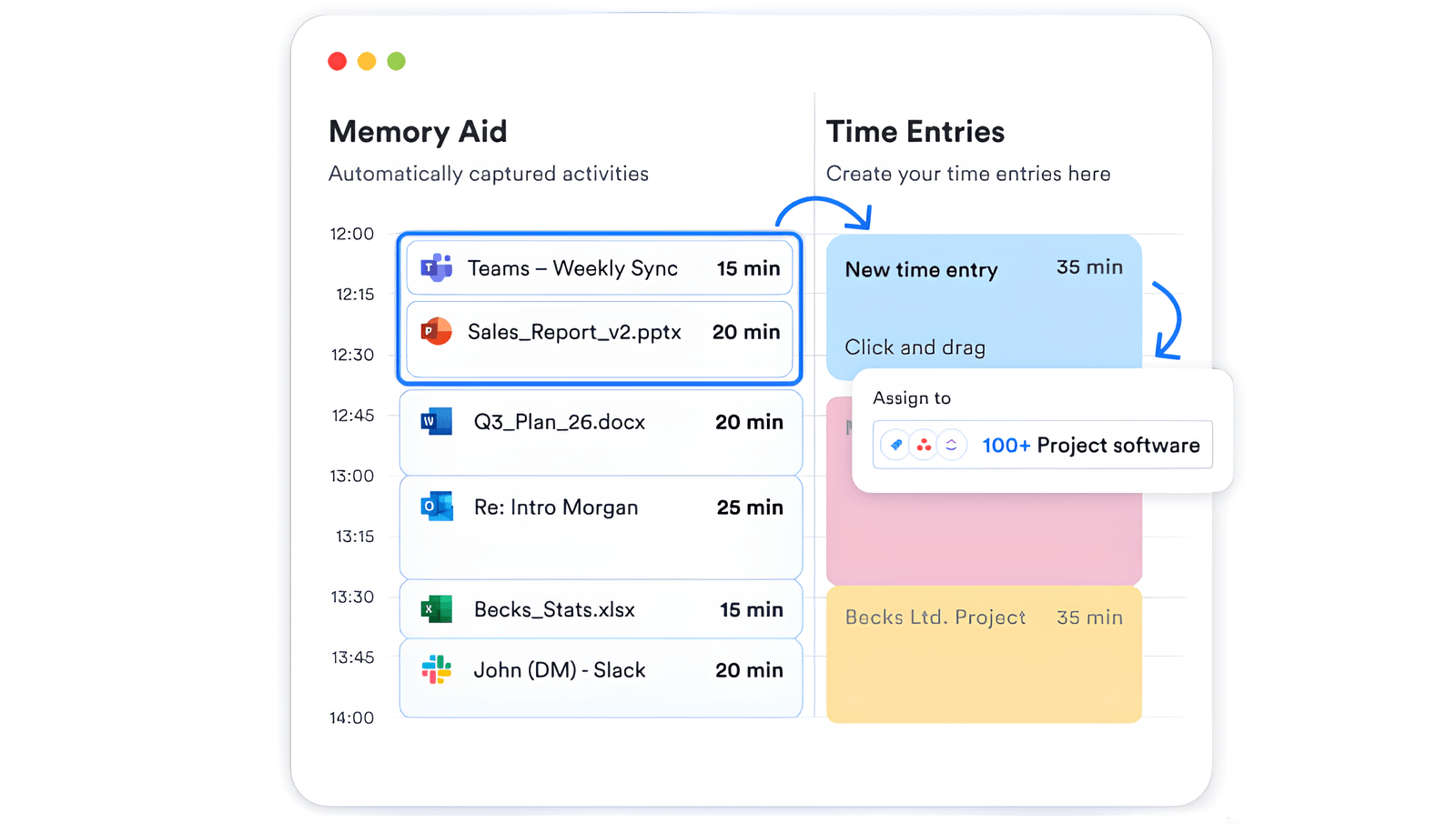
Plus, you can also choose the level of precision that matches how you bill. Memtime supports time increments from 1 to 60 minutes, including 3- and 6-minute increments commonly used in professional services. And if you already use project management, accounting, or practice-management software, Memtime can export your time entries to more than 100 connected tools.
So, the real benefit here is that Memtime tracks your time and stops you from relying on memory to reconstruct your workday, and when you stop forgetting the small pieces of work, you stop quietly giving them away for free. That’s a pretty easy way to improve profitability without adding a single extra hour to your day if you ask me.
- TL;DR: Memtime’s Memory Aid shows you exactly what you did, down to the minute, every day; searchable, zoomable, and grouped so you’re not drowning in each activity. You just look, and turn relevant activity into a time entry.
#2 You start pricing new projects realistically
Imagine this.
You’re putting together a proposal for a new project, and a team lead asks, “How many hours do you think this will take?”
So, you look at the scope, make a reasonable estimate, and come up with a number that feels about right. Then you add a little buffer because you’re a responsible business owner, obvi.
And the project starts.
Things happen. One revision turns into 5. The client needs a few more calls than expected. Your team discovers that the thing you thought would take 2 hours actually takes 6.
So, what do you do? You beat yourself up because you’re bad at estimating.
BUT YOU’RE NOT. You simply based your estimates on assumptions, memory, and feels, not data.
This is where Memtime becomes useful beyond daily time tracking: once you have accurate time data from previous projects, you can look back at what similar work actually took.
Say you’re pricing a website project. You can look at the actual time spent across previous projects, not just the obvious deliverables. Memtime gives you a detailed record of how the work actually happened, so you can compare planned time vs. actual time and spot patterns across projects (like why projects went over).
Maybe the work itself wasn’t the problem at all. Maybe the client needed twice as many meetings as usual. Maybe senior people were pulled into tasks that didn't require their level of experience. Maybe revisions took up a ridiculous amount of time. Whatever the case may be, those details matter when you want to price the next project without rose-colored glasses.
- TL;DR: Memtime shows you what similar projects actually took, so you can spot exactly where time really went (like extra meetings, senior people doing junior work, or endless revisions) and price the next one based on reality.
#3 You stop overservicing
Giving away hours of work every month is overservicing.
Luckily for you, Memtime helps you spot this toxic pattern.
Because it automatically captures your team’s activity, you can look at how much time is actually being spent on a client or project. You might find that a client you consider highly profitable is regularly taking 20, 30, or 40% more time than expected or that a particular type of request is taking more of your team’s hours than initially planned.
With Memtime, you have evidence, meaning it’s much easier to approach a client and say “Hey, we feel like this is taking a lot of time”, and present them with actual numbers when asking for changes. You can tighten the scope, charge for additional work, adjust the retainer, or rethink how the work is delivered.
PLUS, you can also catch overservicing before it spreads like fire. If a project starts consuming more time than planned, the data gives you an early warning.
- TL;DR: Memtime shows you exactly which clients or projects are taking more hours than planned, so you can discuss it with your clients and tighten scope, or charge more.
#4 You identify your most profitable services

Not all revenue is created equal, obviously. Two services can bring in the same amount of money and still have different effects on your profit.
Say you offer Service A for $10,000 and Service B for $10,000. On paper, they look equally valuable, but Service A takes your team 80 hours to deliver, while Service B takes 40.
They are not the same.
So, if you track just the revenue, not the time and effort it takes to generate that revenue, you can’t know what it costs you in team hours.
Memtime can help with that.
Because it automatically captures how your team spends its time, you can look at the actual hours behind different projects, clients, and types of work. Combine that with what you charge, and you start to see which services are truly profitable, and which aren’t. And once you know which services give you the best return on your team’s time, you can make smarter decisions about what to promote, price differently, standardize, and what might not be worth offering at all.
In other words, Memtime can help you see hours that are making you money. How cool is that?
- TL;DR: Same revenue, different cost—$10K that takes 40 hours isn’t the same as $10K that takes 80. Memtime shows you the real hours behind every service, so you see which ones are actually profitable and which aren’t.
#5 You know exactly how much capacity you have
“Can we take on another project?”
Such a simple question in theory, but in practice, not so much.
In order to answer it, you need to make a capacity planning strategy. And opening 5 calendars, checking dozens of spreadsheets, and asking 3 team leads if it’s okay you take on more work is probably not what you want to be doing.
You also have another problem: your team can look busy but not be at their full capacity. Someone might have a packed calendar but still have plenty of time for project work. Someone else might look available on paper but already be spending hours on client comms, internal work, and admin, which are all tasks that don’t show up in a calendar.
And again, this is where Memtime’s accurate data helps.
With Memtime, you can see how your team is spending working hours across projects, clients, meetings, and everything else.
Once you have the data, you’ll know when to say “yes”, “not yet”, and when you might need to hire or redistribute work.
- TL;DR: Memtime shows you real capacity, not who looks busy, but who actually has room to work, while keeping your employees in full control of their data. So when new work comes in, you know immediately whether to say yes, not yet, or it's time to hire.
So, you’re saying Memtime is the only way to improve profitability?
No, of course not. I’d never claim that!
There are plenty of ways to improve profitability. Like, you can get more clients, raise prices, cut unnecessary costs, work more hours, or sell more of your most profitable services. But there’s an issue.
Most of these approaches focus on adding more water to a leaking bucket (a business that is losing profitability).
More clients mean more revenue, more hours mean more capacity, and higher prices mean more money per project, which are all good things, but the bucket is leaking. You need to patch the holes before all the water runs out of it, not add more water to it.
That’s why doing more isn’t the answer. You need to find the source of that leak and fix it ASAP, and Memtime pinpoints those leaks.
Get that profit
Don’t work extra hours. Don’t force your team to work more. Don’t push through the weekend.
Just find visibility because every dollar (or euro, or whatever currency you use) can be recovered thanks to it.
- Double down on what’s actually lucrative in terms of services.
- Know your capacity before you overpromise.
- Bill the minutes you’re already working.
- Stop the free work nobody agreed to.
- Price based on reality.
It really is that simple. After all, you’ve already put in the work, and now it’s up to Memtime to ensure that work finally shows up where it belongs.
FAQs
Does Memtime track billable hours?
Yes, definitely. Memtime automatically records your activity in the background, including all the meetings, docs, calls, drafting, researching, everything. You can then turn the relevant activity into time entries, assign them to the right client or project, and export them to a tool of your choice. And that is how Memtime can help you stop losing those billable hours.
Can Memtime help me price projects?
Oh, absolutely. Memtime gives you accurate data from past projects, so you can see how long similar work took (you don’t have to rely on assumptions or optimism). You can spot patterns like projects that consistently need more revisions, meetings, or senior-level input than expected. That makes it much easier to price future projects.
Does Memtime help stop overservicing?
Yes, it does. Memtime can show you when a client or project is taking more time than you planned for. You can then use that information to tighten the scope, charge for additional work, adjust the retainer, or change how the work is delivered.
How does Memtime improve profitability?
Memtime helps you find where profitability is leaking by showing you where your team’s time is going. You can use that visibility to bill for work you might otherwise forget, price projects more realistically, reduce overservicing, identify your most profitable services, and accurately plan capacity. In short, it helps you make more money from the work you’re already doing instead of adding more work.
How can Memtime help service businesses make more money?
For service businesses, time is one of the highest costs, and one of the easiest things to lose track of. Memtime gives visibility into how that time is being used, helping spot unbilled work, underpriced projects, inefficient services, and capacity issues. You can then make better decisions about what to bill, what to sell, what to change, and what to stop doing. More visibility leads to better margins, without asking your team to work more.

Aleksandra Mladenovic
Aleksandra Mladenovic is a copywriter and content writer with six years of experience in B2B SaaS and e-commerce marketing. She's a startup enthusiast specializing in topics ranging from technology and gaming to business and finance. Outside of work, Aleksandra can be found walking barefoot in nature, baking muffins, or jotting down poems.