Time Doctor vs. Clockify: Key Differences & a Third Way to Track Time
So, you’ve narrowed it down to Time Doctor and Clockify. Nice! Both tools are good options: they’re popular in the time tracking world and actually used by real people (not just featured in listicles written by someone who doesn’t even use a tracking app).
Now, the not-so-good news is that Time Doctor and Clockify are built for very different things. One offers more monitoring features, the other comes with a free forever plan… they are just built different.
So, in this article, we’ll talk about what each tool does, who it’s built for, and where it falls short. We’ll also cover what real users say about both. It’ll be a true Time Doctor vs. Clockify match.
And, if you stick with me ‘til the end, you’ll see a third option—one that takes a completely different approach to time tracking: fully automatic, secure, and private.
But I’m getting ahead of myself. Let’s start from the beginning.
Key Takeaways:
- Time Doctor is built for monitoring, and Clockify for time tracking. Same category, but very different tools: one watches your team; the other just logs hours.
- Clockify has a genuinely useful free plan. Unlimited users, unlimited projects, Auto tracker, and reporting.
- Time Doctor's silent mode tracks employees without their knowledge. It runs invisibly, can’t be paused, and captures screenshots.
- Both tools still require manual effort. Someone has to start a timer or enable tracking.
- Neither tool offers true two-way sync. Data flows out to other tools, but changes don’t come back in automatically.
- Memtime is the only option here that tracks time with zero input from you. It runs automatically from installation, stores everything locally, and never uploads your data to the cloud.

Time Doctor vs. Clockify at first sight
These 2 tools are like apples and oranges. And sure, they share the same category—time tracking—but they’ve taken very different roads to get there.
Time Doctor launched back in 2012 with a clear mission: give companies visibility into what their remote teams are doing. That’s why the company openly markets its monitoring features like screenshots, screen recording, and website monitoring, alongside some other things like productivity scores and payroll integration. Time Doctor is NOT trying to be subtle about monitoring. It’s currently used by over 10,000 global brands, including Verizon, and positions itself in the workforce analytics space.
Clockify came along in 2017 with a different philosophy, which was to make time tracking accessible to everyone, for free, without surveillance. It’s built by CAKE.com, and it’s one of the most widely used time trackers in the world (largely because the free plan is genuinely useful). With Clockify, you can get unlimited users, unlimited projects, and core time tracking without paying a cent. Features like invoicing, approvals, and scheduling come with paid plans, but the time tracking foundation is good even without them.
So, in short:
- Time Doctor is for teams that want workforce monitoring and productivity analytics.
- Clockify is for individuals, freelancers, and teams that want simple time tracking and project reporting, ideally without spending much.
They both work well. It’s just that they solve different problems.
Key similarities between Time Doctor & Clockify
Before we get to the differences, let’s see where they actually overlap:
- Manual time tracking with timers. Both tools let you start and stop timers, log time manually after the fact, and organize entries by project and task. Core time tracking works the same way in both.
- Automatic time tracking. Both Clockify and Time Doctor can record your apps and activity in the background without you having to manually log anything. You’ll need to enable it in both tools, and from there, each tool captures which apps and windows you’re using and lets you turn that activity into time entries. The mechanism is similar, but there’s a difference.
- Web, desktop, and mobile support. You can track time in a browser, a desktop app, or a mobile app on both platforms; none locks you to just one device. Just keep in mind that the Time Doctor mobile app doesn’t track or collect data from the phone itself; it just records the hours while the mobile timer is running and doesn’t capture apps, content, or other phone activity. So, the mobile Time Doctor app is just a manual start/stop timer.
- Project and task management. Both let you create projects, assign tasks, and report on time by client or project. It’s not super deep project management, but it’s enough to keep things organized.
- Reporting. Both tools give you time reports you can filter by project, team member, or date range. The depth of those reports varies, but the basics are there on both sides.
- Integrations. Time Doctor connects with tools like Asana, Jira, Trello, and Slack. Clockify covers those tools, as well as Google Calendar, GitHub, and more.
- Idle time detection. Both tools can detect when you’ve gone quiet. Clockify prompts you to deal with that untracked time when you come back. In Time Doctor, idle time is simply logged as inactive; there’s no prompting.
- Team use. Both support inviting teammates, assigning projects, and managing multiple users, though the approach and pricing are wildly different.
Differences between Time Doctor and Clockify
Here’s where it gets interesting. The differences mostly lie in features related to monitoring and privacy:
- Monitoring vs. tracking. This is a big one. Time Doctor is built around monitoring, and by that I mean screenshots, website and app usage, productivity scores, and even a pop-up when you visit a non-work-related site. Clockify simply tracks time; you can enable some screenshot features on paid plans, but it’s really not trying to watch your every move.
- Approach to automatic time tracking. Clockify’s Auto tracker is a personal tool: you turn it on yourself, it records your activity locally, and only you can see it. Time Doctor’s automatic mode is built with employers in mind: it runs silently in the background from the moment the computer is on, can’t be paused, and feeds data directly to managers, optionally with screenshots. So, technically speaking, both tools auto track; they just do it for very different audiences.
- Pricing. Clockify has a free plan with unlimited users. Time Doctor has no free plan, but it has a 14-day trial, and its Basic plan starts at around $7 per user/month. So, if you have a larger team, this cost difference can add up fast.
- Features. Time Doctor goes deeper on analytics with its AI benchmarks, burnout signals, and workforce comparisons. Clockify is more focused on project tracking.
- Payroll integration. Time Doctor connects with PayPal, Payoneer, Wise, Gusto, ADP, and Deel to automate payments to contractors. Clockify doesn’t have built-in payroll processing, though its timesheet exports work with most payroll tools.
- Markets. Time Doctor is for companies managing outsourced teams and organizations that want heavy monitoring. Clockify is more marketed toward agencies, consultancies, freelancers, and anyone who wants solid time tracking without the overload of features.
Time Doctor vs. Clockify in user reviews
Let’s see what people who actually use these tools had to say about them. Here are some examples from G2 and Capterra, as well as the tools’ rankings.
Time Doctor
G2 rating: 4.4 (485)
Capterra rating: 4.5 (545)
Clockify
G2 rating: 4.5 (201)
Capterra rating: 4.8 (9,248)
Time Doctor pros & cons
Time Doctor pros
#1 Automatic time tracking
Time Doctor’s automatic tracking is pretty good. It runs from the moment the computer is on, captures everything, and never misses a minute, whether your team remembers to clock in or not. It’s accurate, no-excuses time logging. If this is what you’re after, TD does the job really well. (There’s a con to this. Just wait.)
During setup, Time Doctor prompts you to choose how you wish to track time. I chose the automatic one, obvi.

#2 Workforce analytics
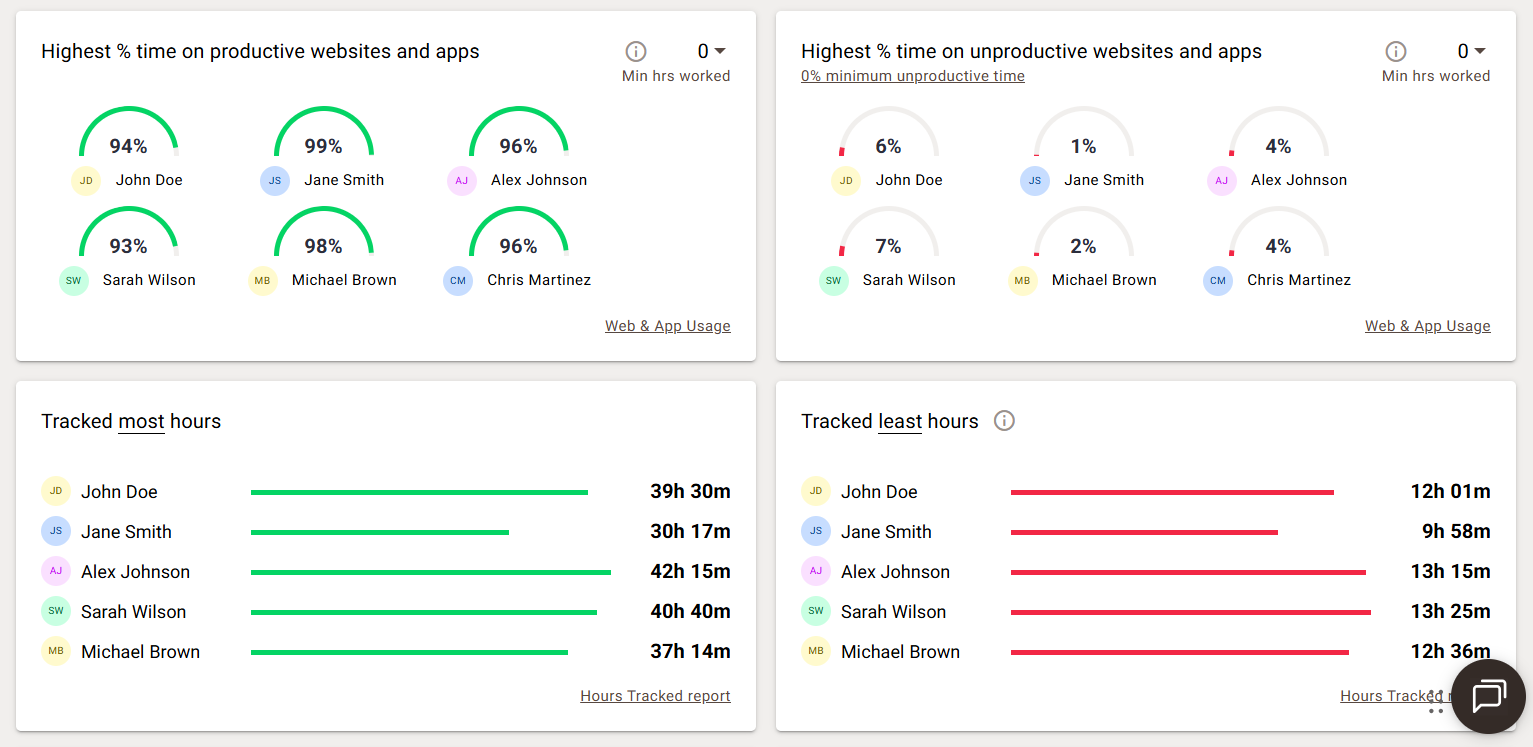
Time Doctor is a tattletale, and I mean that in the most endearing way. It tells you how productive your team was, what apps and sites they used, how they compare to peers, and whether they might be burning out. If you like this type of oversight, that level of visibility is genuinely useful.
If you don’t, just wait until we get to the third tool on this list. 🙂
#2 Payroll integration
You can connect Time Doctor to various payment platforms based on tracked hours. If your company is managing a lot of contractors across multiple countries and currencies, this feature is a life-saver.
#3 Works everywhere
Time Doctor runs on Windows, macOS, Linux, iOS, and Android, so no one in your team feels left out. That said, the Time Doctor mobile app doesn’t track or collect data from your phone; it just records the hours. So, the mobile app is just a manual start/stop timer.
Time Doctor cons
#1 Monitoring features
Screenshots, activity scoring, distraction pop-ups, and silent mode are all good features… uhm, until your team finds out about them. Pause on “finding out about them”.
Time Doctor has a silent mode feature called the Automatic App. It runs in the background with no user interface, notifications, or way to pause it. The employee doesn’t see it, doesn't interact with it, and might not even know it’s there. It tracks app and website activity, keyboard and mouse activity, and can take screenshots at set intervals.
For employers managing large remote teams, that’s a feature. For employees who find out about it after the fact… yikes. A completely different story.
Time Doctor itself recommends using interactive mode with full disclosure, which is good advice, but the fact that silent mode exists at all is worth knowing.
Clockify pros & cons
Clockify pros
#1 Auto tracker
Clockify has a desktop feature called Auto tracker. You hit Start recording to begin, and it runs quietly in the background, logging which apps, websites, and docs you had open and for how long. It doesn’t create time entries for you—that part is still manual.
You don’t have to reconstruct anything from memory; just open the Auto tracker, and see everything laid out in front of you. It's a genuine upgrade compared to a regular timer. One thing to keep in mind, though: the recorded data is only stored for 45 days before it’s permanently deleted, so it’s not a long-term log of your work history.
#2 Free plan
The free plan is actually free. It includes unlimited users, unlimited projects, time tracking across web, desktop, mobile, and browser extensions, an Auto tracker, calendar view, and basic reporting. Teams of 5 or 50 can use it indefinitely without paying a cent. How cool is that? 🙂
#3 Clean interface
Technically speaking, the setup takes under half an hour, which is not bad at all. The interface is clean and intuitive enough that most people figure it out without reading the docs.
#4 Solid reporting & integrations
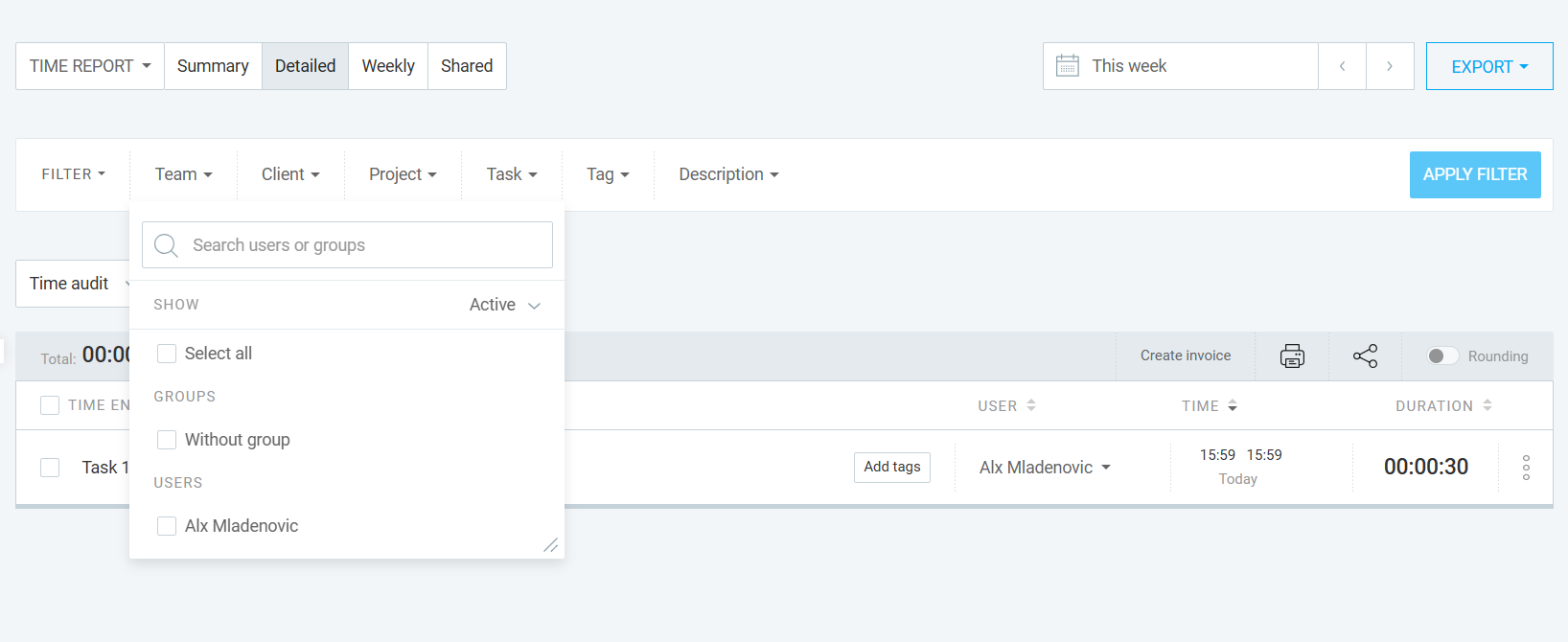
You can filter reports by project, client, task, or team member, and assign billable rates. For a free tool, the reporting is truly useful for understanding where time is going.
Ditto for integrations: Clockify connects with dozens of tools, including Jira, Asana, ClickUp, Trello, Slack, Google Calendar, and GitHub. Just keep in mind that some of the deeper integrations require a paid plan.
Clockify cons
#1 Manual time tracking
The Auto tracker helps, but Clockify is fundamentally a manual time tracking tool. You start and stop timers. If a team member works through lunch, takes a client call on their phone, or simply forgets to start the timer, that time is gone.
For individuals with solid tracking habits, this is fine. For others, not so much.

#2 No payroll integration
If you need to pay people based on tracked time, Clockify won’t connect directly to your payroll provider. You need to export a CSV or Excel file and handle the rest manually or in a separate tool. This is not a dealbreaker per se, just something worth knowing upfront.
Time Doctor or Clockify: Which one is right for you?
If you’re tracking your own time for productivity, billing, or just understanding where your days go, the choice is pretty clear.
Time Doctor is overkill for solo use. Its monitoring features are designed for managers, not individuals. There’s no need for you to commit to paying for features you’ll probably never use.
That’s why my vote goes to Clockify. The free plan covers everything one needs, plus the handy Auto tracker and solid reporting. You’ll get more than enough insights to understand your own patterns.
All in all, choose Clockify for personal use. Time Doctor solves a completely different problem.
Time Doctor or Clockify: Which one to pick for your team?
If we follow the logic from the last sentence, you should choose Time Doctor to manage your team’s time. Right?
Well, no. Not really.
For teams, the decision depends on what you actually need from a time tracking tool. Maybe this table will clear things out:
If I were you, I’d:
- Choose Time Doctor if you manage a remote team and need proof of work.
- Choose Clockify if you need solid time tracking, project reporting, and client billing without surveillance features.
Looking for a third option?
Both tools work great, and I hope you know that by now. But neither solves a purely human problem.
Both Time Doctor and Clockify still rely on you and your team doing something, like starting a tracker, running the desktop app, and remembering to log a call before you move on to the next thing. And that’s not good because you’ll probably forget to log time at some point or have to reconstruct your day later.
Now, why is this such an issue?
It’s because the longer you wait to log time, the less accurate your data will be, and I have data to prove it. A Harvard Business Review study, Time is money, suggests that people who log their time at least once a day are 66% accurate, and those who log their time weekly are only 47% accurate. People who fill out their timesheet less than once a week are just 35% accurate. Ouch.
And I bet you need accuracy (we all do).
So, the one tool that can solve this human problem of forgetfulness is Memtime.
Memtime is our automatic time tracking app that runs silently in the background on your desktop (Windows, macOS, or Linux), and records everything you work on. Every app, browser tab, doc, and email is captured down to the minute, without you touching anything.
You don’t even have to start Memtime; it starts itself. There are no timers. You just work, and Memtime remembers (silently, without disturbing you!).
At the end of the day (or week, or month, or whenever you feel like it), you can open Memtime and see your workday laid out in a chronological timeline—Memory Aid.

From that point on, you can create time entries from what was captured, and assign them to the corresponding clients or projects (or let Memtime do it for you). All that in a couple of clicks.
Here's what makes Memtime different:
- Truly automatic tracking. Not “auto track if you remember to enable it” or tracking using some keywords. Memtime runs from installation and captures EVERYTHING, passively and continuously.
- The Memory Aid timeline. It’s a visual, minute-by-minute record of your day. You can zoom in and out, and recall anything, even months or years later.
- Privacy-first. Your activity data lives only on your device; nothing is ever uploaded to the cloud. Nobody else can see it, not your colleagues, managers, nor us at Memtime.
- Two-way sync with tools. Memtime connects with 100+ PM, billing, accounting and comms tools. This means that you can import projects, export time entries, and keep everything in sync without manual work.
- Works offline. No internet? No worries, Memtime keeps tracking and saves locally.
Now, I know what you’re thinking: Memtime is desktop only; there’s no mobile app. To that I say, depending on your perspective, it’s either a limitation or the entire point.
Here’s the thinking behind it: to track your time accurately and automatically, Memtime needs to run quietly in the background, monitoring which apps and windows you’re using throughout the day. That kind of access works best on a desktop. But more importantly, keeping everything local means your data never goes to a cloud server; it lives on your machine, and ONLY your machine. There’s no syncing, no uploading, no wondering who else might be looking at it. We keep everything 100% private.
So.
Your time isn’t going to track itself. Well, actually, with Memtime, it will. 😉
Grab a free 14-day trial and find out where your hours have been sneaking off to.
And if you’re thinking about rolling it out across a team, let’s chat. We’ll help you figure out if Memtime is the right fit in 10 minutes, tops.
The final verdict
You still with me? Okay, good. And kudos to you for sticking this far!
Let’s do a quick recap.
Time Doctor is a serious tool for serious monitoring. If you run a large remote team where proof of work genuinely matters, go with Time Doctor. Just keep in mind it requires trust conversations with your team.
Clockify is probably the most accessible time tracker on the market. The free plan is genuinely good, the interface is friendly, and it works well for individuals, agencies, and small-to-medium teams. The catch is that it still depends on you remembering to use it.
Memtime is for people who are tired of thinking about time tracking at all. If you want an accurate record of your day without timers or discipline, Memtime does something the other 2 simply don’t.
Now it’s up to you. Define the problem you’re trying to solve with time tracking, and the right tool follows from there.
FAQs
Is Time Doctor or Clockify better for freelancers?
Clockify is the better pick for freelancers. The free plan covers everything you actually need: time tracking, project reporting, and Auto tracker. Time Doctor’s monitoring features are designed for employers managing teams, making it overkill for solo use.
Can my employer see my time data in Clockify?
Not unless you turn it into a time entry. Clockify’s Auto tracker stores activity data locally on your device, and it’s only visible to you. Admins can only see time entries you’ve explicitly submitted.
Does Time Doctor work without employees knowing?
Yes, and that’s exactly the concern. Time Doctor’s Automatic App runs silently in the background with no interface, no notifications, and no way to pause it. Employees may not know it’s installed. Time Doctor itself recommends disclosing monitoring to your team, which tells you everything you need to know.
Is there a time tracking tool that works completely automatically?
Yes, that’s what Memtime does. It runs silently from installation, captures every app, browser tab, and doc you touch, and stores everything locally on your device. You don’t start timers or log anything; you just work, and Memtime keeps the record.

Aleksandra Mladenovic
Aleksandra Mladenovic is a copywriter and content writer with six years of experience in B2B SaaS and e-commerce marketing. She's a startup enthusiast specializing in topics ranging from technology and gaming to business and finance. Outside of work, Aleksandra can be found walking barefoot in nature, baking muffins, or jotting down poems.







