How to Identify Unprofitable Clients & Projects Before They Hurt Your Business

Told you it was gonna burn. 🔥
And I bet you paused for a good second before answering. If you did, this article is for you.
Before we go deeper, let me just say I know you’re good at what you do. You’re excellent! You built your entire business on skill, hustle, and probably way too many 11 pm emails. But because you have so much going on, checking whether “Client A is actually making us money” isn’t on your priority list.
Revenue is there, so why worry?
Here’s why: revenue is NOT the same as client profitability. Revenue is just the number that makes the top of your P&L look impressive.
Profitability is what’s left after you’ve paid for everything it actually took to deliver the work. And in a service business, “everything it took” is basically labor. That’s the cost nobody sees clearly, because it rarely shows tidily. A meeting here, a revision there, a quick call, and scope creep. All of them ruin your margins, slowly but firmly.
So, let’s talk profitability. Not how you should calculate your margins (you probably know that) but more in how to determine which clients and projects deserve a closer look, and which ones don’t. Basically, how to identify unprofitable clients and projects once and for all.
Ready? Ok, let’s go.
Key Takeaways:
- Revenue looks reassuring, but it tells you nothing about whether a client is actually worth the trouble. Profit is the only number that matters.
- Your gut is sometimes lying to you. The difficult client might be perfectly profitable, and the easy one might be draining your team.
- Labor is the highest cost in your business, and it’s also the one nobody tracks properly.
- Watch out for the usual suspects: the overly nice client, the committee client, the “just one more thing” client, and the quiet scope-creeper.
- You don't need to audit every client—just your biggest accounts, your gut-feeling red flags, and anyone whose scope has quietly grown over time.
- Automatic time tracking (like Memtime) turns your assumptions into actual evidence, so you can calculate project profitability.

Profitability & your assumptions
As a business owner, you probably have a mental list of good vs. bad (difficult) clients.
The good ones pay on time, don’t argue about invoices, and seem to run themselves. The “bad” ones email constantly, request calls, and always seem to need something extra.
Naturally, you assume the difficult ones are the unprofitable ones. It’s a reasonable guess, but it’s also, frustratingly, often wrong.
Profitability isn’t measured by how a client makes you feel but by how much delivery time, coordination effort, and internal resources they actually consume relative to what they pay.
A client can be a total joy to work with—friendly, easy-going, just a cutie pie— and still be bleeding your project margins dry. At the same time, the client who emails 5 times a day and wants a status update every single Tuesday might be perfectly profitable (because all that work happens to be efficient, scoped, and paid for).
So, before we go any further, I need you to do something for me.
Ditch this mental shortcut for judging client and project profitability based on assumptions. I’m talking these assumptions:
- The loud clients are the expensive ones. Sometimes that’s the case, for sure. But loud clients are often loud in ways that don’t actually cost much; think of a quick call with clear direction. Compare that to the client who never complains but sends 5 rounds of revisions, each taking your designer 45 minutes. Which one is actually more expensive?
- The easy client must be profitable. Easy clients are wonderful for morale, but some of the most quietly unprofitable clients are the “nice” ones. They are the ones your team likes so much that nobody wants to push back on scope creep, track their extra hours too closely, or raise their rates. Kindness has a way of disarming your project management discipline, and that’s exactly what ruins your profitability.
- If they pay on time, they’re fine. Paying on time tells you about their reliability as a payer, not about the cost of serving them. A client can pay every invoice within 24 hours and still consume double the hours you quoted for.
- We’ve worked with them a long time, so we’ve got it figured out. Long-term clients are dangerous in one specific way: scope expands over years, and nobody notices because it happens one small request at a time. That’s why the original quote from 3 years ago has nothing to do with what you’re actually delivering today.
None of these assumptions is stupid. They’re just based on how you feel about clients, and a feeling is not evidence. So, remove them from your brain.
Why labor is the cost you can’t see
If you ran a manufacturing business, you’d know exactly what a unit costs to produce. That’s just pure logic. But services don’t work that way because your materials are your team’s hours.
And those hours are often fugazzi. Fake. BS.
Nobody logs into your accounting software and sees a line item that says “37 unplanned minutes explaining the same thing to a client for the 3rd time”. That time just happens and gets lost in someone’s day.
This is why labor costs are the biggest expense in every service business and the hardest one to see. You can look at your billed hours and think everything checks out, while your team’s real, unbilled efforts are wildly different. The gap between the two—between what you think a project costs and what it actually costs—determines your profitability.

Here’s what that division looks like in practice.
Say you quoted a client 20 hours a month for ongoing design support, billed at $100/hour. That’s $2,000 a month, tidy and predictable.
But here’s what actually happened this month with your designer:
- They spent 4 hours in quick sync calls that weren’t on the original schedule.
- Then another 3 hours reworking a deliverable because the brief changed halfway through.
- Then another 2 hours answering follow-up questions in Slack.
In total, that’s 9 extra hours—nearly half the original scope!—that the designer didn’t log because it didn’t feel like a big deal at the moment.
So, the invoice still shows $2,000, but the actual delivery time was closer to 29 hours, not 20. At $100/hour, you just did $900 of unpaid work.
Multiply that across 10 clients, and you’ve got a business that looks profitable but certainly isn’t.
Early signs of invisible labor costs you should investigate
If I scared you, good. I meant to do it because profitability is a serious matter.
But that doesn’t mean you should go full detective mode on every account. Instead, look for a few signals that suggest a client or project deserves a closer look:
- Meetings multiply with the speed of light. If a client who used to need a weekly check-in now needs 3 touchpoints a week, ask why.
- The number of revision hours goes up. Two rounds suddenly becoming 4, project after project.
- More people show up in emails and calls. That means the coordination required to get the work approved has expanded.
- Support requests that never seem to end. Especially on projects that were technically marked complete months ago.
- Your team’s reaction changes when the client’s name comes up. A sigh, an eye-roll, are all worth noting, even if it’s not proof of anything on its own.
How to review client and project profitability (fairly quickly)
Alright, alright, alright.
You want to know whether Client 1 is more chaotic than Client 2. Here’s how to actually check, without turning it into a 3-week audit (nobody has the time for that). Just 5 steps.
Step #1: Pick your suspects
Don’t start with all of your clients. Start with the accounts that matter most or the ones giving you that nagging feeling. Your biggest retainers, your longest-running clients, and anyone who’s been triggering warning signs from the list above.
Step #2: Get real numbers on what it actually costs to deliver the work
No, not the quote. Not the estimate. What actually happened, including every meeting, every revision round, and every call.
Now, this step brings us to automatic time tracking, which handles the boring part for you.
You can’t exactly review the profitability based on memory or vibes. You need actual data on where your team’s hours are going, and manually logging time is the kind of task everyone says they’ll do but never does. Automatic time tracking tools solve this by running in the background and capturing all work—meetings, emails, revisions, and support tickets—without asking you to log any of it.
I’m talking about automatic tools like Memtime.
Let me keep this “pitch” short.
Memtime:
Memtime watches you work quietly, and builds an honest timeline of where the hours actually went.
This means that you and your team can, at any point of the day, open Memtime’s Memory Aid—a chronological, zoomable timeline of every recorded activity—and see your activity, minute by minute. Like so:
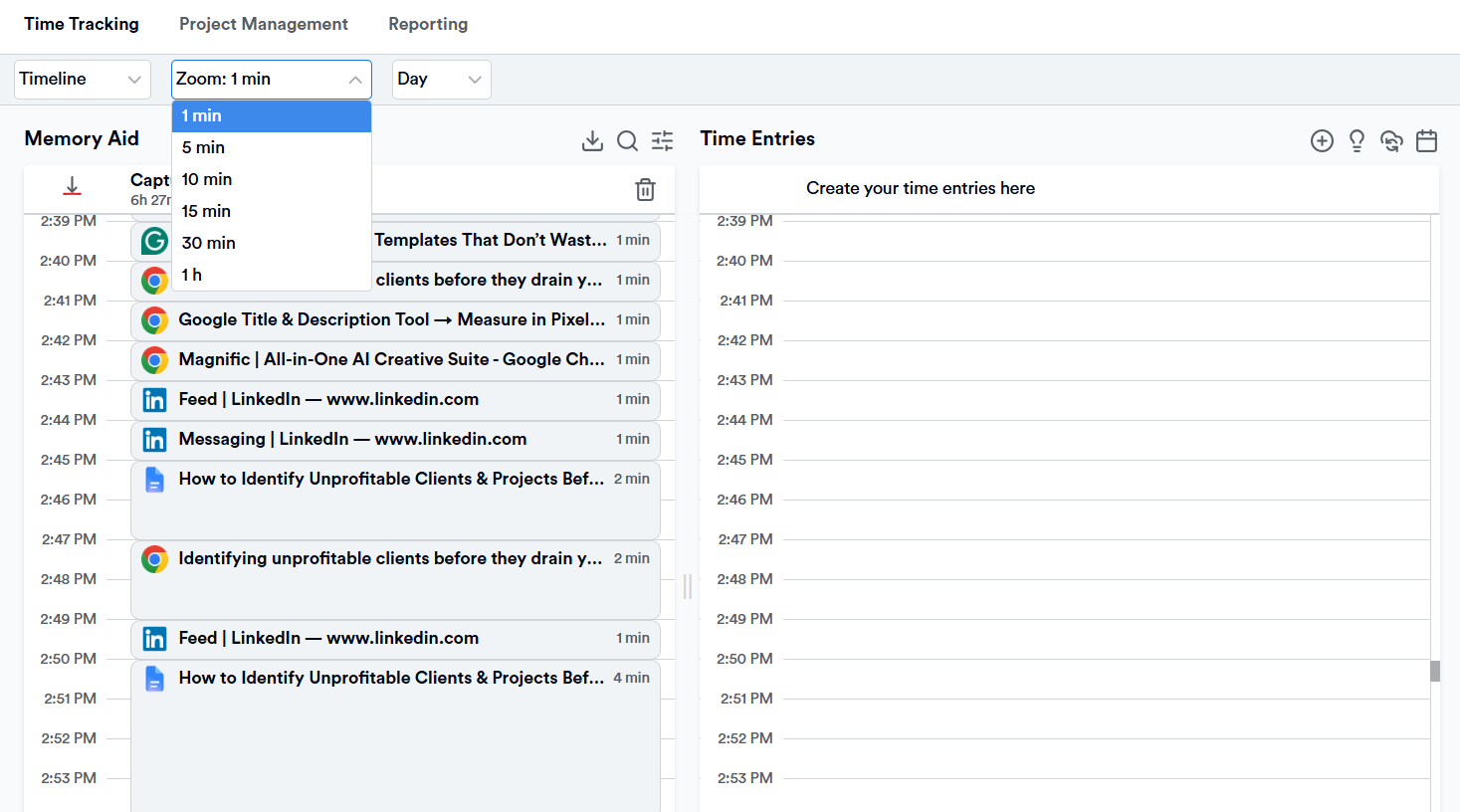
You can zoom the view from 1-minute to 60-minute increments depending on how granular you need to get, and it’ll even pull your calendar events in alongside your recorded activity, so you can see planned meetings vs. what actually happened side by side.
But that’s not all.
A few things that make Memtime particularly useful for the profitability review we’ve been talking about:
- It syncs with your existing project software. Think Jira, Asana, ClickUp, and 100+ others. Your captured time can be assigned straight to the right client or project without you rebuilding your whole workflow around a new tool, thanks to the 2-way sync.
- All the raw activity data stays on your device. Nothing gets uploaded to the cloud, so your team isn’t tracked by some dashboard watching their every click. Only they see their own detailed timeline; what gets exported to your project software is entirely their call.
- It captures all invisible time. Like the stuff that never made it into a task list because nobody thought a 20-minute Slack exchange was worth logging. All that will show up.
Like how that sounds?
I hope you do because none of this requires your team to change how they work. The data just accumulates, honestly, in the background, and when it’s time to answer the question we started with, you’ve got real numbers to show.
So, forgive me for being so blunt, but just go ahead and start your free 14-day trial of Memtime. Install it, forget it’s running, and in a couple of weeks you’ll get a very honest answer to the question that started all this: are my clients actually profitable?
I promise.
And if you don't get your answer (which you WILL!), you can send me a mug that says “LIAR!” on it. Etsy is full of them; just pick one.
Step #3: Compare cost to revenue, per client and per project
This is the moment you find out if that easy client is actually easy, or just easy to underprice.
Line up what you billed against what it really cost in delivery time, and look at the margin.
No, not the revenue number, the margin.
Step #4: Look for the gap between what was quoted and what was delivered
If a project that was quoted for 40 hours quietly turned into 65, that’s not “just how this client is”. You need to have a conversation with them.
Step #5: Decide, don’t just observe
Once you see the gap, you have 3 real options: reprice, rescope, or restructure how the work gets delivered. You’re the owner; it’s up to you to decide what the next step is.
Just make sure you build this review into a rhythm. This review tells you where you stand today, but a recurring one, like quarterly for your top accounts, and after every major project wraps, can tell you whether things are getting better or worse.
Wrapping it up
You’ve made it this far, which means you’re either genuinely curious about this topic or would do anything to avoid actual work.
Either way, I like you, so let me say this: you didn’t build this business by simply guessing. You built it by paying close attention to the stuff that matters. And now you need to apply the same principle to profitability.
So, here’s your homework: stop assuming and start measuring. Let the numbers tell you what you’ve been “smelling” for months. You and your team deserve to know.
Go on. Be nosy. It’s good for business.
FAQs
How do I know if a client is unprofitable?
You need to look past how they make you feel and check how much delivery time, coordination, and internal effort they require of you compared to what they pay. A client can be lovely to work with and still cost you money in extra meetings and revisions that never get tracked. The only reliable way to know is to compare real hours worked against what you billed.
What’s the difference between an unprofitable client and an unprofitable project?
An unprofitable client is a relationship where the overall cost of serving them, across all their work, outweighs what they pay you over time. An unprofitable project is more specific: a single engagement in which the scope, timeline, or delivery cost exceeded the quoted amount, even if the client is pleasant to work with. You can have a profitable client with one bad project, or a struggling client relationship where every individual project technically breaks even.
Should I fire an unprofitable client?
Not immediately, and not without doing the math first. Sometimes an unprofitable client just needs a pricing conversation, a tighter scope, or a process change to become profitable again. Firing should be the last option after you’ve tried repricing or rescoping and that didn’t work.
How often should I check if my clients are profitable?
You don't need to check weekly, but a quarterly review of your top accounts is a solid habit, along with a check after every major project wraps up. It’s also worth reviewing before renewing a long-term contract, since scope tends to quietly expand over time without anyone renegotiating pricing. Basically: check regularly enough that problems get caught early, rather than becoming permanent.
Why do profitable-looking clients sometimes lose money for my business?
Because revenue and profitability aren't the same thing. A client can pay on time and in full while still consuming way more delivery hours than you’re pricing for. This usually happens gradually, due to tasks that don’t feel significant enough to flag at the moment. Over months or years, that invisible time creates a real margin problem.
What’s the fastest way to spot profitability problems without a full audit?
Start with your biggest accounts and any client that’s been giving you a nagging feeling. Compare what you originally quoted with what was actually delivered, and focus on the gap, not just the invoice total. If meetings, revisions, or support requests have crept up over time, that gap is usually where your answer is hiding.

Aleksandra Mladenovic
Aleksandra Mladenovic is a copywriter and content writer with six years of experience in B2B SaaS and e-commerce marketing. She's a startup enthusiast specializing in topics ranging from technology and gaming to business and finance. Outside of work, Aleksandra can be found walking barefoot in nature, baking muffins, or jotting down poems.