5 Consultant Timesheet Templates That Don’t Waste Your Time

Let’s start this article with a cold, hard fact: you’re a consultant, which means time is literally your product. You sell it and bill for it.
So, one could say that time tracking isn’t a bureaucratic nuisance to you. It’s basically how you get paid accurately, protect yourself from scope creep, and prove to clients that those 6 hours of “just thinking” were ABSOLUTELY worth the charge.
That’s why a good timesheet is your evidence, and you probably use one template for all your clients.
But, tell me, what do you think about your current timesheet template? Do you like it? Don’t like it? Hate it?
I have a feeling you built it eons ago, in the middle of the night, using a random template an ex-colleague forwarded you.
If I’m right, it’s time to refresh your timesheets. Preferably, with our consultant timesheet templates.
In this article, we’ve laid out 5 formats, each suited to a different working style, billing cycle, or level of project complexity. You can just pick one (or a few?), and use it consistently.
And one more thing.
If the thought of yet another spreadsheet makes you want to move to Bali and forget about your life, just keep reading the article. There’s a surprise waiting for you at the end, and it involves a timesheet that basically fills itself. Stick around and find out. 😉
Key Takeaways:
- A consultant timesheet template is a pre-built spreadsheet or doc for logging billable hours by date, client, project, task, and rate.
- Detailed timesheets improve billing accuracy, build client trust, and give you proof to push back on scope creep.
- Five timesheet formats exist: project-based, daily, weekly, biweekly, and monthly. Each is suited to a different billing cycle or working style.
- Manual time tracking is typically only 36-67% accurate, meaning consultants often lose a third of their billable hours to forgetting or rounding.
- Best practices include logging time daily, using specific task descriptions, and separating billable from non-billable hours to avoid billing errors.
- Automatic time tracking tools like Memtime record work activity in the background and convert it into timesheet entries with minimal manual input.

What are consultant timesheet templates & why you need them
We’ll get to the templates, don’t you worry. Before we do, let’s cover the basics.
A consultant timesheet template is just a pre-built structure. It’s usually a spreadsheet or doc where you log the hours you spend on client work. Think date, client, project, task, billable status, rate, total billable amount, and so on. Some consultants use a daily version broken down by the hour, others prefer weekly, biweekly, or monthly rollups. Some even organize theirs by project instead of by date.
So, the formats of these timesheets are pretty flexible, and the whole point of the templates is to turn your work into a structured record your clients trust.
Here’s why they matter:
- First, they keep your billing tight. When you’re dealing with 3 clients, 2 projects, a retainer, and one stakeholder who emails you at 11 pm, you need proof of work. Detailed logs mean detailed invoices, which means way fewer back-and-forths about whether that strategy workshop was really necessary (it was, obvi).
- Second, timesheets build client trust. A clean, itemized timesheet tells your clients exactly where their budget went. It signals to them that you treat their money like it’s your own, fully responsible. And you already know this, but clients who can clearly see where their money went tend to stick around and renew.
- Third, they help you push back on scope creep. If you take on extra work and don’t log it, your margins eat the cost. That’s why your timesheet needs to show everything, including those 12 hours of “additional stakeholder interviews”. The invoice will come in higher than expected, and you need to have the receipts.
- Finally, timesheets give you self-awareness. Reviewing your logs monthly can show you which clients are eating more time than they’re paying for, which project types drain you, and where you’re underpricing yourself. Reviewing them makes you sharper as a consultant and a lot more profitable.
The 5 consultant timesheet templates
Told you we’ll keep it short.
Now, the good part. Five templates, and each of them is designed for a specific rhythm of your work.
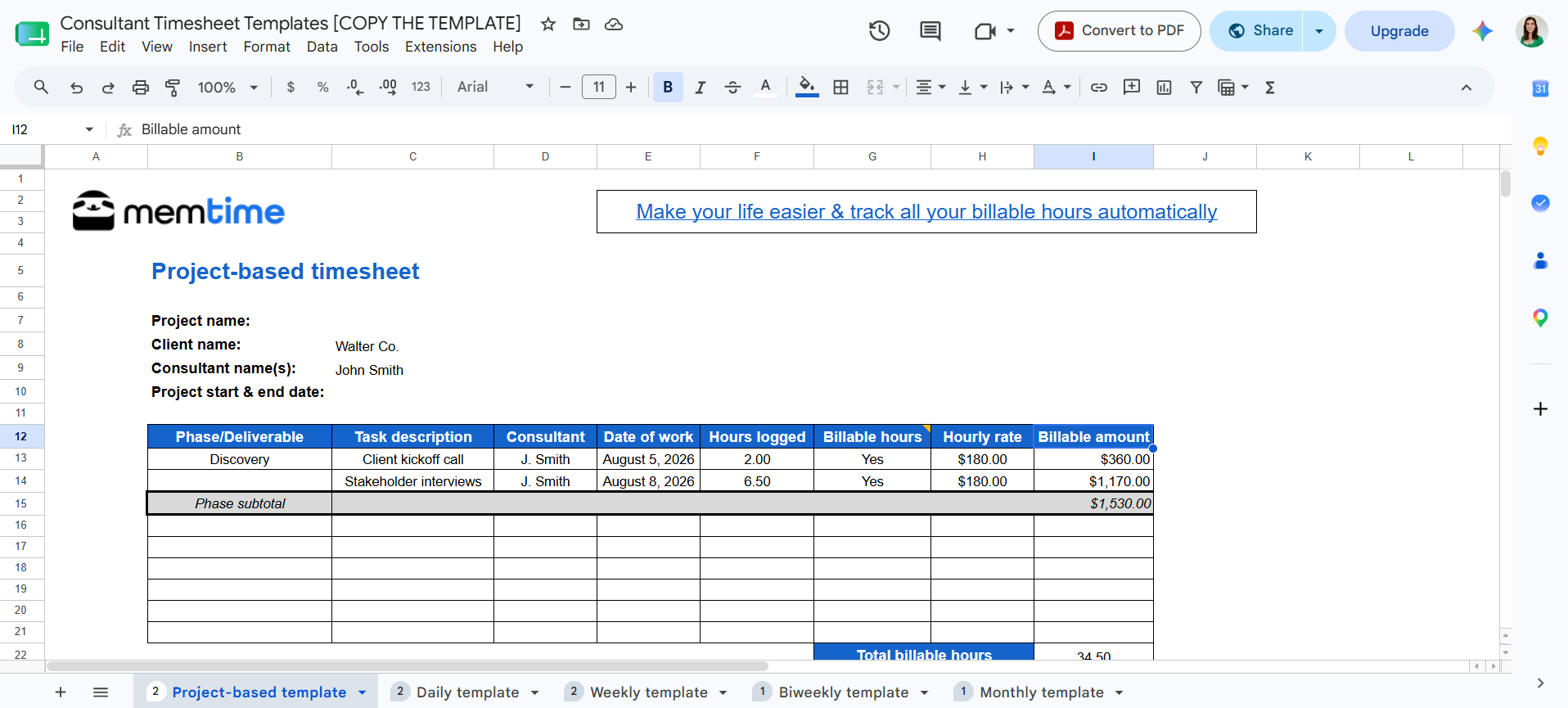
#1 Project-based timesheet template
This one’s for the consultants who work project-to-project rather than on retainer. If that’s you, by all means use this template.
Now, what I want you to remember is that project work doesn’t respect the calendar. A 7-week engagement with 3 distinct phases doesn’t care that week 3 falls over a holiday, or that phase 2 spills 2 days into what would’ve been “week 5”. That’s why a Monday-to-Friday grid doesn’t work; the project-based template needs to be organized around the work itself. And everything related to one engagement, from kickoff to the final deliverable, should be in this timesheet.
Additionally, this template is especially handy if you’re running a small team on the engagement.
Here’s what the timesheet looks like:

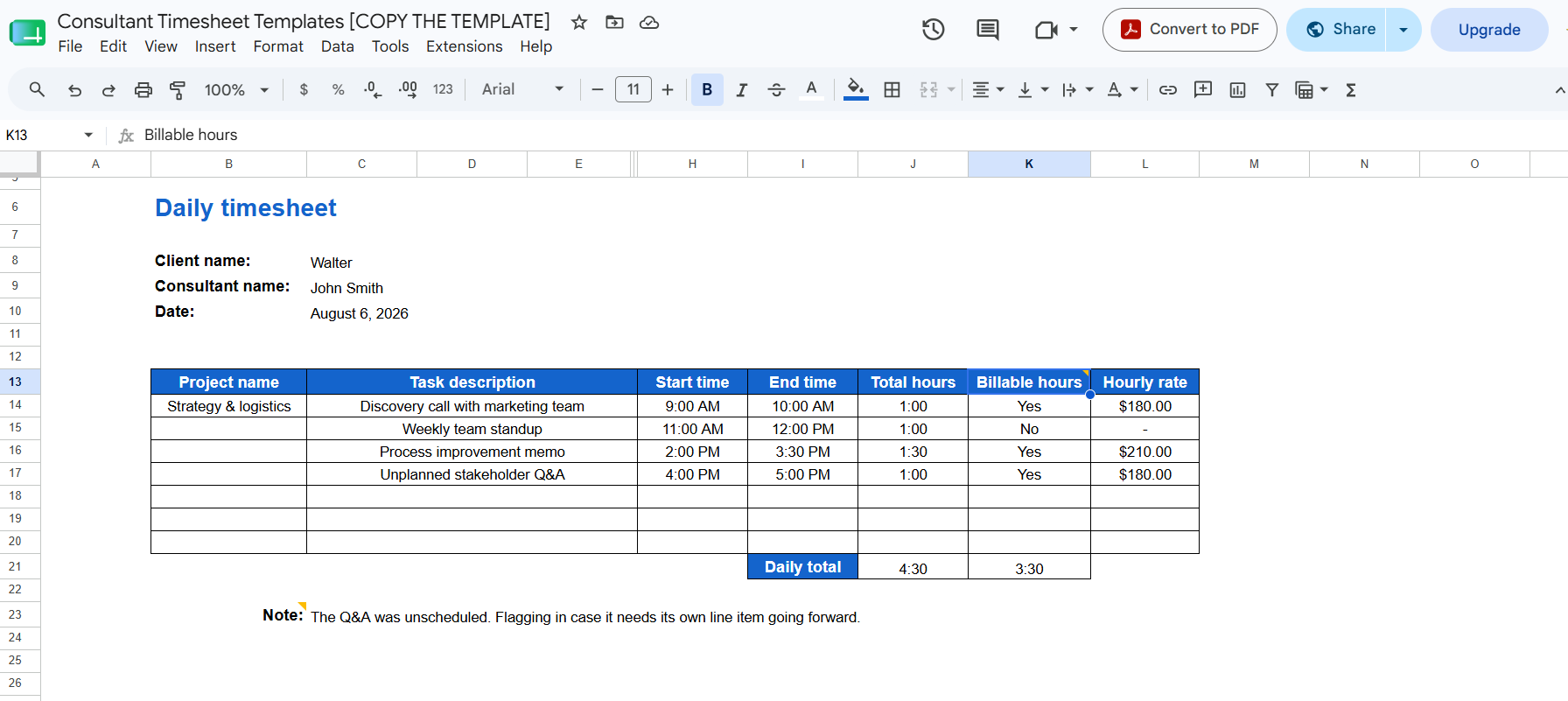
#2 Daily timesheet template
If your days look like a game of whack-a-mole, and by that I mean:
- Call for Client 1 at 9 am
- Deep work for Client 2 at 11 am,
- An “urgent” call from Client 3 right after lunch
- Aaand so on…
This template is for you. It’s the most granular of all of them, breaking your day down hour by hour. The trick with daily templates is timing: fill it out at the end of each day before you close your laptop, no later. If you wait until Friday to reconstruct your week from memory, you’ll lose ALL the details that actually justify your invoice. So, be careful.
Here’s what the template looks like:
#3 Weekly timesheet template
This template is a true beast of burden.
If you invoice weekly, work primarily with one client, or just like closing it every Friday, this template is for you.
The weekly log is probably the most used format in consulting, and for good reason. It hits the sweet spot between the daily template’s granularity and the monthly template’s wide view. You get a full picture of what you worked on, how many hours went in each day, and how it all rolls up by the end of the week. The template is clean and efficient.
Here’s what it looks like:

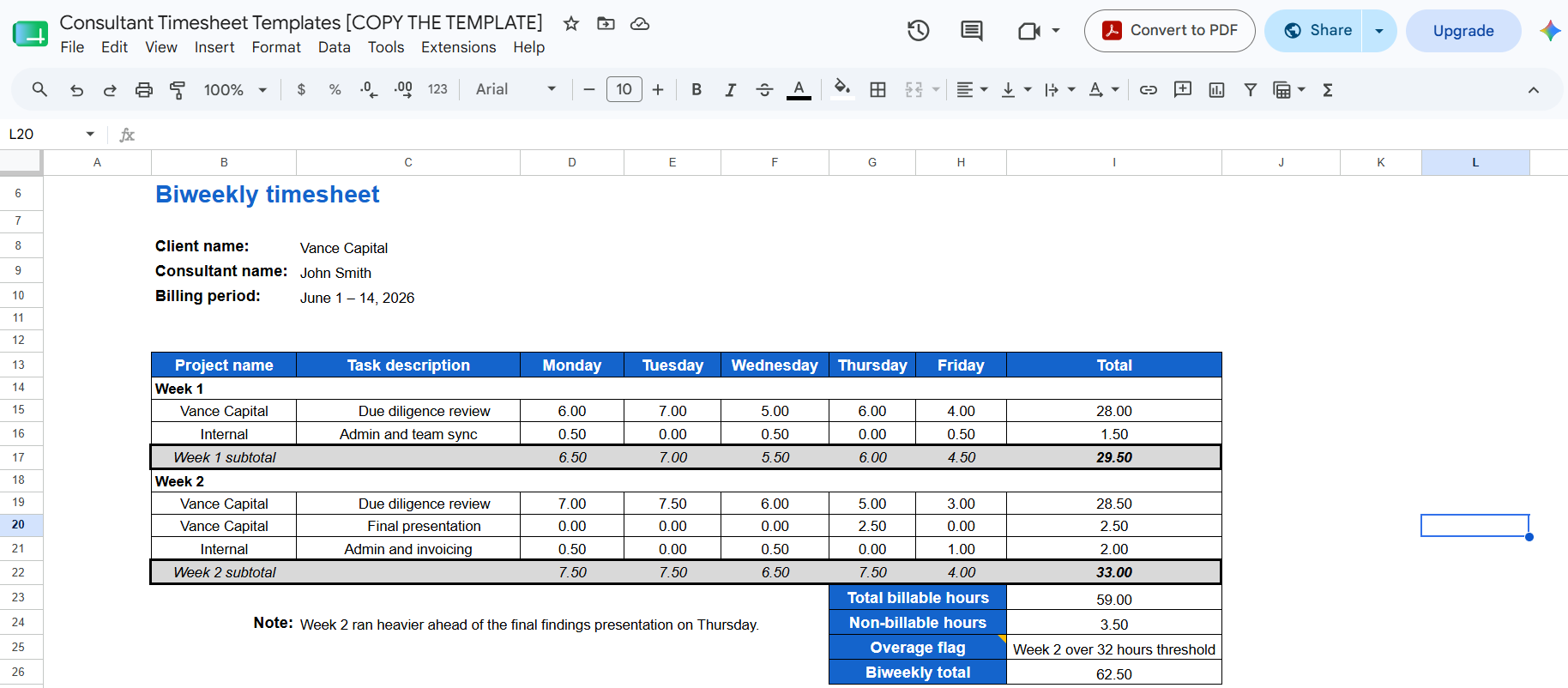
#4 Biweekly timesheet template
If you’re living on someone else’s payroll clock, this template is for you.
Think agencies, staffing firms, or clients who’ve embedded you in their team so much that you now run everything on a biweekly cycle. The biweekly invoicing is also just a solid middle ground if weekly invoicing feels like too much admin and monthly feels too distant.
Structurally, it’s exactly what it sounds like: 2 weekly templates stitched into one table. There’s nothing flashy about it; it can help you invoice every 2 weeks, which, frankly, is the whole point.
Here’s what the template looks like:
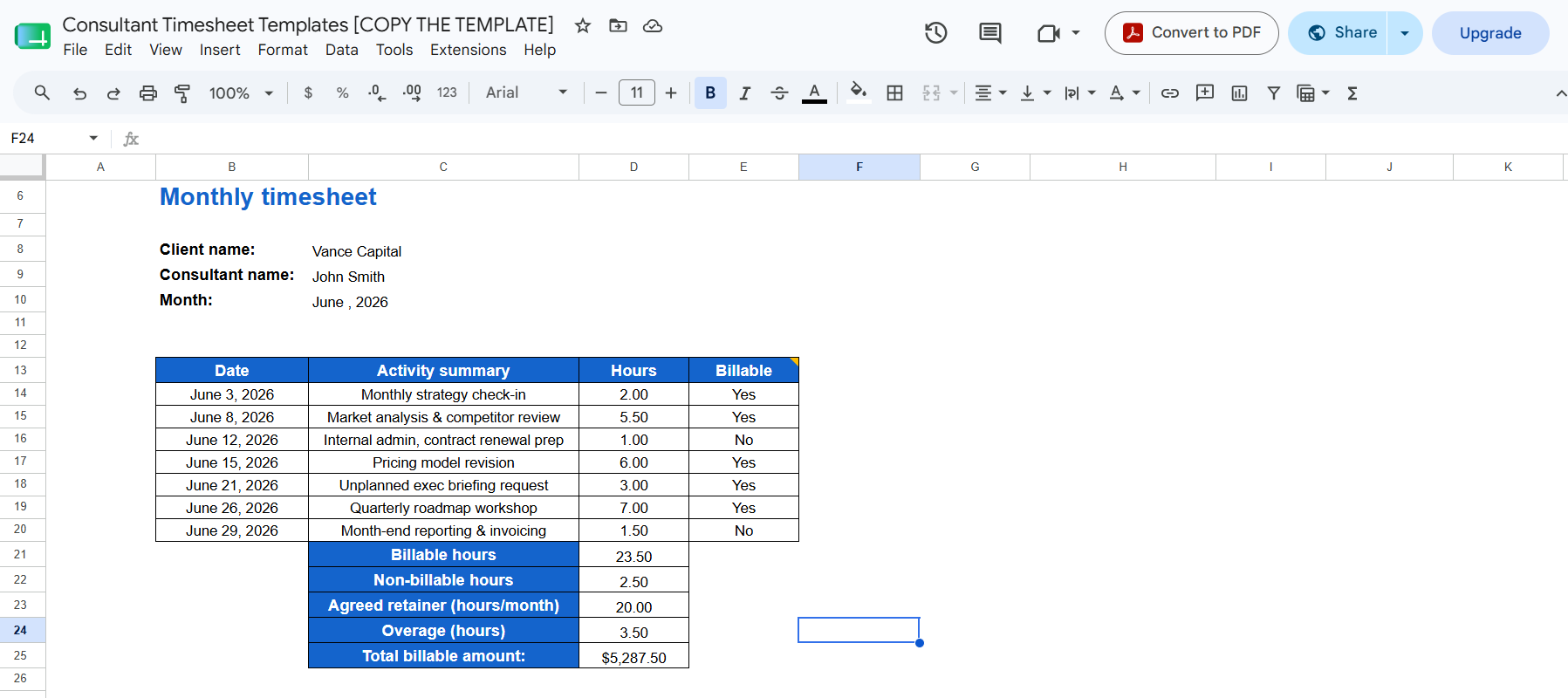
#5 Monthly timesheet template
If you work on retainer and prefer to go deep in long-term engagements, this template is for you.
Now, for this type of tracking, you don’t need to track every hour; the bigger picture is enough. That’s why this monthly template gives you that zoomed-out view with a full month of hours in one place. It could be useful for review, for reporting, and even for catching it if you’ve worked double your contracted hours without ever billing for the overage.
Here’s what the monthly template looks like:
Best practices for filling in consultant timesheets
Okay, so you’ve picked your template. Good for you!
Now I want to focus your attention on filling it in.
If you want the template to work, you need to be diligent about what you put in it (and when):
- Log as you go, not after the fact. The longer you wait to record a task, the more your brain rounds things. A 40-minute call becomes “about an hour”, and your afternoon becomes “yeah, that’s about 4 hours, give or take”. Ideally, you should be jotting things down in real time, or at the very least before closing out your laptop. The longer you wait to log time, the more your time logs are doomed.
- Be as specific as possible. “Client work” tells you nothing 3 weeks from now when an invoice gets questioned. “Discovery call with marketing team” or “Revised deck per stakeholder feedback” means something. So, when writing down tasks, be specific. That’s the only way you’ll save yourself from unnecessary client questions.
- Separate billable from non-billable hours. Admin, internal syncs, your own invoicing… yeah. None of that should get blended with billable hours. Be very cautious when separating these 2 groups, otherwise, you can end up overbilling by accident or underbilling because you can’t tell what’s what.
- Use consistent naming or project codes. You shouldn’t call a client project “FutureMe” on Monday and “FutureMe GmbH” on Thursday, because it’ll create extra sorting work for future-you. Pick a naming convention and stick to it.
- Review before you submit. Always do a quick scan of your timesheet—does this add up, does anything look off, did I forget to log Wednesday afternoon, etc. You can do this weekly.
- Mention scope changes and anomalies in the notes. If a task ran long or a client asked for something outside the original brief, write it down. And write it before you forget!
Do these 6 things consistently, and any one of the 5 templates above will serve you well.
But hold on a minute
You’ve seen the templates. They are genuinely useful—very structured, practical, and can help you track time pretty accurately.
But let’s be real for a second.
Filling out timesheets manually is a discipline exercise. It’s an admin ritual filled with estimates, and estimates are wildly inaccurate.
Do you remember what you ate for lunch last Friday? My point exactly.
Manual tracking accuracy typically lands somewhere between 36% and 67%, which means that you are losing a third of your billable hours to forgetfulness and rounding.
But it doesn’t have to be like that. Allow me to present to you automatic time tracking.
Meet Memtime
Memtime is our automatic time tracking software for Windows, macOS, and Linux.
It does something deceptively simple: it runs in the background while you work and records everything, so you don’t have to. Memtime just quietly watches, remembers, and presents you with a visual timeline of your day that you can actually use.
Here’s how Memtime complements you:
- You do your actual job, like writing proposals in Word, reviewing contracts in Acrobat, creating a deck in PowerPoint, emailing in Outlook, and researching in Chrome.
- Memtime logs every minute of it in the background. Every program, email, tab, and meeting running in the foreground gets timed automatically.
So, when you’re ready to fill out your timesheet (or, more accurately, when Memtime has already filled it out for you), you open the app and see a chronological timeline of your entire day.
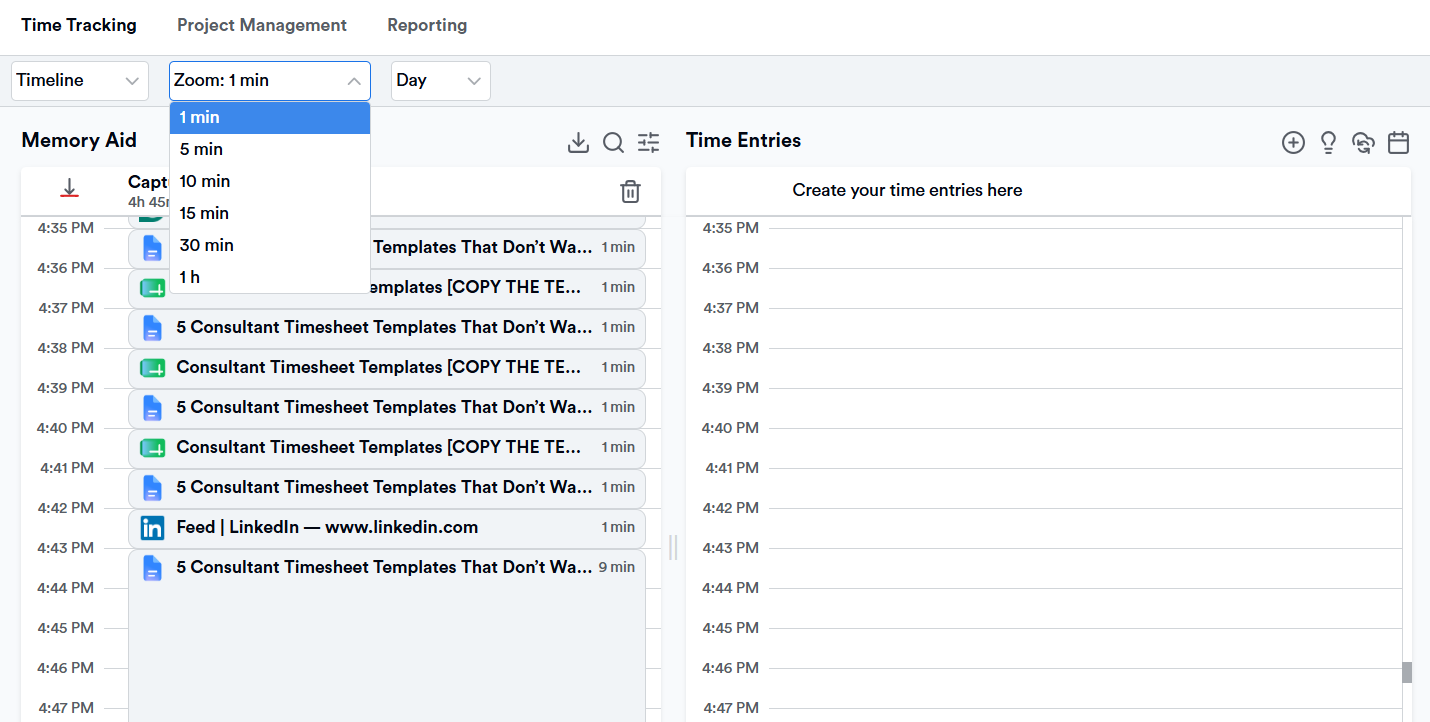
You can zoom in to see activity in 1-minute to 60-minute increments, quickly identify what you worked on and when, and then convert those captured activities into time entries on the correct project.
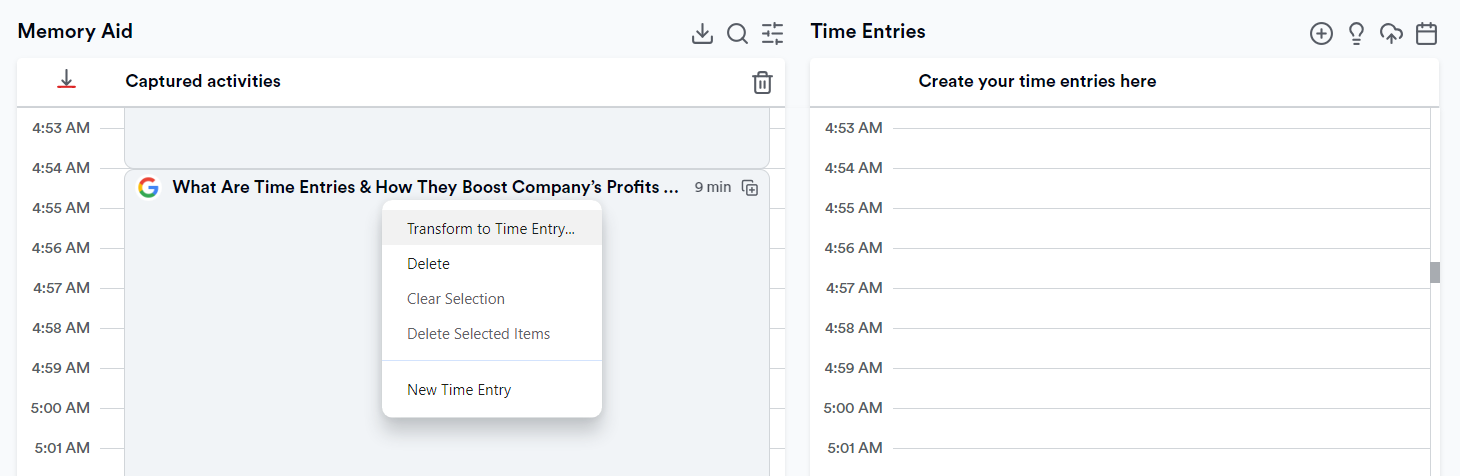
Here’s what else Memtime can do:
- It protects your data like its life depends on it. All captured activity data is stored locally on your device only—it’s never uploaded to the cloud. You’re the only one who sees your timeline, not your clients or your team. You can review, edit, or delete any activity before you turn it into time entries.
- It syncs with your calendars. Memtime syncs with Google Calendar, Microsoft Outlook, macOS Calendar, and more. Your scheduled meetings and events appear alongside automatically captured activities, so you can cross-reference what was planned vs. what actually happened.
- It connects to tools you already use. Memtime connects with 100+ tools, including Jira, Asana, Salesforce, Quickbooks, and more. Once connected, it mirrors your project and task structure, and you can push time entries directly to the right project in your existing software.
- It allows you to go dEeP. Need to find what you were working on two Thursdays at 2 pm? You can locate any captured activity from any past day. It’s like having a photographic memory, but for your computer.
- It’s perfect for individual and team use. Memtime works for individuals and teams. If you’re running a small consultancy, your team members each get their own private timeline (private to them!), and logged time entries roll up into shared project views for reporting and billing.
So, does Memtime actually fill out your timesheet for you?
I know what you’re thinking. You still don’t know how Memtime handles your timesheets.
Here’s a simple explanation.
Memtime doesn’t magically produce a finished, submitted timesheet, but it removes all the annoying parts that make timesheets painful in the first place. Here’s how it all goes:
- You work. Keeping it business as usual. Handling all the calls, emails, decks, whatever your day actually looks like.
- Memtime remembers. It’s all captured quietly in the background.
- You confirm. At the end of the day, you open your timeline, see everything laid out, and click-and-drag activities into time entries (or let Memtime do it for you).
- Memtime syncs the rest. Once your time entries are created, they land automatically in whatever project software you’re already using.
And if you’re not connected to outside project software?
Lucky you, Memtime has a timesheet built right in. Head to the Reporting tab, and you’ll find a Timesheet widget that lays out every time entry you’ve created, organized by project, task, and date, for whatever range you pick. Export it as Excel, CSV, or PDF.
Choose wisely
The 5 templates above are real tools that can improve how you track, bill, and account for your time.
But if you’ve read this far and the thought of filling timesheets is unbearable, give Memtime a shot.
Memtime protects your privacy, plays nicely with the tools you already use, and leaves you to do your work in peace. You can get to thinking, advising, and making your clients’ problems disappear without thinking about time tracking.
After all, you went into consulting to sell your expertise, not your ability to track time. 🙂
FAQs
What’s the difference between a timesheet and a timesheet template?
A timesheet is the actual record of hours you’ve logged for a specific period, so it’s filled in and unique to that week, month, or project. A timesheet template is a reusable structure that includes predefined fields (date, client, task, hours, rate, and so on). You fill the same template over and over instead of building a new sheet every time.
Which timesheet template is best for consultants?
Well, it depends on how you bill. If you invoice per project and work in phases, go with the project-based template. If you juggle multiple clients in a single day, the daily template gives everything you need. Weekly works well for regular invoicing; biweekly suits agency or payroll-style cycles; and monthly is ideal for retainer work.
How detailed should a consultant’s timesheet be?
Detailed enough that a client could read it and understand exactly what they paid for, without needing you to explain it. That’s why your task descriptions should be specific enough to hold up if an invoice ever gets questioned.
Do consultants need to track non-billable hours, too?
Yes, definitely. Non-billable hours, like admin, internal syncs, and your own invoicing, still cost you time, and tracking them separately shows you how much of your week is actually going toward paid work vs. overhead. That split is what makes pricing decisions accurate.
How often should consultants update their timesheets?
Ideally, you should do it the same day the work happens. End-of-day logging is far more accurate than trying to reconstruct a week on a Friday afternoon. The longer you wait, the more your brain rounds hours up or down without realizing it.
Can automatic time tracking entirely replace a timesheet template?
Sure. It can give you a structured format for invoicing, reporting, or client sign-off. Tools like Memtime also remove most of the manual work, automatically capturing your activity in the background so you’re confirming logged time rather than trying to recall it yourself.

Aleksandra Mladenovic
Aleksandra Mladenovic is a copywriter and content writer with six years of experience in B2B SaaS and e-commerce marketing. She's a startup enthusiast specializing in topics ranging from technology and gaming to business and finance. Outside of work, Aleksandra can be found walking barefoot in nature, baking muffins, or jotting down poems.