Time Tracking Data Isn’t Just Reporting: Here’s What to Do With It
I’d like to start this post with a hot take that’s been making the rounds on Inc.com: time tracking is a colossal waste of time.
The article tells the story of a well-meaning professional who spent months tracking every minute, only to conclude that it didn’t actually make them work better. Instead, it became another productivity chore.
More tracking led to more thinking about tracking and less actual work, so they ditched it and felt almost enlightened and reborn.
And honestly? I can see why they felt that way.
But here’s the thing most people miss when it comes to time tracking: the problem isn’t time tracking itself. The problem is what they do (or don’t do?) with the data.
Time tracking usually stops at reporting.
Timesheets get filled in.
Reports get exported.
Charts get overlooked.
Then everyone goes back to gut assumptions, like “I think this client is profitable (enough)”.
So, here’s our hot take: time tracking isn’t useless. But unused time tracking data is.
When time data just sits in your time tracking tool, of course it feels pointless. But when you treat time tracking as what it actually is—business intelligence—it starts answering questions you didn’t even realize you were asking yourself.
And those questions matter. A lot!
In this post, we’ll show you what time tracking data is actually good for, including the questions it can answer, and the uncomfortable truths it exposes.
We’ll also explain how you can only get those answers with automatic time tracking (and Memtime).
Let’s roll.
Key Takeaways
- Time tracking itself isn’t the problem; it’s what you do with the data that counts. When you track time properly and use data, it’s one of the few ways to really see how your business works.
- Good time data shows which clients and projects are making you money, which ones are quietly eating your margins, and where undercharging or scope creep is happening.
- Time data also helps you manage workload better, spot bottlenecks, and fix broken processes.
- Manual time tracking can feel tiresome, but automatic tools capture what’s actually happening with emails, meetings, and tiny tasks, with zero effort from you.
- Memtime runs quietly in the background, keeps your data private, and gives you insights you can actually use.

Is time tracking just admin work?
It probably is… to you.
I say this because most companies treat time tracking like dental floss; it’s annoying, and something everyone lies about doing.
Most employees track time the same way: at the end of the day (or week), they try to reconstruct where their hours went from memory. They open a timesheet, guess, round, and move on. The goal is to be compliant, as time tracking is just another box to tick.
And the more manual and interruptive it is, the more it feels chore-y and admin-y. That’s why so many people feel time tracking is pointless.
In reality, proper time tracking is anything but a chore. And time data is one of the few datasets that tells you how your business operates. It answers questions you’re probably guessing right now, like the ones on pricing, profitability, workload, processes, and margins (all the questions that make you slightly uncomfortable).
Let us show you which questions precisely proper (automatic) time tracking can answer.
Q1: Are we undercharging?
If you have to ask yourself this question, you probably are.
And the reason is simple: without accurate time data, you’re pricing based on *vibez*.
When you track time properly, you see the full effort behind a project, not just the obvious deliverables, but the emails, revisions, meetings, context switching, anything-but-quick questions, and that one tweak that somehow took an hour.
Time tracking data shows you:
- How long work actually takes vs. how long you estimated.
- Which services consistently run over budget.
- Where fixed fees turn into unpaid overtime.
With time tracking, undercharging is measurable and fixable.
Q2: Which clients are profitable?
Here’s the thing with revenue: it tends to lie.
It shows up cleanly in dashboards and monthly reports, but it only shows what came in, not what it cost you to earn it.
A client can look incredible on paper with high fees, a long-term contract, a steady stream of work, and a genuinely pleasant relationship. But, behind the scenes, that same client might be quietly eating your margins.
Here’s how that happens.
Two clients can pay the same amount, but one takes twice as much time. Without time data, they look equally profitable. With time data, one of them is clearly “a challenge”.

The “challenging” client makes you verge into scope creep and requests last-minute changes. They require more coordination, constant reassurance, and back-and-forth. And none of that extra work is big enough to invoice separately, yet all of it is very real in terms of time spent. So, thanks to that client, your revenue stays flat, effort grows, and margins shrink.
On paper, the numbers look healthy. In reality, the hours tell a very different story.
Time tracking data connects revenue to reality. It shows how much effort actually goes into earning that income, per client, per project, and per task.
Q3: Where does invisible work go?
Invisible work is most likely the reason your team is exhausted.
It includes internal communication, fixing mistakes, constant context switching, admin tasks, work that isn’t assigned but still gets done, and so on.
Manual time tracking almost never captures this properly. People forget what they were working on, tend to round time, and don’t bother logging the small stuff.
With proper (cough, automatic) time tracking, invisible work starts being something you can plan for. That’s when patterns start to emerge, and you see:
- Support work that eats more time than expected.
- Entire afternoons that disappear into “small” tasks.
- Projects that take longer because of constant interruptions.
Automatic time tracking makes invisible work visible, so you can finally account for it and stop pretending your team has extra capacity when they don’t.
Q4: Who’s overloaded?
(It’s usually not who you think.)
When you don’t have accurate time tracking data, workload discussions are pointless. Here are some sentences you usually hear from your team:
- “I feel busy”.
- “There’s no time for that.”
- “Everyone’s stretched”.
And all these sentences are usually based on your team’s feelings and assumptions, not facts.
I’m not saying your team is being untruthful. I’m saying you need data if you want to manage their workload, so you can see who consistently works longer days, who switches between tasks non-stop, who never has uninterrupted focus time, and who has capacity but isn’t using it effectively.
That’s why you want to get data that goes beyond “8 hours worked”. When employees start capturing what their day actually looks like, you can see patterns: someone spending 3 hours a day in meetings before they even touch their core work, another jumping between 5 projects in a single afternoon, or someone logging long days because small tasks keep piling up.
That kind of data gives you something specific to act on. You can get them fewer meetings here, clearer priorities there, a project reassignment, or simply protected focus time where it’s missing.

Q5: Which processes are broken?
The issues with the processes can be boiled down to this simple sentence: if a task takes twice as long as expected every single time, the problem hides in the process, not the people.
That’s why when you see a simple task consistently eating hours across the team, you know exactly where to investigate.
But you need to see it. And you do so by consulting time data.
Accurate time tracking data will show you all the rework loops, tools that create more trouble than value, bottlenecks, and steps that slow everything down.
Q6: Where do margins leak?
Margins don’t collapse suddenly. They do it quietly, over time, one small request at a time.
A quick extra revision here, an unplanned meeting there, and your margins go out the window.
They hide in client relationships, and the gap between what was agreed and what actually gets delivered.
And time tracking data exposes them:
- It shows scope creep in actual numbers. Time tracking data shows you when a project that was estimated at 40 hours landed at 55. That’s not just bad estimating, but also a lot of unpaid work.
- It highlights tasks that aren’t billed but absolutely should be. Think internal reviews for a client, rework caused by unclear briefs, extra support work, deliverables that multiply, and new expectations.
All while revenue stays fixed, and time doesn’t.
Can you answer all these questions using manual time tracking?
Nope.
Time tracking only works if the data is accurate. And manual time tracking, unfortunately, isn’t.
People forget to start timers, they guess at the end of the day, round generously, and log what they feel should be logged.
That’s why we at Memtime say that if your data relies on memory and/or discipline, your time data is compromised.
The only way time tracking becomes real business intelligence is with automatic time tracking tools.
Automatic time tracking changes everything
Automatic time tracking tools run quietly in the background, with no timers and no interruptions.
They capture apps used, how long tasks actually take, and where time flows naturally throughout the day, and that’s how you get data you can trust.
Meet Memtime
Memtime is our fully automatic, completely private time tracking tool that captures reality. It was built specifically for people who want accurate time data without micromanagement or monitoring (we stand against any type of workplace surveillance!).
Our app is a desktop time tracker for Windows, macOS, and Linux. It runs in the background and records ALL your digital activity, so you can reconstruct your workday with actual precision.
And the best part?
Time data stays local on your device. You can’t see your employee’s time data unless they choose to export it to their (project management) software of choice.
Privacy + autonomy. That’s what Memtime is all about.
Here are some of Memtime’s features worth mentioning:
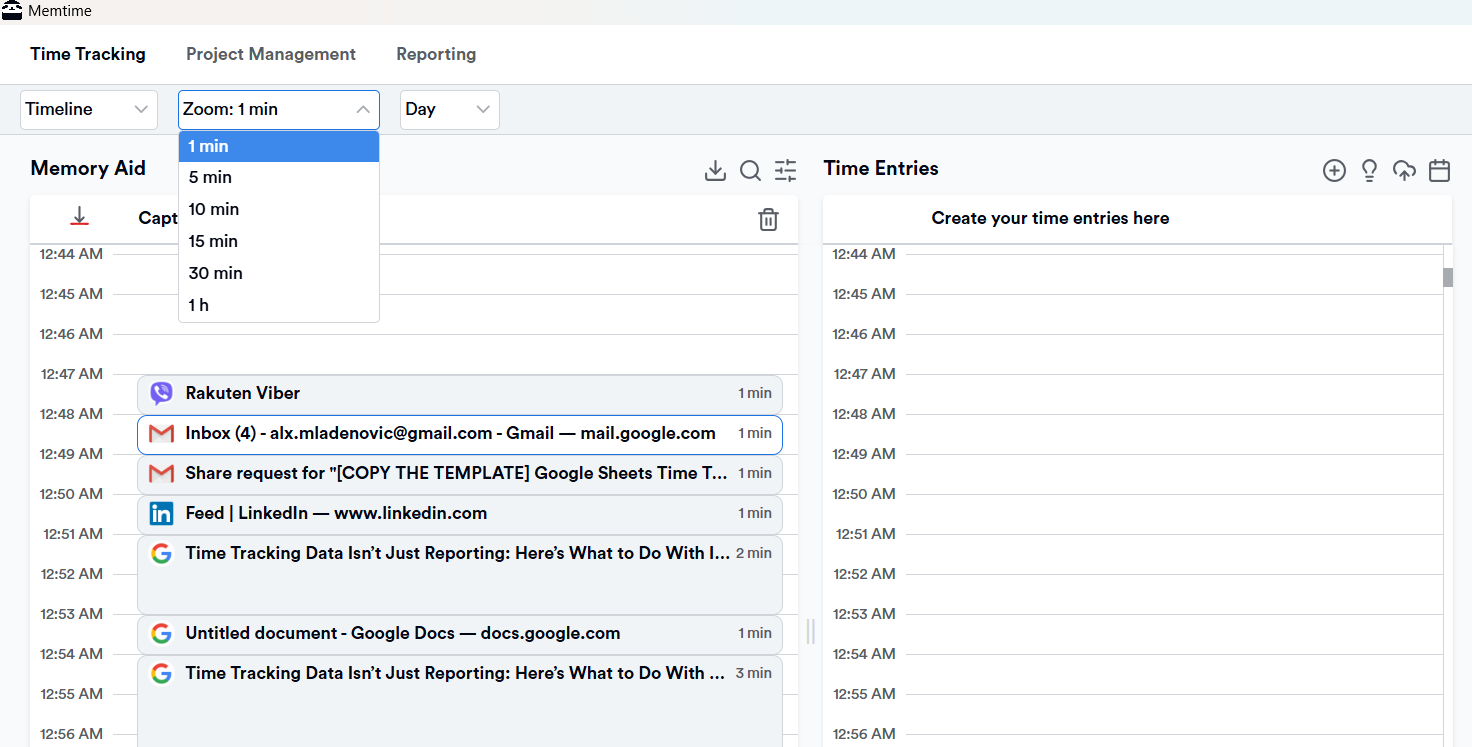
In short: Memtime gives you time data you can actually trust, without changing how you work.
If you want a time tracking tool that runs so silently you forget it’s even there, Memtime’s for you.
You can start with a 2-week free trial (full access, no credit card) to test it yourself, or if you’d rather skip the experimenting, book a 15-minute demo and see exactly how it works with your team.
Your call. Literally.
So, is time tracking a waste of time?
Could be.
If time tracking exists to produce reports you and your team don’t act on, then yes, sure.
But if you treat time tracking as data that answers the hardest questions about your work, clients, pricing, and processes, it becomes one of the greatest business tools.
So, next time you start thinking you don’t know your business like the back of your hand, turn to time data. You’ll have all your answers.
Is time tracking really a waste of time?
The problem isn’t tracking itself; it’s the method (like manual time tracking) and ignoring the numbers. When you capture accurate time data, you can see which clients, projects, or tasks are profitable and where your team’s effort is actually going. Tools like Memtime make that process automatic, so you don’t have to lift a finger.
Why do most teams feel time tracking is pointless?
Because it usually ends with reporting. Timesheets get filled in, charts get ignored, and everyone goes back to rounding and guessing. When you treat time tracking as real business intelligence, it starts answering the questions you didn’t even realize you had.
How can time tracking help with workload and burnout?
Manual tracking doesn’t show the full picture, like all the small tasks, constant context switching, and invisible work that gets lost. Accurate data (that you get when using automatic time tracking tools) lets you see who’s overloaded, who has focus time, and where processes are slowing things down, so you can fix problems before someone burns out.
Can time data really show which clients or projects are profitable?
Yes, absolutely. Revenue alone doesn’t tell the full story. Time tracking data reveals the effort behind projects, so you can spot clients that quietly eat margins and make smarter pricing and resourcing decisions.
Does automatic tracking really make a difference?
Yes, definitely! Automatic tools capture what people actually do instead of relying on memory or guesses. That means fewer admin headaches, more accurate insights, and the ability to act on real data, so you can reclaim lost hours and plan smarter.

Aleksandra Mladenovic
Aleksandra Mladenovic is a copywriter and content writer with six years of experience in B2B SaaS and e-commerce marketing. She's a startup enthusiast specializing in topics ranging from technology and gaming to business and finance. Outside of work, Aleksandra can be found walking barefoot in nature, baking muffins, or jotting down poems.







