Time Tracking ROI Is More Than You Think: Here's How To Assess

Is time tracking worth it?
That’s the question many have pondered before investing in a time tracking tool.
On the one hand, there’s license fees, the learning curve, and resistance to new policies. On the other, there’s potential revenue you can recover from capturing more billable time.
So how do you know if it’s worth the investment? By calculating your ROI, simple as that.
After talking to hundreds of teams in professional services, we built a simple calculator to help anyone decide if time tracking is worth it. All you have to do is plug in your numbers and see the exact ROI you’ll get from investing in automatic time tracking.
- Enter your hourly rate
- Estimate how much additional time you could recover daily (e.g. 15 min from answering emails or responding to phone calls)
- Enter the number of people in your team
Voila – our calculator gives you the exact ROI you can expect from investing in automatic time tracking with Memtime.
Give it a try.
How to estimate additional billable time?
Additional billable time is your estimate of how much time you’re currently under-reporting. This could be because you forget to stop the timer or because you don’t track small activities like emails and calls.
Before you’ve given automatic time tracking a try, how do you know how much additional billable time per day you could recover? This depends on what your day looks like and what typical tasks can slip through the cracks.
Let’s review the most common suspects.
1. Urgent emails ≈ 15 min/day
Regardless of the nature of your services, emails are probably among the biggest time drainers you’re unaware of. Especially if you don’t block time to respond to emails or have a lot of urgent requests coming in throughout the day.
It’s typical for professional service providers to respond to emails on the go from their mobile devices, which also remains largely untracked and rarely makes it to the invoice in full.
2. Ambush phone calls ≈ 10 min/day
If you conduct business over the phone, a portion of incoming calls is bound to go untracked because you don’t have the time to record them. When your day is interrupted by phone calls, you’re not only distracted for the actual duration of the calls but also lose extra time trying to regain your focus.
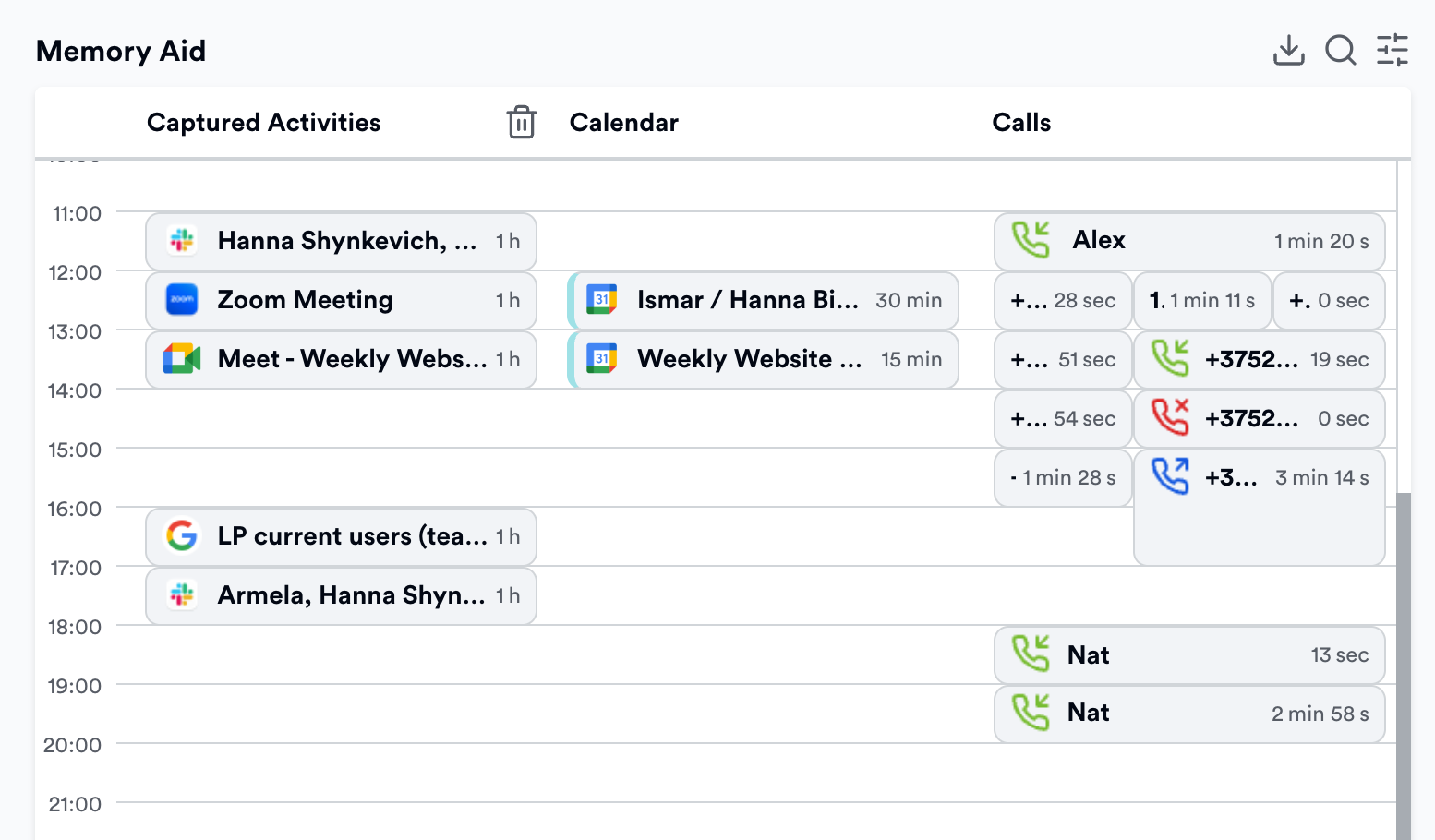
3. “Quick” revisions ≈ 45 min/day
Who among us hasn’t been fooled by the promise of “quick” revisions that drag on for hours instead of “only 15 minutes”? The reality of work in professional services is that tasks can take many iterations. Not all of these iterations fit into the scope of the project and too many of them take longer than expected.
4. Meeting creep ≈ 30 min/day
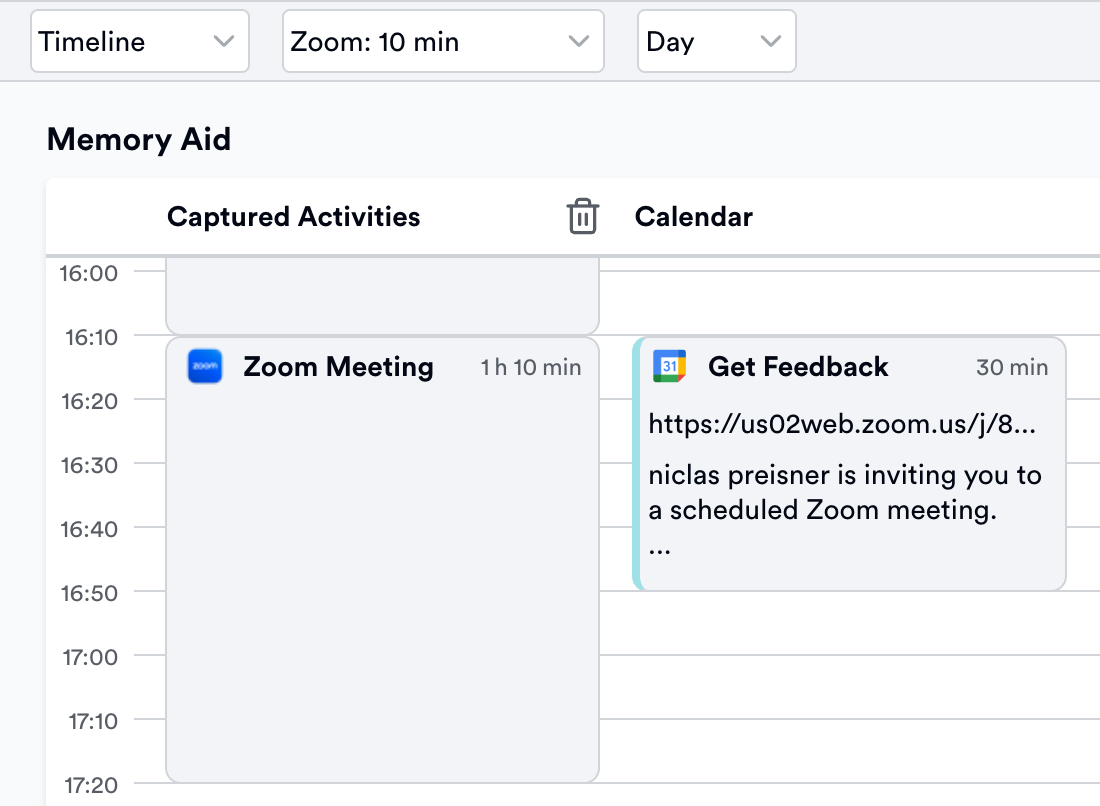
Have you ever wondered how much time you lose per week on all the meetings that exceed their planned duration? Many people log billable time by copying their calendar events, e.g. team meetings and calls with clients. However, very few meetings last exactly as long as planned.
Even 5 min of extra time on every meeting could mean hours in the span of a week. In order to track this time accurately, you need automatic time trackers that can display your calendar events alongside their actual duration.
5. Work chats ≈ 30 min/day
Last but not least among our usual suspects is work chats, i.e. messengers like Slack or MS Teams. Very few people care to use the timer for every work DM or group chat notification they engage in. Meanwhile, these can pile up and contribute to hours of unbilled time every week.
Manual vs automatic time tracking ROI
Your ROI on time tracking can vary quite a bit depending on the methods and tools you’re using. In order to adequately assess the investment you’re making (not just the money but time, mental load, etc.), use the comparison table below.
As you can see, while manual time tracking methods require little to no monetary investment, the effort and time you’re putting into it hardly justifies the output. One could argue that the mental load of tracking time outweighs any additional time recovered – because you get distracted from the actual billable work.
Let’s not forget the well-justified resistance you get from your team when you introduce a manual time tracking policy. Not only are they required to perform additional unpaid work (setting the timer, writing descriptions, etc.), but also get more stressed over the requirement to fill out the timesheet and reach their utilization targets.
Automatic time tracking, meanwhile, comes with an initial investment into a paid subscription but instantly frees up the time previously wasted on manual time tracking. Not to mention the additional billable time recovered from precisely capturing all small tasks and interruptions.
Even just an extra 10 minutes a day captured from meeting creep or incoming phone calls makes a massive difference in the span of a week. In fact, most teams recover the annual cost of their Memtime subscription before their free trial expires.
Best practices to maximize time tracking ROI
To make sure you’re getting the biggest return on your investment into time tracking, we’ve compiled a list of best practices to follow when building your time tracking workflow.
1. Automate activity recording
There’s no reason to waste time on recording your work when you have tools for passive activity tracking in the background. Automatic time trackers such as Memtime run quietly on your computer and don't require any manual input. No need to keep the app open or remember to press any buttons.
Think of your automatic time tracker as your “second memory”. It’s there to keep a log of everything you’re doing on your computer without ever interrupting your day. Memtime keeps a detailed record of your activity in all programs from day 1 of using it. Even years later, you can go back to any day and remember precisely what you were working on.
2. Automate time entries
Time tracking is not only about recording the actual work; you also need to log it under the correct projects and clients. This is what time entries and timesheets are for, and you can automate this part of your time tracking workflow too.
For example, in Memtime, you can set up automation rules to help the system draft time entries for you based on keywords, client names, etc. You can tell Memtime to draft a time entry whenever a client name is detected among email participants. Or even whenever a partial URL is detected in your Google docs.
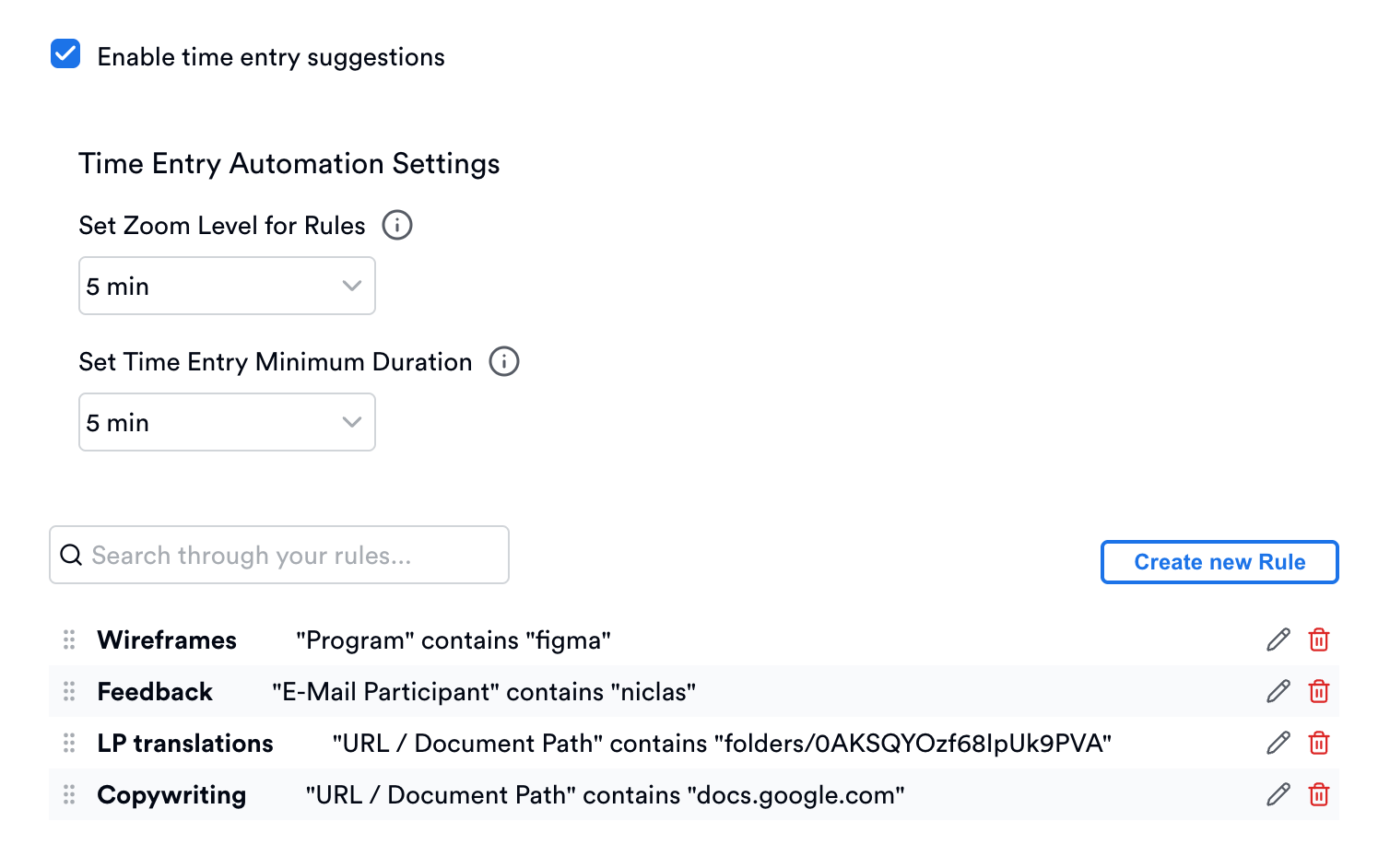
Automation rules are superior to AI suggestions because you always need to double-check after AI. After all, billable time entries are sensitive information that populates your invoices. AI is only 80% accurate when it comes to logging your billable time.
Suggestion rules, meanwhile, are created by you. You control the whole process of drafting time entries and you also have to approve every time entry suggested by Memtime. This way, you don’t need to double check or worry about the accuracy of your invoices.
3. Connect project software
Another way to maximize your time tracking ROI is by making sure the data flows seamlessly between your time reporting systems. If you use project management or invoicing software, make sure to enable instant sync of time entries from your tracker into your timesheet.
For example, Memtime integrates with 100+ project tools, from agency software like ClickUp and Asana to legal firm software like Lawcus and Clio. As soon as you add a time entry in Memtime and assign it to a task from your connected software, the time entry is instantly synced back into your connected app.
There’s no need to enter the same data twice or double check to make sure your timesheet has been filled out. Two-way sync enables seamless data flow between the systems and further minimizes the time you spend on logging billable hours.
4. Maximize adoption
The more people use automatic time tracking in your organization, the more total billable time you’re able to recover. Of course, more people also means more onboarding time and bigger subscription costs.
The good news is that your entire team can trial automatic time tracking for free, with custom onboarding and premium features like phone calls time tracking. Memtime’s 14-day free trial is available to teams of multiple users at once – you only need to book a call and we’ll get your team trial started without any investment on your part.
You’ll see that our time tracking ROI calculator includes an adoption toggle that allows you to assess the impact of your time tracking based on your adoption rate. You’re welcome to evaluate the results by tweaking the numbers and consider all the different scenarios before you commit.
Wrapping up
Any new policy is a tradeoff. You invest money, time, effort, and mental energy into building a workflow that needs to work for your entire team. This means everybody needs to know how to use it and stick to using it in the long term if you want to see consistent results.
Time tracking is a waste of billable time by definition. The more manual your process, the more time you waste instead of reclaiming it. The more you can automate the workflow, the bigger your time savings will be. From the time saved on ditching the timer to the time recovered from capturing small tasks like ambush calls and “quick” revisions.
Use our time tracking ROI calculator to adequately assess your potential return on investment into a time tracking system that’s fully automated. Whenever you're ready to give it a try, sign up for Memtime and see time tracking pay for itself and boost your revenue without adding more work to your plate.

Yulia Miashkova
Yulia Miashkova is a content creator with 7 years of hands-on experience in B2B marketing. Her background is in public relations, SEO, social listening, and ABM. Yulia writes about technology for business growth, focusing on automated time tracking solutions for digital teams. In her spare time Yulia is an avid reader and jogger.







