Harvest vs Toggl: Deep Dive & What to Try If You Need More

Finding the right time tracker can make a huge difference in your life. The right tool can help you understand where your time really goes, improve productivity and billing accuracy, and even prevent burnout.
The right tool makes you feel more in control, no matter if you’re flying solo or managing a team.
Now, 2 popular options out there are Harvest and Toggl. Both are well-known, widely used, and generally trusted, but they serve different needs, styles, and workflows.
That said, let me show you what each tool does best, where they fall short, and how they perform for personal use vs. team-wide time tracking. I’ll also cover what real users think, plus share my experience using both tools (so you’re not just getting marketing claims, but honest opinions).
And if you stick with me ‘til the end, you’ll see another tool worth considering. It gives you a bit more flexibility, power, and automation than either Harvest or Toggl can offer.
We have a lot to cover here, so let’s dive right in.
Key Takeaways:
- The right time tracker can help you feel more in control of your day and stay on track.
- Harvest and Toggl Track are popular and reliable tools, but they’re designed for different goals and ways of working.
- In this article, you’ll learn what each tool does best, where they struggle, and who they’re ideal for.
- We’ll compare personal vs. team use, share real user feedback, and add honest insights from testing.
- And at the end, we’ll introduce a third tool (Memtime) that offers more automation, flexibility, and privacy.

Harvest vs. Toggl Track at first sight
Harvest and Toggl Track are both time tracking tools, but they’re built with different priorities in mind.
Harvest is known as a time tracker designed for billing, invoicing, and client-focused work. It helps freelancers, agencies, and service-based teams track hours, calculate costs, send invoices, and understand project profitability. Basically, it’s built to keep your revenue closely tied to tracked hours.
Toggl Track focuses on flexible and lightweight time tracking (especially now, with their new redesign). It’s often loved by individuals, startups, and teams who want fast time tracking for their projects without being so focused on invoicing (it lets you generate customizable PDF invoices from tracked time from reports, though). Toggl is super easy to use and gives you more than enough insights into personal productivity.
That all said, I think it’s clear that:
- Harvest is for people and teams who need time tracking tightly connected to billing and budgets.
- Toggl Track works for those who want an easy way to track time, whether for personal productivity or team reporting.
As I mentioned before, both tools are popular, trusted, and capable, but they serve different goals.
Key similarities between Harvest and Toggl
Although Harvest and Toggl Track are designed with different priorities, they share a lot in common.
Here’s a list of their similarities so you can see where either tool could fit into your workflow:
- They track time pretty efficiently. You can start, pause, and stop timers for tasks or projects, log hours manually, and categorize your work. Both tools let you create projects, assign tasks, and track time against them.
- You can access them on desktop, mobile, and browser extensions. This means you can track time wherever you are; you’re not tied to one device or location.
- You get good reporting features. Both tools offer reporting that helps you see where your time goes. You can generate reports by project, client, or team member; the insights go beyond just raw hours.
- You can use either tool team-wide. Both tools allow you to invite teammates, assign projects, and see what everyone is working on.
- You can integrate them with many other apps. You can connect them to project management tools (think Asana and Jira), communication platforms (like Slack), and calendar apps. This means that either tool can fit naturally into your existing workflow.
- Both offer free and paid plans. The free versions are good for getting started or managing basic time tracking, and the premium plans get you more advanced features like unlimited projects or invoicing (depending on the tool).
- You get support for multiple projects and clients. If you juggle multiple clients or projects, both tools allow you to organize work by client, project, or task. These features help keep billing and reporting accurate.
- They send you reminders. Both Harvest and Toggl Track remind you to track time through browser notifications, app alerts, and timer prompts.
As you can see, both apps let you log hours easily, track multiple projects, generate reports, collaborate with your team, and integrate with other apps.
The differences mostly come in extra features, depth of reporting, and how each app connects to other tools in your workflow.
Main differences between Harvest and Toggl
When it comes to the differences between these tools, they mostly lie in how they help you log, organize, and act on your time data:
- Manual vs. automatic time tracking. Harvest allows you to manually start and stop timers or enter the hours you worked after the fact. Toggl Track also lets you track time manually, but it goes one step further with automatic tracking options: its Autotracker can detect when you open specific apps or websites you’ve defined and start timing based on those triggers.
- Different focus of features. Harvest is built with billing, budgeting, and client‑focused work in mind; invoices and payments are tied to tracked time, and timesheets are approved or exported for payroll. Toggl Track is more about time insights with reporting and analytics tools. Plus, Toggl has built‑in features that help with productivity (like a Pomodoro timer) more than billing.
- Different integrations. Toggl supports more third‑party integrations than Harvest, especially with project management and calendar apps (it also allows a 2-way sync, which we’ll talk about later). Harvest also integrates with many tools (including accounting and payment systems), but its focus is more on financial workflows than project management.
All in all, if your workflow revolves around clients and billing, Harvest works wonders.
And if you want less time tracking friction, more insights and time tracking analytics, Toggl is an excellent choice.
Harvest vs. Toggl Track user reviews
Now that you have a feel for how both apps work in general, let’s see what real users are saying about them.
I’ve pulled some examples from trusted platforms like G2 and Capterra, so you can read what people who use these tools every day say about them.
Harvest
G2 rating: 4.3/5 (830)
Capterra rating: 4.6/5 (643)
Toggl Track
G2 rating: 4.6/5 (1,582)
Capterra rating: 4.7/5 (2,580)
So, what do you think?
IMO, no tool is perfect.
That’s why it’s time you check out the pros and cons of each tool, so you can compare them side by side and choose the one that fits your needs and workflow best.
Harvest pros & cons
Harvest pros
#1 Easy time tracking
With Harvest, time tracking is pretty straightforward: you start and stop timers or manually add hours later. Just like I did here.

.png)
#2 Project reporting and invoicing
Harvest offers reports that show you how much time has been spent on projects, who worked when, and how billable hours stack up against budgets. Once you see your tracked time, Harvest lets you generate invoices from that time and expenses and send them directly to clients. Like so:

#3 Multi‑device support
You can track time from the desktop app, browser, or mobile app. Basically, you log hours whether you’re at your desk or on the go.

Harvest cons
#1 Manual tracking only
Harvest doesn’t offer automatic time tracking (like detecting what you’re working on), so it relies on you starting/stopping timers or entering hours manually. The lack of automation means that you have to face the hard fact: you’ll probably forget to log time at some point or have to reconstruct your day later. And that’s not good.
Why?
Well, the longer you wait to log time, the less accurate your data will be. According to a Harvard Business Review study, Time is money, people who log their time at least once a day are 66% accurate, those who log their time weekly are 47% accurate, and people who fill out their timesheet less than once a week are only 35% accurate. And I imagine you want accuracy.
#2 Limited free plan
The free plan supports only 1 user and up to 2 projects, which makes it mostly a try-it-out option rather than a full solution.
Also, a note: when you first sign up for a free plan, you get a 30-day trial (like the paid plans).
After it ends, you can choose to stick to the free plan or upgrade to a paid one. If you don’t choose, the account is temporarily deactivated (data is kept).
#3 Limited integrations
Harvest integrates with tools like Asana, Trello, Slack, QuickBooks, Xero, and many others, but it does so by embedding timers into other tools. Integrations are available with the Teams plan that costs $9 per seat/month with an annual subscription.
For the record, there’s also a 2-way sync that allows you to import projects, tasks, and time entries back into your project management or billing software. With this integration, data flows between the tracker and all other systems; no need to copy-paste data.
#4 Cloud data storage
Harvest stores your time entries and project data in the cloud (their online servers), so your devices stay in sync, and you don’t lose information if you switch devices. And this is helpful because everything is backed up and available everywhere, but some users prefer tools that keep data local only (on their computers), especially if they’re tracking sensitive work.
Toggl pros & cons
Toggl Track pros
#1 Automatic & manual time tracking
Toggl Track makes it easy to log your time however it makes sense for you. You can manually start and stop a timer or enter hours later, and the app also offers automatic tracking that records your activity in the background (like which apps and sites you used), and lets you decide what becomes a time entry.

#2 Strong project reporting & customization
Toggl Track’s reporting tools can filter and group data, see time by project, client, team member, or task, and assign billable rates. There’s also a visual timeline and calendar view that make reviewing your week really clear.

#3 Generous free plan
The free plan lets you use core time tracking across platforms (web, desktop, mobile, browser extension) and includes some integrations. That said, adding tasks for projects is available on a Starter plan, the first of the paid plans.
Overall, I’d say the plan is generous enough for individual users or small teams of up to 5 people.
Toggl Track cons
#1 Limited integrations
Toggl offers better integrations compared to Harvest, as it gets you a 2-way sync with Toggl Plan, Salesforce, Jira, Asana, and QuickBooks. But if you want to bring Jira and Salesforce data to Toggl, you need to sign up for the Premium plan, $18 per user/month with annual subscription.
Now, that doesn’t sound so bad.
But what if I told you that you can get much more 2-way sync integrations, just with a different tool? Hint: Memtime. 🙂
#2 Cloud data storage
Like most modern time trackers, your data is stored and synced via the cloud. This makes sync easy, but maybe you prefer local‑only storage for your work.
#3 Pricing
Harvest and Toggl Track approach time tracking differently, and their pricing reflects that. Harvest’s paid plan starts at $9 per user per month, the same as Toggl’s. But if you want a bit more power to Toggl (like integrations), you’d need its Premium plan.
Ultimately, it’s up to you to decide what gives.
Toggl Track offers features like automatic time tracking and flexible reporting, while Harvest focuses more on billing, invoicing, and project budgeting.
Harvest or Toggl: Which one’s better for personal use
If you’re mainly looking for a time tracker to manage your own time, work, projects, or productivity, both Harvest and Toggl can do the job.
But.
Harvest works fine if your goal is tracking billable hours or simple project budgets. It gives you timers, good reporting, and you can generate invoices for freelance work. But the free plan is very limited (1 user, 2 projects), so you’ll likely need to move to the paid plan. Also, because it’s mostly manual, you need to remember to start and stop timers consistently.
Toggl Track is a better fit for personal use. Its free plan is generous, it works across devices, and it includes automatic tracking. Plus, it has features like the Pomodoro timer, idle time detection, reminders, and calendars that are all about improving your productivity.
That said, if I were you, I would:
- Pick Harvest if you’re focused on client work and billing.
- Pick Toggl Track if you want to improve your productivity.
Harvest or Toggl: Which one to pick for team use
When you’re tracking time across a team, the picture changes a bit.
Harvest and Toggl Track support teams, but they do so in different areas, so the choice really comes down to how your team works and what you want out of a time tracker.
Team collaboration
Harvest makes it easy to see who’s working on what and how project hours are stacking up.
You can pull team time reports, see who’s ahead or behind schedule, and understand project budgets vs. actual hours. It’s also useful when you need to share status with clients or stakeholders, because Harvest ties time tracking directly into reporting and billing.
Toggl Track gives teams a bit more freedom in how they track. With features like workspaces, project tagging, and timeline views, everyone on the team can track time in a way that fits their style. Toggl’s automatic tracking options can also help teams who context switch a lot.
Reporting
Harvest’s reporting is strong for budget and billable visibility, and exporting reports or turning tracked time into invoices is straightforward.
Toggl Track offers more detailed report filters, which can be great if you want insights beyond simple totals, like time by task type, individual habits, or productivity trends.
Pricing
Harvest’s paid plan is $9 per user/month, and the free plan is very limited (1 user, 2 projects), which means you and your team will need to subscribe.
Toggl Track’s free plan supports up to 5 users. If you’re working with a small team or just getting started, Toggl’s pricing can feel more accessible.
What to use instead of Toggl or Harvest
Memtime. As simple as that.
And Memtime is not inherently the best tool out there. It just does things differently.
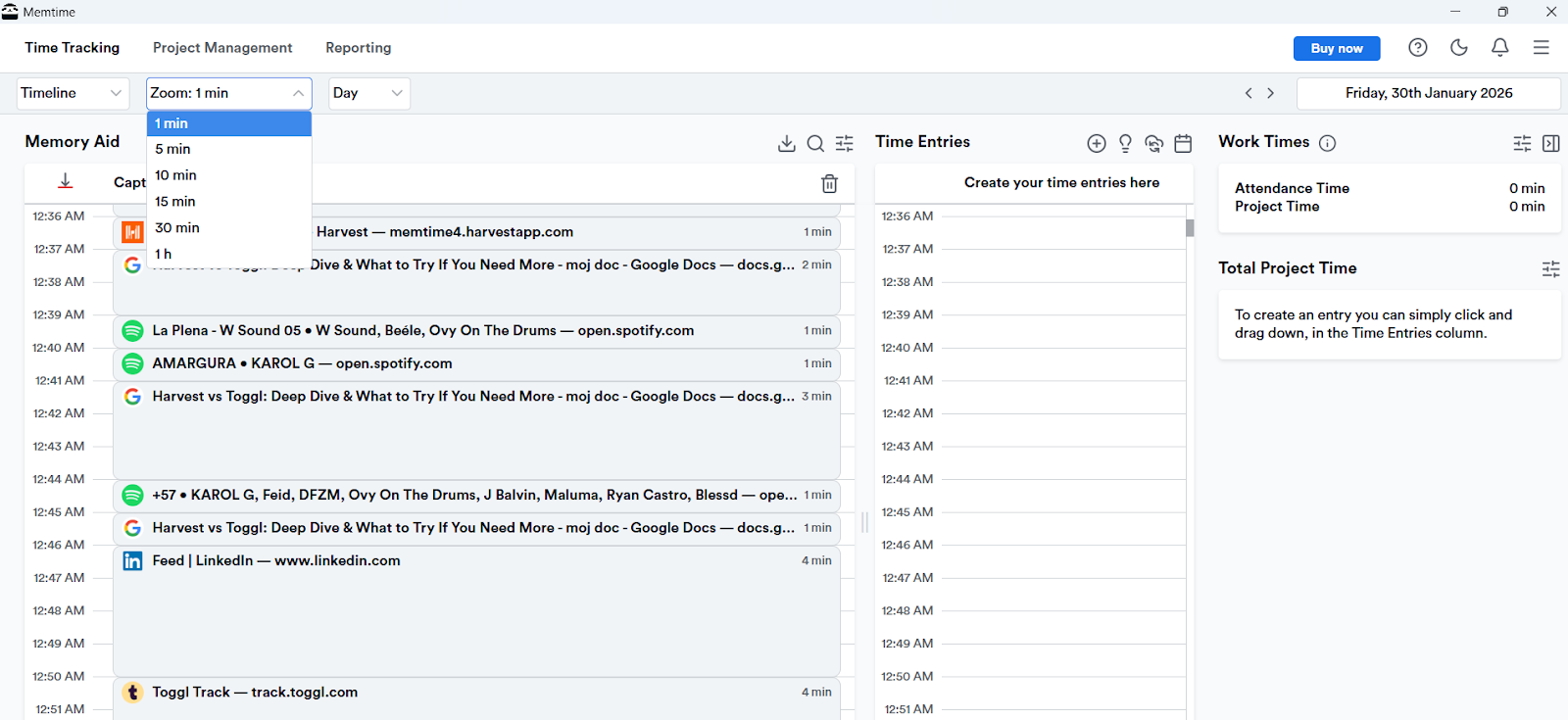
Memtime is our automatic time tracking app that runs passively (and quietly) on your desktop and records what you’re working on. Every program, browser tab, document, or email is captured without you having to start or stop a timer.
You review your day in a timeline and manually turn those captured sessions into time entries. Your activity data stays on your computer and is never uploaded to the cloud.
See? I told you it was different.
Here’s what makes Memtime stand out:
- Fully automatic tracking. Memtime records your activity as you work and builds a detailed timeline of your day. No interruptions.
- The Memory Aid timeline. See your work organized chronologically, zoom in/out, and recall what you did and when.
- Local storage. All activity is stored locally on your device, so nothing gets sent to a server unless you choose to export or sync it.
- Two-way sync with project and billing tools. Memtime integrates with tools like Harvest, Jira, and ClickUp, keeping time entries and tasks aligned automatically. When you track time in Memtime, it appears in your tool - and updates made there sync back to Memtime.
- Projects & calendars. You can create projects directly in Memtime or pull them from your project tools, and connect calendars to align scheduled meetings with tracked time.
- Works offline. Even without the internet, Memtime keeps tracking and saves it locally, so you never lose data.
So, as you can see, with Memtime, you might not get invoicing built in or the ability to log time on your smartphone. That’s because Memtime focuses on local, desktop-only time tracking and smoothing out your workflow:
- It all starts with your automatic timeline, in which you get a chronological, visual overview of your day with captured activity (at minute‑level detail).
- Then, you turn captured activity into time entries. You decide what gets logged and when.
- And then, you move a step further and sync time entries for project management and billing.
Memtime focuses on accuracy, so you don’t have to guess or overthink.
And if you like how this sounds, just click the button below to start our 2-week free trial.
Final verdict
Which tool should you choose?
You tell me. 🙂
No matter which one you pick, your time is in good hands. The only thing you have to do is decide how hands-on you want to be. (tongue twister very much intended)
And remember: time flies, but with the right tracker, at least you’ll know where it went.
FAQs
What’s the main difference between Harvest and Toggl Track?
Harvest is built for billing, invoicing, and client-focused work, while Toggl Track is more about productivity and flexible time tracking. If you care about tying your hours to money, Harvest wins. But if you want easy tracking and time insights, Toggl is a better pick.
Which tool is better for personal time tracking?
Toggl Track is generally better for personal use. It comes with a generous free plan and automatic tracking features, so it can help you understand your habits and improve productivity. Harvest can still work, but it’s more tailored to billable client work.
Which one works best for teams?
Harvest is awesome for teams that want clear budget tracking, billable hours, and client reporting. Toggl works better for teams that want insights and have lighter workflows. The best choice depends on whether you and your team prioritize billing or productivity.
Do these tools support automatic time tracking?
Toggl offers some automatic tracking options, like detecting app and website activity. Harvest doesn’t; it relies on manual timers and time entry. If you want fully automatic tracking without having to start timers, Memtime is designed specifically for that.
Is there a good alternative to Harvest and Toggl Track?
Yes, of course! Memtime is a great option if you want fully automatic, accurate time tracking and stronger privacy. It records your activity in the background, stores data locally, and lets you review your day in a visual timeline.

Aleksandra Mladenovic
Aleksandra Mladenovic is a copywriter and content writer with six years of experience in B2B SaaS and e-commerce marketing. She's a startup enthusiast specializing in topics ranging from technology and gaming to business and finance. Outside of work, Aleksandra can be found walking barefoot in nature, baking muffins, or jotting down poems.







