Billable vs Non-Billable Hours: Are You Billing Enough?
Let’s play a quick game. Oh, c’mon, humor me, dear reader.
Picture your average workday. Does it look like this: client calls, a bit of research, drafting something important, 3 internal meetings (that somehow ended up at 90 minutes), a pretty filled inbox, and a 10-minute lunch break at your desk while reading an important doc? Did I get it right?
If I did, all I can say is wow. Seems like you’re a really dedicated hard worker. 👏
But let me ask you this: how much of that day did you actually bill for?
If you hesitated with the answer, or made a face like you just bit into a lemon, I’m right there with ya. Most people in consultancies, agencies, and law firms have only a rough idea of how many hours they worked, and basically no idea of how many hours they actually charged for.
That’s why I want us to talk about billable vs. non-billable hours: what they actually are, how much of your time should be billable, and why so many smart, hardworking professionals (like yourself!) are underbilling without realizing it. Lastly, I want us to talk about what you can do to address this whole situation and maximize your profit.
I’m ready when you are. Let’s roll.
Key Takeaways:
- Billable hours get invoiced to clients; non-billable hours (meetings, admin, training) support your business but aren’t charged. Both matter, though.
- A healthy billable ratio typically falls between 60% and 80%, depending on your industry, role, and firm size.
- Attorneys capture only 37% of their time as billable hours on average, according to Clio’s 2024 Legal Trends Report.
- Tracking both types of hours reveals true project profitability, helps you spot burnout early, and protects you if clients question an invoice.
- Manual time tracking is only 66% accurate when logged daily, and drops to 35% accuracy when logged less than weekly.
- Automatic time tracking tools like Memtime capture your actual work as you go, so you stop losing billable hours to memory gaps.

Billable vs. non-billable hours: Definitions
Billable hours are the hours you spend on work that you can invoice to a client. This is the time that pays your salary, keeps the office electricity on, and funds your office espresso machine, which nobody knows how to use properly. Think client calls, legal research, drafting a contract, building an ad campaign strategy, traveling to a client site, and so on.
Non-billable hours are everything else you do at work that doesn’t get charged to a client (but that doesn’t mean it’s a waste of time). Things like internal meetings, business development, admin work, professional development, onboarding new hires, switching to a different invoicing software because the old one simply doesn’t work, etc. All these tasks are non-billable, yet still necessary for your business to function.
Here’s a simple table that clearly shows the distinction between the two:
Seems pretty straightforward, ha?
Sure, but there’s the murky middle ground—the tasks that could go either way depending on your firm’s policy, contract terms, or how generous you’re feeling that day.
Think of things like traveling to court, redoing a logo based on vague client feedback, or a “free” consultation that somehow turned into 45 minutes of free strategy advice. These things fall in the gray zone, and it’s up to you to draw the line between billable vs. non-billable hours.
Here’s what that split can look like in practice, by industry:
Now, let’s pause for the gray zone column. That column alone can determine whether your utilization rate is healthy. It’s also the place where your company policy needs to be the most explicit, with no “it depends” answers. There should be no “it depends” when it comes to billing.
Which brings us to the next topic.
An “acceptable” billable ratio
Is there a magic number when it comes to billable hours?
Hmmm… no.
I know you want a clean, universal number, but it’s pretty unrealistic to give you one. What counts as “good” or “acceptable” depends heavily on your industry. That’s why you need to look for real benchmarks.
According to Statista’s research on professional services organizations worldwide, which covers accounting, marketing, consulting, engineering, IT, and legal firms, employee billable utilization has been around 71% between 2014 and 2023, before dipping to over 69% in 2023. That’s the general benchmark.

The picture changes slightly once you zoom into specific industries:
- In law, requirements vary by firm size, but NALP’s Directory of Legal Employers data puts the average annual billable hour requirement at around 1,892 hours, and the Illinois State Bar Association suggests attorneys should aim to bill roughly 70% of their total time worked. At the more ambitious end, Big Law firms push associates toward 2,400 productive hours a year, which are a combination of billable and non-billable hours.
- In consulting, billable utilization averaged 67.4% in 2024, while IT consulting ran higher at 71%, according to SPI Research’s Professional Services Maturity Benchmark data cited by NetSuite.
- When it comes to marketing and creative agencies, the Wow Company’s BenchPress report, based on a survey of hundreds of UK agencies, found the industry average utilization rate is around 65%, and can climb to about 75% for junior staff and drop to roughly 33% for agency directors. (Agency directors tend to spend most of their time on strategy and business development instead of billable client work, so that’s why the number is so low.)
Now, let me ask you this: while reading these industry-specific utilization rates and billable hours, what did you notice?
Every single one of those figures sits below “billing every hour of every workday”. You simply can’t hit 100% billable, but you can do your best to hit a realistic target for your industry.
To figure out where you stand, you can use the billable utilization rate. It’s basically the percentage of your actual work time that gets billed. Here’s the formula:
All in all, I’d say somewhere between 60% and 80% billable is the zone you should aim for, depending on your field. If you’re way below that, it’s worth figuring out why. If you’re consistently way above it—yay, good for you!—but also maybe you need to slow down before you burn out.
Pushing utilization way past that healthy range can have serious consequences. According to SPI Research’s benchmark data, firms operating above the 84% mark deliver lower quality and their staff retention suffers.
Why bother tracking billable AND non-billable hours?
Tracking billable hours makes sense. After all, that’s the stuff that actually gets you paid. But why waste time logging the hours that don’t generate revenue?
Well, because those unproductive hours are exactly where your profitability problems are hiding.
When you track billable and non-billable hours, you get to:
- See the full profitability picture. If you only track billable time, you have no idea how much it actually costs you to deliver a service. A project might look profitable on paper, meaning it has a bunch of billable hours logged, while the non-billable admin, rework, and coordination eat your margin.
- See which clients and projects are actually worth it. Some clients are dreams: quick to give feedback, decisive, low-drama. Others require 3 rounds of “just one quick call” that burn 4 non-billable hours a week. Without tracking, you can’t tell the difference, and you keep pricing both types of clients the same way.
- Make realistic plans. When you know how non-billable time is actually distributed (I mean all the meetings, admin, training, business development), you can plan realistic project timelines. And remember: nobody works at 100% capacity; that’s just not realistic.
- Foresee burnout. An employee who’s technically hitting their billable hours might be doing so while working nights and weekends just to squeeze in the non-billable admin that never got accounted for. If you’re not tracking non-billable hours, you won’t see the burnout coming until someone quits.
- Be protected from clients (just in case). Full time records—billable and non-billable—give you a view of where ALL hours went if a client ever questions an invoice. When they ask, “Why was I charged for 6 hours of research?”, you just show them a timeline. It’s that simple.
So, basically, billable hours tell you what you earned. Non-billable hours tell you why you didn’t earn more. They are 2 sides of the same coin.
Are you billing enough?
Now we’re getting to the uncomfortable question.
My guess is you’re probably not.
If you work in a service-based business—especially law!— there’s a good chance you’re not billing as much as you should, and you don’t even realize how much that is.
Take the legal industry, for example (since it has the most data available). Clio’s 2024 Legal Trends Report, based on over 1,000 US legal professionals, found that attorneys capture only 37% of their available time as billable hours, which, when you do the math, ends up being less than 3 billable hours in an 8-hour workday. Ugh.
Moreover, a Wells Fargo Legal Specialty Group survey of more than 130 law firms found that lawyers at Am Law 100 firms billed an average of just 1,551 hours in 2023, against firm targets that typically sit between 1,800 and 2,200.
And don’t think this is just an American legal problem.
A Yale Law School Career Development Office broke down what it actually takes to hit a target of 1,800-2,200 billable hours a year. The math suggests long days, and even then, the target assumes you never take a personal call, never chat with a coworker, never attend a family event, and never do a single unbilled minute of pro bono or bar association work. Which is just mind-boggling.
This exact frustration shows up constantly ‘round the Internet. A thread on r/Lawyertalk asking about people’s real-world billable-to-non-billable ratios turned into a comic and short discussion with one user commenting, “Non-billable hours? You mean like sleep?”. Underneath the joke, though, you can see data that shows wildly different self-reported ratios depending on firm size and practice area.
It’s not exclusive to law, either. Over on r/consulting, someone asked a seemingly simple question: Is it even normal to only get paid for billable hours?
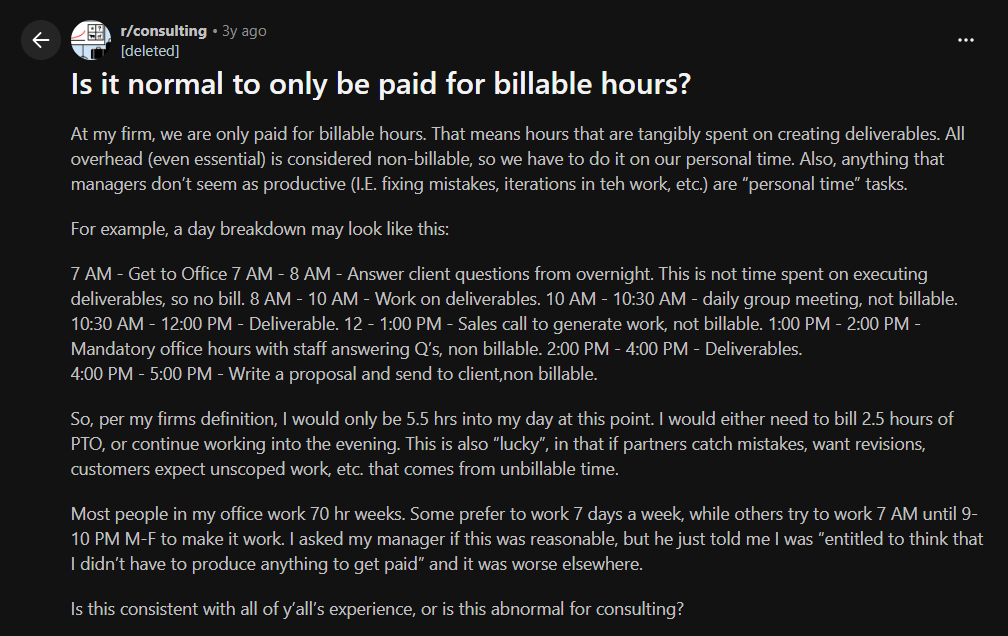
The overwhelming response was: no, this wasn’t normal. Consultants absolutely track billable hours—and many firms have utilization targets—but the vast majority of commenters said employees still be paid for the full time they’re required to work. Internal meetings, training, business development, proposal writing, and admin work might not be billable to a client, but they’re still part of the job and are typically paid by the employer.
A few consultants shared how it works at their firms.
They explained that billable hours are usually a performance metric, not the basis for whether you receive a paycheck. Some said they had daily or weekly billable targets, but they still received a salary regardless of whether every single hour could be charged to a client. Others pointed out that if a project goes over budget or there isn’t enough client work, employees often charge time to internal codes rather than working for free.
Many commenters were especially alarmed by the expectation that the OP should answer client emails, attend mandatory meetings, generate new business, fix mistakes, and revise work all on their own unpaid time. Several called it exploitative, with some encouraging the OP to look for another employer because this wasn’t representative of the consulting industry as a whole.
The thread also highlighted an important distinction. Tracking billable hours is common, but being paid only for billable hours as a full-time employee is much less common. Billable hours are designed to help firms understand how much client work employees are doing and to invoice clients accurately. They aren’t generally meant to shift the cost of essential, non-billable work onto employees.
All that being said, I think that one thing is clear. The pattern across all of these experiences is that the gap between what firms want billed and what actually gets billed is wide, common, and rarely talked about openly outside forums. If you’ve never sat down and calculated your own utilization rate, now’s a good time to do so. 🙂
Why you’re not billing enough
It’s not that you’re lazy or that you don’t care about profiting. It’s more the fact that you’re busy and simply don’t have time to track your hours.
Here are the most common culprits of not billing enough:
- You’re not tracking time as you go. Reconstructing your day at 6 pm from memory and what you think has happened is basically fiction. You think you remember what you did between, but your brain is creating a plausible story, not a fact. Multiply that error across a week, a team, a year, and you’ve got a revenue leak.
- Too much admin work. According to this article, admin tasks alone can consume up to 25% of an attorney’s working time, and similar numbers show up across consulting and agency work. Tasks like invoicing, internal status updates, and chasing approvals all eat into hours you could be charging for.
- You’re undercharging out of guilt or “just to be nice”. You know what I’m talking about. That 12-minute call that feels too short to charge for? Or writing off the extra 20 minutes a task took because you don’t want to look inefficient? Yeah, they’re individually harmless but tend to add up fast. So, collectively, they are costing you money.
- You get interrupted constantly. Research from UC Irvine found that after a single interruption, it takes roughly 23 minutes to fully refocus on the original task. Meaning, every quick question from a colleague takes 2 minutes to answer + recovery time tacked on afterward. And most of which never gets logged anywhere.
- Your project scope keeps quietly expanding. A client asks for “one small tweak”, then another, then a third, and none of them get logged separately because they each feel too minor to bother billing. That’s how scope creep ruins your invoice.
- You don’t know the difference between busy and billable. Being at your desk for 9 hours doesn’t mean you did 9 hours of client work. Slack messages, internal debates about important choices, and the fourth re-read of an email you already understood are all work, but none of them move a client’s project forward.
How to start billing enough
The obvious answer is to just track your time. Although this is true, it’s probably the least helpful advice ever given. Like saying to someone battling depression, “just look at the bright side of things”.
My advice is this: don’t track time. Find the tool that will track time for you, without you having to lift a finger.
Manual, memory-based tracking is so bad that it’s alarming. It’s because it relies on you to start and stop the timer each time you begin or complete a task. It also allows you to log time later in the day, but the longer you wait, the less accurate your data will be.
A Harvard Business Review study, Time is money, suggests that people who log their time at least once a day are 66% accurate, while those who log their time weekly are only 47% accurate. People who fill out their timesheet less than once a week are just 35% accurate. That’s not a minor rounding issue but nearly half your time entries being wrong, missing, or misattributed.
That’s why we at Memtime firmly stand by the fact that human memory simply isn’t built to reconstruct a timeline of a busy day. Which is why you should look for an automatic time tracking solution.
Introducing Memtime
Memtime is our desktop automatic time tracking app that runs quietly in the background on your computer and records what you’re working on. Every app, doc, browser tab, and email you work on throughout the day will be logged, without you having to do anything (except turn on your computer).
Memtime then shows you a visual timeline of what you actually did. You look back, drag the relevant blocks onto the right project or client, and you’ve got an accurate, defensible time entry.
Here are some of Memtime’s key features you need to know about:
- Automatic activity timeline (the Memory Aid). Every app, file, tab, and email you touch shows up automatically, laid out chronologically, so you can reconstruct your entire day in seconds. Like so:
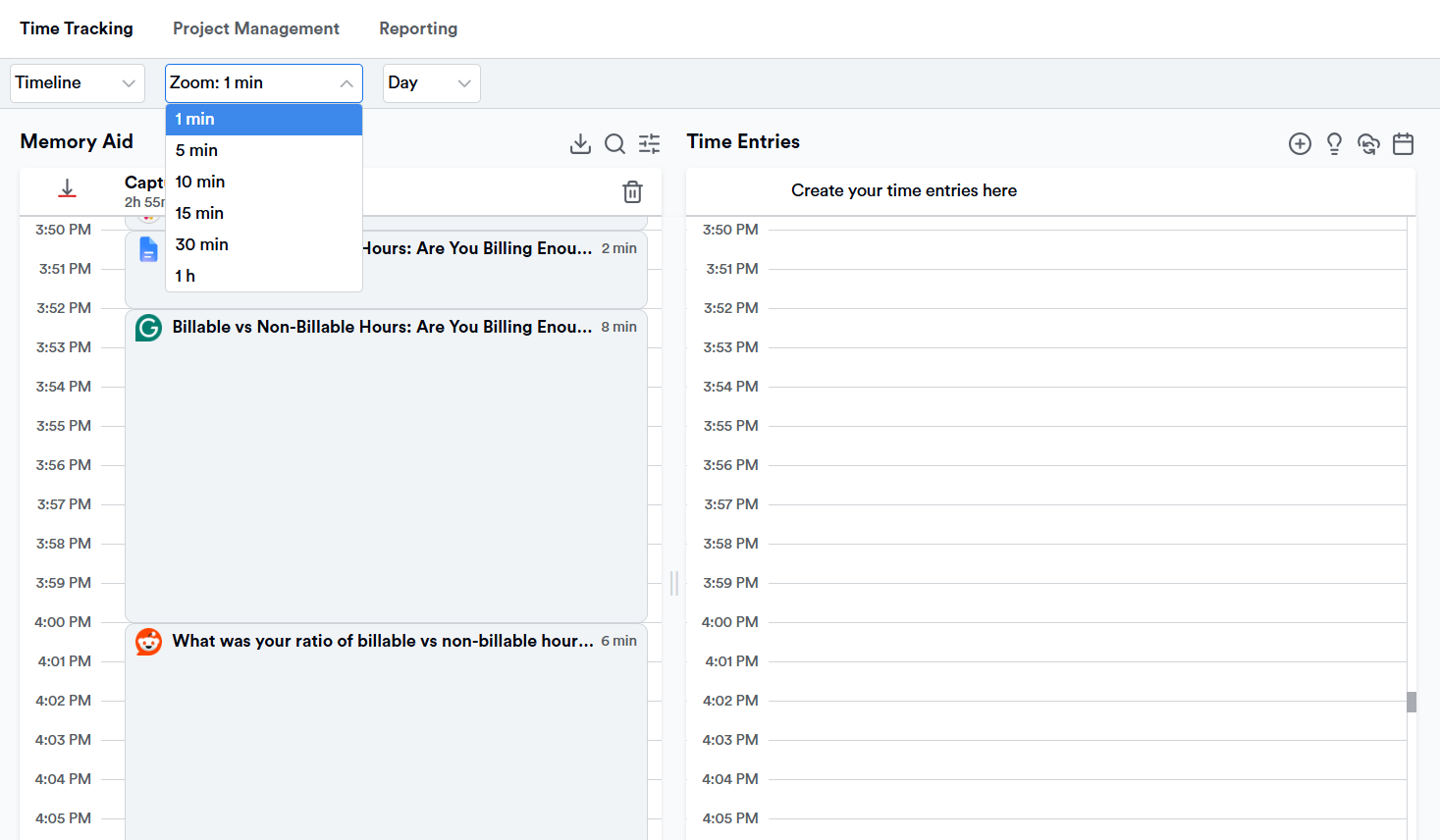
- Adjustable time increments. You can zoom in and out from 1-minute to 60-minute intervals, which is pretty useful for law firms working in strict 6-minute billing increments, where every unlogged minute is literally unbilled revenue.
- Privacy-first, offline data storage. Activity data is stored locally on your device, not uploaded to the cloud, and it’s only visible to you. You choose what to convert into a shareable timesheet or time entries.
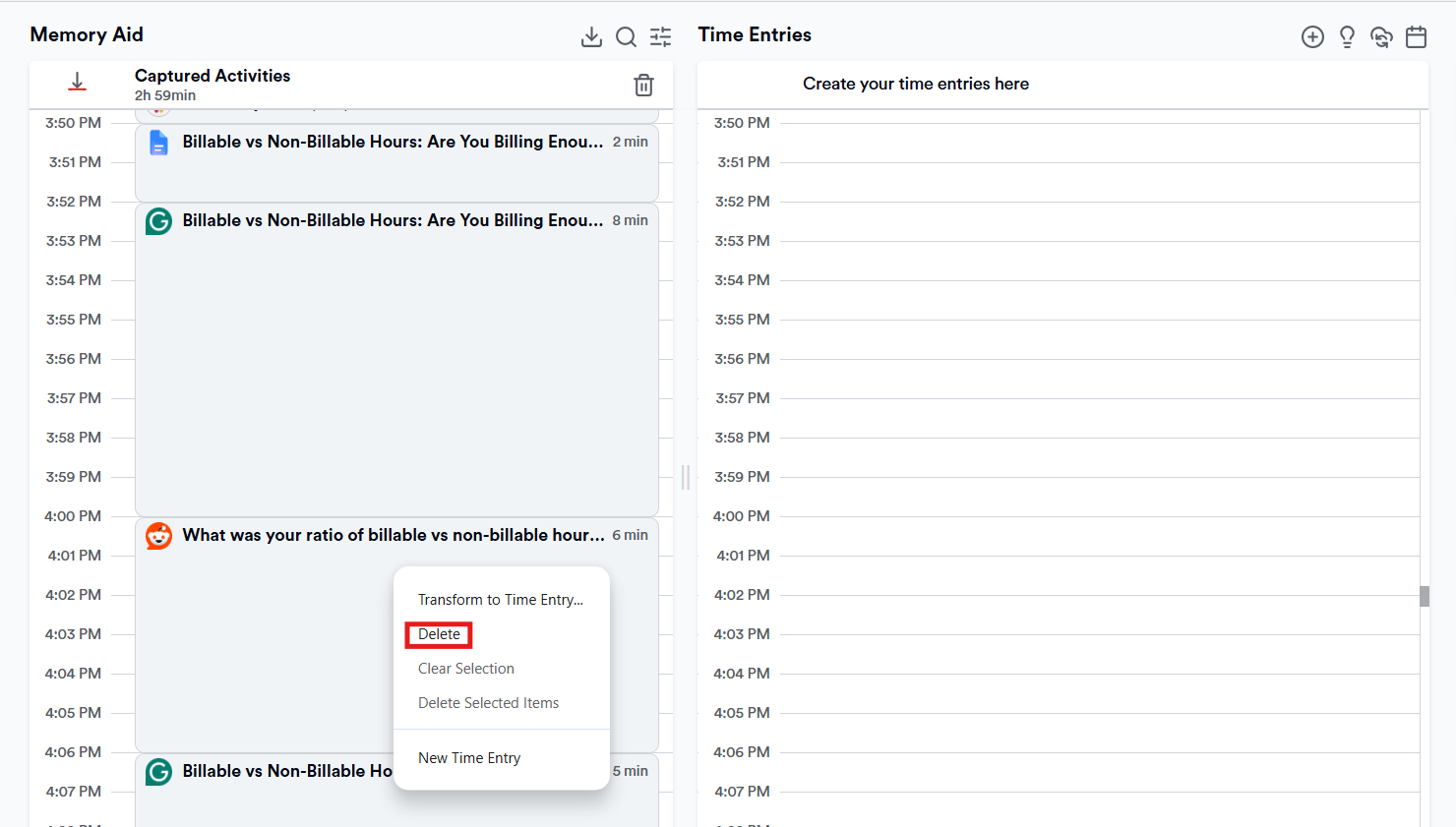
- Delete or exclude anything you don’t want tracked. Memtime lets you right-click any block on your timeline and delete it. And for the stuff you’d rather never see logged (like personal banking, that job search tab, whatever), you can set up exemption rules in Preferences that tell Memtime to simply skip certain apps, programs, or websites going forward. Both actions happen locally, and nothing gets flagged or reported to a client.
- Integrations with 100+ project and billing tools. Memtime connects with tools like Jira, Asana, Xero, and other practice/project management platforms, so logged time flows directly into your existing invoicing workflow. It does so via a 2-way sync, meaning updates flow both ways, so your tools always stay in sync.
- Automation rules. You can set up rules so that recurring activities are automatically turned into time entries.
- Calendar sync. Memtime syncs with Google, Microsoft, or macOS calendars so your scheduled meetings sit right alongside your actual tracked activity. It’s a pretty handy way to check how your planned day compares to what actually happened.
So, the whole point of Memtime is to help you see that gap between hours worked and hours billed. Imagine what you could do with recovering just 5 billable hours a week. Over a year, those 5 billable hours per week can add up to a significant chunk of (previously invisible) revenue.
That being said… What if you just… tried Memtime?
It understands you and how you work. That’s why it follows you quietly.
So, watcha say to a 14-day free trial, no credit card required? You can just watch your own timeline fill in over the next couple of weeks and see how much of your day was quietly going unbilled.
(Worst case scenario, you find it boring and move on with your life. Best case, you find 6 hours a week you didn’t know you were giving away for free.)
Strategies for optimizing non-billable hours
The goal with billable hours is to capture them all. Like Pokémon.
But with non-billable? The goal is to keep those hours in their lane, not letting them quietly expand to your whole week. Here’s how you can ensure that doesn’t happen:
- Cap them, deliberately. Treat non-billable time as something that needs to happen in a structured and intentional manner. You can’t let them accumulate informally. One quick sync per week is fine; 5 is too much. Set your boundaries.
- Outsource what doesn’t need your expertise. You don’t need a senior partner updating the company’s website, and you don’t need a senior consultant formatting slide decks. Delegate the non-billable tasks that don’t require your specific skill set, and protect your own time for the work only you can do.
- Automate the repetitive stuff. Recurring admin tasks, like status reports, lead qualification, and basic scheduling, are all tasks you can automate. Such tasks are non-billable regardless of who does them, so the goal is simply to make them take less time.
- Batch similar tasks together. Constantly switching between billable client work and non-billable admin costs money; just remember that 23-minute refocus cost after every interruption. Block dedicated time for admin instead of letting it interrupt billable work throughout the day.
- Treat professional development and business development as investments. Non-billable doesn’t mean worthless. A few hours a week spent on pitching new clients pays off later, so just make sure it’s intentional time, not time that happens by accident because nobody was tracking where the day went.
- Review the data regularly. Pull utilization reports monthly (even weekly!), not annually, because you need to catch poor ratios ASAP. Think of it this way: catching a poor ratio in March is a lot more useful than catching it in December, when the year’s revenue is already locked in.
- Set a realistic non-billable budget per role, not per person. A partner and a first-year associate shouldn’t be held to the same non-billable expectations. After all, one is expected to spend more time on business development and mentoring, the other one on skill-building. Don’t set targets across an entire firm and punish the people doing exactly what the business needs from them.
In the end…
You need to remember that billable hours pay the bills BUT non-billable hours keep the business alive, growing, and staffed.
The goal was never to reach 100% billable time; no healthy service business runs that way, and if yours claims to, you’re lying in the books.
The real goal you can set is to know your actual ratio and compare it honestly against your industry’s benchmark.
And if the honest answer to “Are you billing enough?” is “Probably not”, good for you for being honest with yourself. This particular problem is fixable with better visibility into how your time is spent. Once you can see it clearly, you won’t view billing as a discipline problem (you are disciplined already!) but a simple math problem. 🙂
FAQs
How do you calculate your billable utilization rate?
Divide your total billable hours by your total actual hours worked, then multiply by 100 to get the percentage. The number you get shows how much of your workday actually gets invoiced. Tracking this regularly (monthly or even weekly) helps you catch a poor ratio early, rather than discovering it at year-end when the revenue is already locked in.
What falls into the “gray zone” between billable and non-billable hours?
Gray-zone tasks depend on your firm’s policy; there isn’t one universal rule. Examples include travel time to court, free initial consultations that turn into real strategy sessions, or redoing work based on vague client feedback. Your company should set clear, explicit guidelines here.
How many billable hours should an attorney aim for per year?
Well, requirements vary by firm size, but NALP data puts the average annual requirement around 1,892 hours, while Big Law firms often push associates toward 2,400 total productive hours (billable plus non-billable). The Illinois State Bar Association suggests that attorneys aim to bill roughly 70% of their total time.
Why is it so hard to accurately track your own billable hours?
Reconstructing your day from memory later is unreliable, since your brain fills gaps with a plausible story instead of facts. A Harvard Business Review study found people who log time daily are only 66% accurate, dropping to 35% for those who log less than weekly. That’s why automatic time tracking tools tend to produce far more reliable, defensible records.

Aleksandra Mladenovic
Aleksandra Mladenovic is a copywriter and content writer with six years of experience in B2B SaaS and e-commerce marketing. She's a startup enthusiast specializing in topics ranging from technology and gaming to business and finance. Outside of work, Aleksandra can be found walking barefoot in nature, baking muffins, or jotting down poems.