Top PSA Time Tracking Integrations That Actually Work for Service Teams

Time tracking in service teams sounds simple in theory, but it’s not. In fact, I bet you find it ghastly.
I also bet this scenario hits close to home: You assumed everyone was logging their hours correctly. But then you discovered half your team’s time evaporated or ended up in the wrong project.
Oh, and don’t even get me started on built-in time tracking in PSA software. Software usually promises “seamless time tracking” but actually requires 3 extra clicks per task and manual adjustments.
Your team’s valuable (and billable!) hours get eaten up all the time. Or they’re lost entirely.
That’s why having the right PSA time tracking integration is pretty nice to have. With the right add-ons, you can track time accurately, see where every hour is going, and make smarter project decisions.
So, let me zip it, and let’s get to the 7 time tracking integrations for PSA software that actually work and give your reporting a breath of fresh air. You can just skip the usual intro.
Key Takeaways:
- Tracking time in service teams seems easy, but without the right PSA setup, hours get lost, dashboards lie, and your billing suffers.
- Most PSAs rely on manual entries or timers, so forgotten or inaccurate time is almost guaranteed.
- Built-in PSA tracking has perks; it makes billing easier because data flows freely across a platform. But accuracy still depends on your team remembering to log everything.
- Automatic PSA integrations like Memtime, Timely, and TimeCamp capture work in the background, reducing manual work and boosting accuracy.
- Tools like Pia aiDesk and Thread integrate automation and AI to log time directly from tasks, tickets, or conversations.
- Using the right PSA time tracking add-on lets you see every billable hour, plan smarter, and actually get paid for all your work.
- Memtime stands out for fully automatic tracking, privacy-friendly design, and syncing with most PSA platforms.

How time tracking usually works in PSA software
As someone who works in a service team, you know that tracking time can feel like herding cats. And your PSA software does everything it can to make it easy for you.
Why?
Because time tracking is SO important; it’s the backbone of your service business. Without it, you have:
- No idea which projects are making money and which are bleeding cash.
- A billing system that’s not really a system, ‘cause it doesn’t rely on accurate data.
- Poor visibility into team utilization, meaning there’s probably some wasted capacity in your team.
Simply put, time tracking is there to help you get paid for the work you do. It can also keep your team accountable, and give you and the managers data to plan smarter.
Now, knowing all of this, it’s so strange that most PSA software gives you just 2 ways to track and log time:
- Via a manual entry. You enter your hours on a project or task, usually via a timesheet interface. You can specify the task, client, or project phase. It’s simple, but it relies on you to remember to log every minute. How fun is that?
- Via a timer. You start a timer when you begin work on a task and stop it when you’re done. You can pause, switch tasks, or track multiple timers. This method is much closer to reality, but it still depends on you remembering to hit the Start button.
(Some PSAs also allow bulk updates or rounding rules, like auto-filling time based on calendars or automatically rounding to the nearest 6 or 15 minutes. These features can save time, but can mess up accuracy if not managed carefully.)
Just think of market leaders in the PSA industry.
There’s ConnectWise PSA, with manual timesheets and timer-based tracking. You can log hours against tickets, projects, or service agreements, then see approved vs. billed hours.
Then, there’s Kantata. It combines project management and time tracking in one place; you can log time on tasks, projects, or milestones, and managers get dashboards showing utilization and budget vs. actual hours.
And also HaloPSA. The tool lets you track time per ticket, task, or project, with timers and manual entry. You can also automate approvals and see time spent on support vs. projects, which is useful.
And the list goes on. Productive, Atera, Autotask PSA, Scoro, Wrike, and Certinia all offer manual time tracking.
In some cases, time tracking is built into tickets and projects, while others let you track on mobile devices. They come with timesheets and dashboards that show total hours, budgets, resource allocation, utilization, and how time impacts profitability.
So, why do these tools rely on manual time tracking when the accuracy of such tracking is just 66%?
Why are you still required to remember how much time you spent working on certain projects for dozens of clients, and enter it manually, often days after you did the work?
PSA software ≠ time tracking software
Well, because PSA software is NOT a time tracking software.

Just because a PSA has a time tracking feature doesn’t mean it’s built for 100% accurate tracking.
Most PSA tools were designed to manage projects, tickets, and client relationships first. Time tracking is there, but it’s more of an afterthought. That’s why so many of them rely heavily on manual time entry.
PSA tools’ focus is on billing and reporting (so you can run projects, manage clients, and generate invoices), not on capturing the full reality of your work in real time. And, unfortunately, that’s how you get forgotten hours, underestimated project costs, and time tracking panic at the end of the week.
Now that you know PSA time tracking isn’t perfect, I hope you also know it’s not useless.
Here’s the good, the bad, and the slightly annoying about relying on your PSA for tracking time.
Pros of built-in PSA time tracking
- You get everything in one place. Your projects, tickets, clients, and time entries all live in the same system; there’s no need to switch apps or hunt down your spreadsheets.
- It makes billing and reporting easy. Logged hours usually go straight into invoices and utilization dashboards, which makes client reporting super simple.
- You get easy approval workflows. Many PSAs allow managers to review and approve timesheets before billing, reducing errors.
- You get visibility. You can see how much time is spent on each task, ticket, or milestone without manually calculating numbers.
Cons of built-in PSA time tracking
- You have to do it manually. As mentioned before, most PSAs still rely on you remembering and typing in hours after the fact. If you even forget one task, your time data is way off.
- There are accuracy issues. Since you are relying on manual time tracking methods and your memory, you can expect a lot of work to get lost, underreported, or rounded awkwardly.
- You need consistency to improve accuracy. If your team doesn’t consistently log hours, all the dashboards, reports, and margins you’re trying to track become meaningless and useless.
So yes, PSA time tracking has its perks. But it’s not the most automated solution either.
To get the numbers you actually need, you can lean on integrations. A good integration can handle all that messy real-time stuff your PSA doesn’t.
6 time tracking integrations for PSA software
There aren’t many time tracking tools built only as PSA time tracking add-ons, in the sense that they exist exclusively to plug into your PSA software. What you’ll find instead are automated time tracking tools that integrate with PSAs and act as add-ons by feeding them more accurate data.
If your goal is fully automatic, PSA-compatible tracking, these are the strongest options right now:
- Memtime. It’s fully automatic and PSA-friendly, as it runs passively and automatically records activity in apps, documents, browser tabs, and more. It mirrors your projects and syncs time entries directly into connected software, including PSA tools.
👉 Memtime is one of the closest things to a true automatic PSA time tracking add-on.
- Timely. The tool automatically records activity in the background and builds timesheets using AI. It suggests time entries based on your real activity, reducing manual work.
- TimeCamp. The app offers automatic desktop tracking and traditional timers. It tracks activity automatically and feeds that data into timesheets and reports.
- ManicTime. The tool tracks app usage and web activity automatically in the background. It can help you reconstruct workday timelines and assign tracked time to projects.
- Pia aiDesk. Automatically creates PSA time entries whenever automated workflows run. It works with tools like ConnectWise and Autotask.
- Thread. It automatically generates time entries based on ticket activity. The tool integrates with platforms like Autotask and HaloPSA.
Let’s dive deep into each tool.
#1 Memtime
Meet Memtime.
An app that’s not a replacement for your PSA, but it’s the missing automatic time tracking layer that makes your PSA data accurate and complete.
It acts as a fully automatic time tracking add-on that connects directly to your PSA software, records your work activity in the background, and syncs clean time entries back to your PSA without.
Here’s how it works:
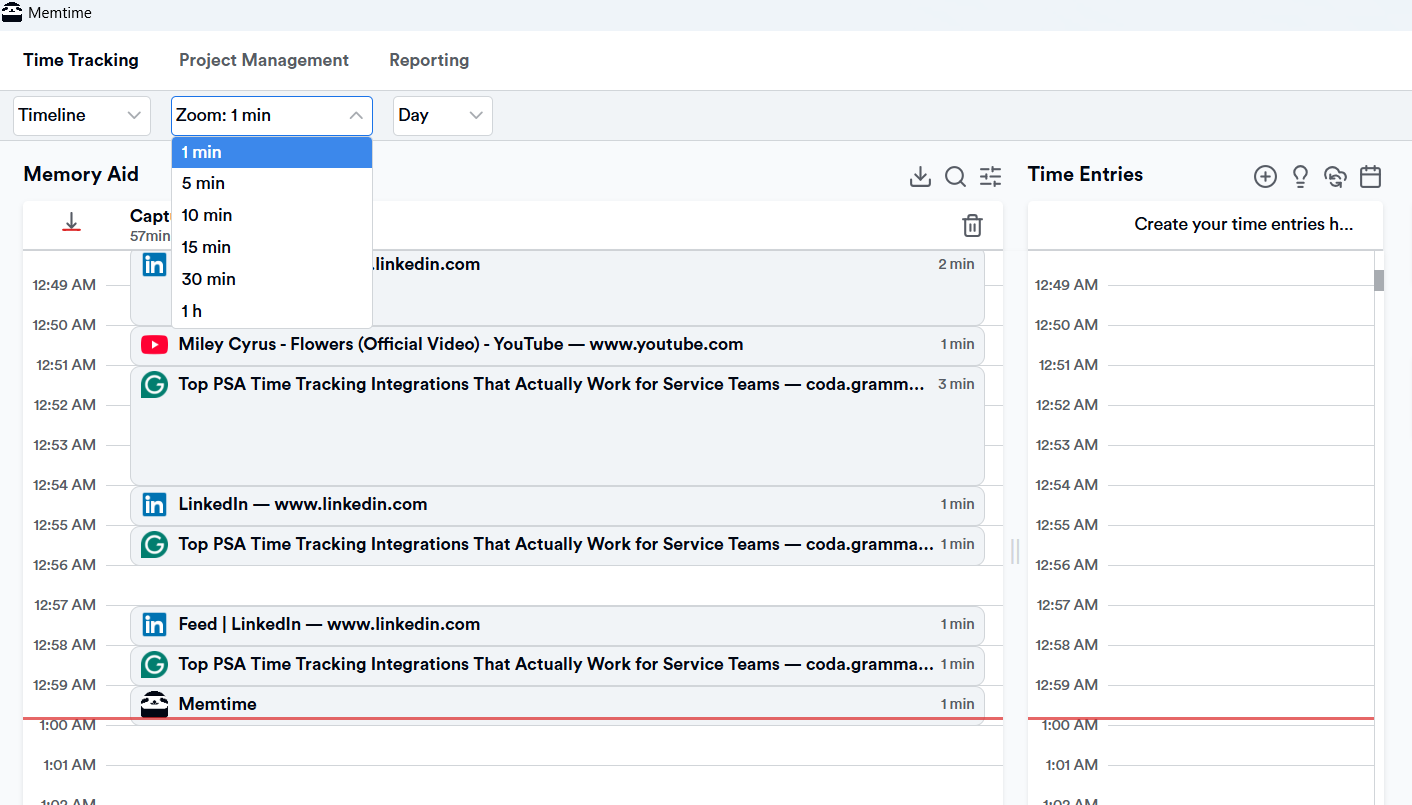
- It autonomously runs in the background and captures EVERYTHING you work on across apps, browser tabs, documents, emails, and meetings.
- It shows you exactly what you worked on and when, down to the minute (in Memory Aid). Like so:
- The entire process is automatic.
And that’s how it solves the biggest PSA time tracking problem: forgotten work.
Your time is captured automatically, whether you remember to track it or not.
How Memtime connects to PSA software
Memtime integrates with PSA platforms via a 2-way sync. And that means the integration process typically works like this:
- You connect your PSA software to Memtime (takes about a minute).
- Memtime imports your projects, tasks, and tickets.
- Memtime automatically records your work activity.
- You review and assign captured time to tasks.
- Time entries sync into your PSA software.
This means that, once connected, Memtime automatically exports time entries so they appear in your PSA in the correct place, attached to the correct client, project, or ticket.
Which PSA software?
Glad you asked.
A bunch of them (Memtime integrates with PSA, billing, and PM tools), including Datto Autotask PSA, Kantata OX, Scoro, Productive, PROAD, and more.
And that’s not all, folks.
☆ The app is also privacy-friendly by design. Memtime stores your activity timeline locally on your device, not in the cloud. That means only you can see your detailed activity history, and nothing is shared unless you choose to turn it into a time entry and sync it with your PSA or work platform.
☆ Memtime can also create and suggest time entries for you. Using customizable automation rules, the app can recognize specific apps, documents, meetings, or websites and assign that time to the right project automatically. Those rules can be based on things like app names, URLs, document paths, window titles, email subjects, or calendar events. Once a rule is in place, Memtime will automatically suggest or assign matching activities to the correct project.
Memtime automatically captures your work, organizes it for you, and sends clean, accurate time entries straight to your PSA. No timers!
If you like how that sounds, book a call with us.
And if you’re not ready to commit to a 15-minute call, try Memtime yourself for 2 weeks; it’s on us. Just click the button below:
#2 Timely
Timely focuses on capturing your time automatically using background activity logging and AI‑powered suggestions. It silently records what you work on and turns all of it into a timeline you can review later.
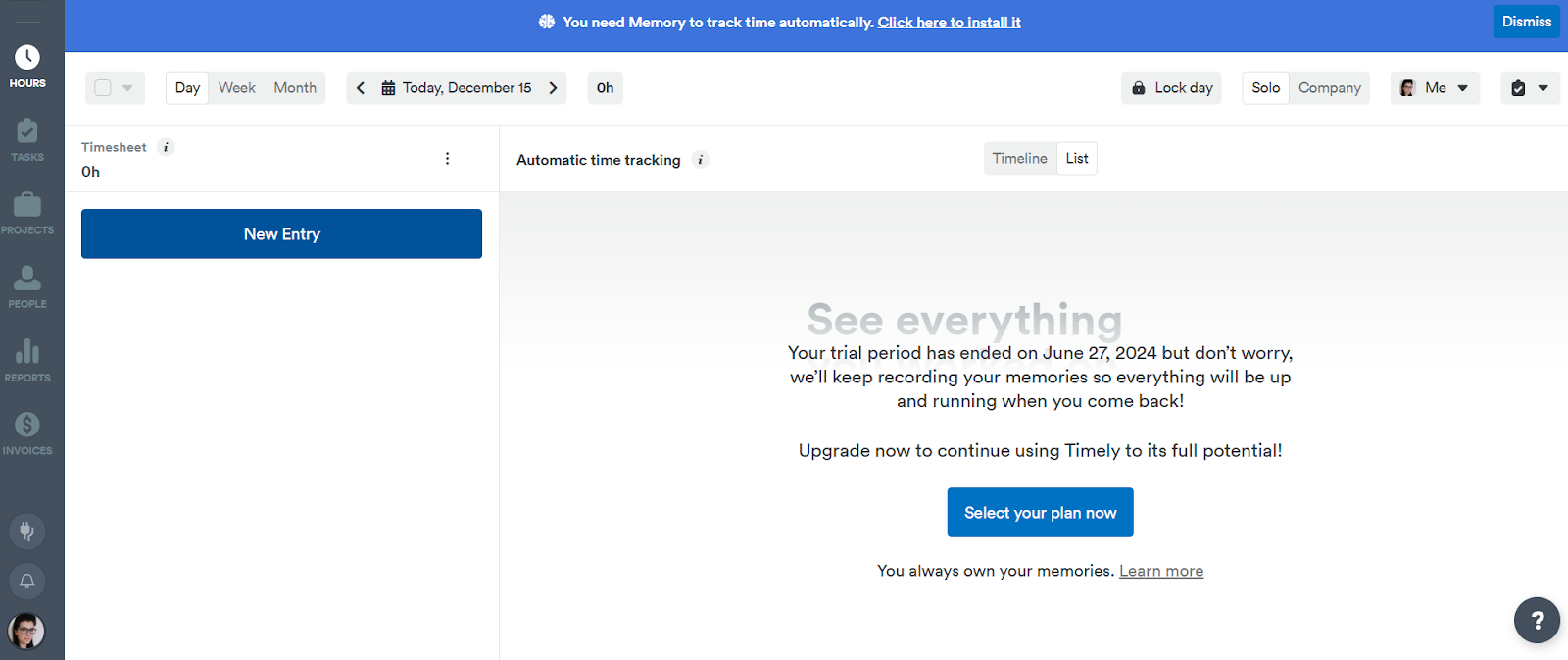
Timely runs behind the scenes and builds a picture of your workday, showing you apps, docs, browser activity, and visited URLs, meetings, and files. At the end of the day (or whenever you choose), Timely presents this data in a clean timeline. You can then let Timely’s AI suggest the right assignments for you.
What’s also interesting is that Timely’s AI learns your patterns over time. Once it recognizes how you usually categorize similar work, it will start suggesting project assignments automatically. This is especially helpful if you have multiple clients or project types, where context matters.
When it comes to syncing with PSA tools, it integrates with platforms via APIs or connectors, so that you can:
- Capture your time in Timely.
- Review and refine time entries with suggestions.
- Sync those entries into your PSA system (like Autotask PSA).
Overall, Timely is a good choice if you want automation and that extra oomph with AI.
#3 TimeCamp
TimeCamp sits somewhere in the middle; it’s more automatic than traditional timers, but it’s not fully invisible. It combines background tracking with smart recognition (like keywords and activity patterns), so you don’t have to remember every entry.
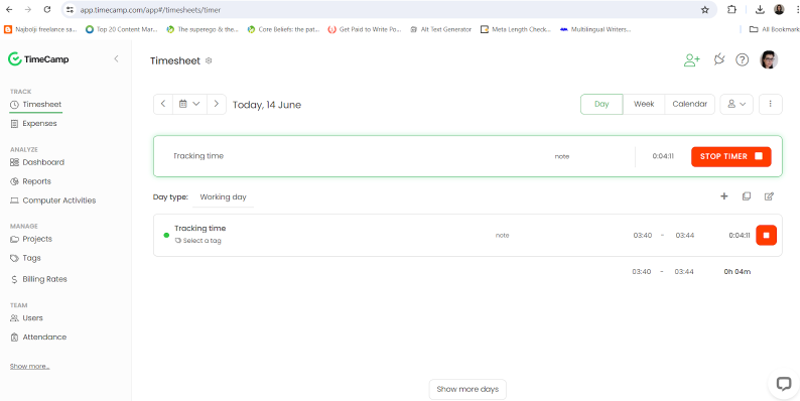
The tool quietly watches what you’re doing, builds a timeline of your day based on real activity, and lets you assign those activities to projects.
Here are some TimeCamp’s features:
- Once installed, TimeCamp monitors your computer activity in the background. It then uses keywords to recognize work patterns. For example, you can set rules like: anything with Project X in the window title becomes time for that project. Or working in Slack or Notion with a specific client’s name gets logged under that client.
- TimeCamp pre‑categorizes your time, so you’re not assigning every minute manually but reviewing.
- If you want more control, TimeCamp gives you timers and manual entry options. Probably best if you skip them.
TimeCamp also integrates with PSAs and project management tools, so your captured time can be synced back into your PSA’s timesheets. You work as usual, and TimeCamp logs activities. It then suggests time segments based on your activity and detection rules. You review or adjust those entries, and approved entries are exported into your PSA.
All in all, TimeCamp is good at activity capture and creating keyword rules for smarter assignments. You also get decent reporting and dashboards; you can see utilization, productivity trends, and billable hours.
#4 ManicTime
ManicTime is similar to other automatic time tracking apps in that it quietly records what you do on your devices and turns all of that activity into time data you can use for PSA workflows. It’s designed to help individuals and teams see exactly how their time is spent without needing to start and stop timers.

Here’s how the tool works:
- ManicTime runs in the background on your computer (it’s desktop-based) and captures your usage throughout the day, including when you were active, which apps you used, which docs you worked on, and which sites you visited. It also logs idle times separately.
- Once tracked, all of this activity is presented in a timeline interface. You can review your day and assign those blocks to specific tasks or projects (called tags). You can also define rules (autotags) so that common activities get categorized automatically based on patterns you create.
From that point on, you can export reports to Excel or CSV for external use, and the system also offers a REST API or direct database access if you need to connect the tracked hours with your PSA or internal tools.
If you want deeper integration with PSA systems, ManicTime supports tag connections, like the one with ConnectWise PSA, which lets you pull ticket or project data into ManicTime as tags and, when configured, push tracked time back into the PSA as time entries.
There are also ways to build integrations using tools like Zapier, so you can connect ManicTime Cloud with other time trackers or project tools and automate workflows between systems.
Overall, if you want automatic tracking that captures your work, a bit of manual fine‑tuning and integration with PSA systems, ManicTime is a solid choice.
#5 Pia aiDesk
Pia aiDesk is similar to other service management tools because it brings automation and time logging right into your PSA workflow. Pia’s focus is on automating help‑desk tasks and then logging the time those automations take directly into your PSA system, so you don’t lose any billable work.

Here’s how it all works:
- Pia aiDesk works by integrating with your existing PSA (think ConnectWise, Autotask, or HaloPSA) and automating many of the repetitive tasks your people handle daily, like password resets and provisioning new users. It does so with the help of ML and predefined automation packages.
- Once an automation runs or a task is completed, Pia can capture the time spent and automatically log a time entry in your PSA. You can configure whether Pia logs time as the team member who started the task, the ticket assignee, or a specified PSA user, and even define rules about which clients or tags the automatic logging should apply to.
- Pia’s entries include start and end times, as well as notes on what was done.
So, it’s safe to say Pia is not like other time trackers; it logs time only when automation runs or tasks are completed, aligning captured time with real ticket work.
When it comes to syncing with PSA tools, Pia’s Automated time logging works directly with major PSA platforms.
The tool also includes other productivity features, like AI‑assisted ticket triage, SmartForms for client‑driven tasks, and deep PSA integration across workflows.
Overall, Pia aiDesk is a good choice if you want PSA‑centric automation combined with built‑in time logging.
#6 Thread
Thread is different from all the other tools on this list and, somehow, similar to Pia. It focuses on capturing and generating time entries from service desk conversations, automation, and technician workflows. It uses AI and PSA integration to automatically track, summarize, and log work.

Here’s how Thread works:
- As an AI-powered service desk, it connects with your PSA, communication tools (like Teams or Slack), and workflows. As you communicate with clients, resolve tickets, or collaborate internally, Thread automatically captures relevant context, actions taken and time spent. It then ties time entries to the correct ticket.
- One of Thread’s features is its built-in Time Pad, which allows you to start or stop timers, manually log time, or let AI generate time entries automatically based on conversation and activity. These entries can include notes, start and end times, and summaries of the work performed.
- The AI-driven time entry automation is called Magic AI. It analyzes conversations and service actions, then automatically generates invoice-ready time entries and summaries while tracking minutes spent on requests.
Thread integrates with PSA platforms like ConnectWise, Autotask, and HaloPSA. Through these integrations, it can sync ticket details, scheduling, and time entries in real time between systems.
Overall, Thread is a good choice if you want AI-powered PSA-native time tracking. Instead of tracking activity separately, Thread captures time naturally as part of conversations, automation, and ticket resolution, which can be useful if you rely heavily on MSPs and PSA systems.
Wrapping it up
So, there you have it. Six ways to make PSA time tracking work for you.
Let your PSA handle projects, tickets, and billing, but use one of these integrations to stop wondering about your time.
My suggestion? Memtime, of course. And if you wanna know why, just click here.
FAQs
Why is PSA time tracking so unreliable?
Most PSA tools focus on projects, tickets, and billing, not real-time activity. That means manual entry or timers are often the only options, which is why your team forgets and mislogs hours. Using a tool like Memtime can fill these gaps, automatically capturing work, making your PSA data more accurate.
Can I rely on manual timesheets alone?
You can. But in that case, time data accuracy depends entirely on consistency and memory. Teams often forget tasks or log hours late, which skews reporting.
How do automatic time tracking integrations work with PSAs?
They run silently in the background, capturing apps, documents, meetings, and browser activity. Then they map your time to the correct project or ticket in your PSA. Memtime, for example, syncs with your PSA so entries appear in the right place without you having to manually move them.
Which PSA time tracking tool is best for accuracy?
Tools like Memtime, Timely, and TimeCamp improve tracking by automating data capture. Memtime stands out for its privacy-first design and easy two-way PSA sync, ensuring every minute of work is logged correctly.
Will using an integration replace my PSA?
No, not at all. Your PSA still manages projects, tickets, and billing. An add-on like Memtime complements your PSA, giving you precise, automated time entries that flow directly into your system.
Can Memtime help with team visibility and reporting?
Yes, of course! Memtime shows exactly where every hour is spent, giving you insight into utilization and project costs. This makes dashboards, billing, and planning far more accurate, without any manual work.

Aleksandra Mladenovic
Aleksandra Mladenovic is a copywriter and content writer with six years of experience in B2B SaaS and e-commerce marketing. She's a startup enthusiast specializing in topics ranging from technology and gaming to business and finance. Outside of work, Aleksandra can be found walking barefoot in nature, baking muffins, or jotting down poems.







