Time Tracking Experience: Here’s What to Expect (And Avoid)
So you’re thinking about starting to track your time. Pretty exciting, ha?
Maybe a colleague mentioned they’re doing so, and now you wanna give it a go.
Or maybe you just want to find a system that can help you defend your invoices.
Whatever the case may be, it brought you to this article, so welcome. This article is written specifically for you, as we’ll talk about the overall time tracking experience. 🙂
Before we officially get started, please keep in mind that this blog post is not a guide full of steps and frameworks. It’s also not a pep talk about why time tracking will change your life. It’s more of a realistic look at what the experience actually feels like, what tends to go wrong, and what you get once you push through the early bit. It’s all based on what real people and companies have gone through.
Ready to get started? Let’s roll!
Key Takeaways:
- The first days of time tracking are disorienting in a good way; you’ll quickly realize things take longer (or shorter) than you thought.
- Most people quit time tracking because of the tool, not the habit; if it asks too much of you, you’ll stop using it.
- Manual tracking only works as well as your memory, and your memory isn’t built for fragmented workdays.
- A few untracked hours per project might feel small, but across clients and months, it adds up to real, uninvoiced revenue.
- Automatic time tracking tools like Memtime capture everything in the background so you don’t have to use timers or reconstruct your days.
- The payoff isn’t instant. Accurate estimates, better pricing, and clearer client conversations come after a couple of months of consistent data.
- Time tracking works best when you actually use the data; look at your reports, spot the patterns, and let the numbers change how you quote and plan.

Getting into time tracking
If you’ve been thinking about getting into time tracking, chances are you’ve already gone down the Google rabbit hole, trying to see what it actually looks like, how people use those tools (and which ones), and whether it’s really worth the effort.
And I bet you’ve come across this Reddit thread somewhere along the way:
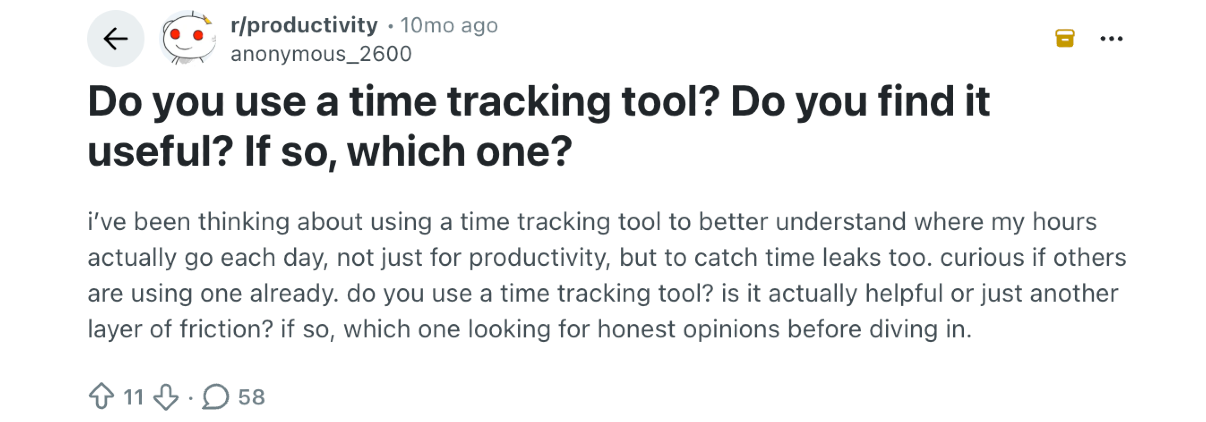
That thread is a great snapshot of how people feel about time tracking; no marketing, no polished success stories, just honest experiences.
What’s interesting is how mixed (and relatable) the responses are.
Some people swear by it. A user mentioned that time tracking helps them see a breakdown of their day, helping them plan better and maintain focus on what truly matters. Another pointed out that simply tracking their work made them more intentional.
But not everyone had a good experience.
For example, one user admitted they find time tracking to be expensive or not working properly.
So, it feels like when time tracking works, it’s eye-opening. You start to see patterns, like how long things actually take, where your time goes, and what messes with your focus. But when it doesn’t, it’s like extra admin with no reward, like another thing to keep up with that tells you nothing you didn’t already know.
So, how come people have such polarized opinions on time tracking? Does it really work?
Well, it’s all about the tool you use and how you use the time data.
But I’m getting ahead of myself. Let’s talk about the first few days you start time tracking.
The first few days of tracking your time
Let’s imagine you’ve found the tool you want to use. (For this part of the story, it really doesn’t matter whether you chose a manual or automatic one.)
And you started tracking.
The first thing you’ll notice is your day laid out in actual blocks of time, including what you worked on and for how long. Sometimes, even when you get distracted.
And that’s amazing but a little disorienting. Not in a bad way, more like turning on the lights in a room you’ve been sitting in the dark for so long.
So, that first week experience for most people is a mix of “oh, I actually jump between tasks a lot” and “wait, it actually takes me THIS long to complete this silly little task??”.
Basically, during these early days, you start catching yourself. You realize a 10-minute check-in call went to 35 minutes. You notice a task you thought you spent 2 hours on only took 25 minutes, or vice versa.
So, you may feel a little discomfort, but just give it a few days, and that discomfort will pass. The data stays. 🙂
Where time tracking typically breaks down
The first 2 weeks of your time tracking experience have passed, and so has the excitement and novelty. This is when people usually hit the wall with time tracking, and it almost always happens for the same reason: their time tracking tool.
Depending on the tool you chose, you might find that it asks you to do too much. As a result, you forget to track, and you don’t want to reconstruct your days anymore. And it’s understandable; you don’t need another job next to your current one.
Here’s what and why it happens in detail.

You forget to track time (and face the real cost).
This happens when you use manual time tracking tools, where you are asked to click a timer or log your hours at the end of the day.
Now, the reason you forget to track is that your tracking is only as good as your memory and discipline. And memory and discipline don’t really go with real workdays.
Sven Rohskogler, Managing Director of büroJETZT, put it bluntly:
… you don't do it. It starts when you forget to press start.
And you’re not to blame for this “flaw”. Your days are fragmented; you’re deep in a client document, your phone rings, you take the call, you fire off 3 quick emails, someone taps you on the shoulder, and so on. And by the time you’re back at your desk, it’s 2 hours later, and you have no idea how to reconstruct what happened.
And that’s the real cost. You get inaccurate records, but also untracked, unbilled, and unacknowledged time. A few hours per project might not sound like much, but multiply that across every client, every month, and it adds up to a significant amount of revenue that simply never gets invoiced.
Work that was done, effort that was real, just never made it onto the bill. And unlike a missed deadline or a budget overrun, this kind of loss is so quiet; it eats into your margins until you stop to wonder why the numbers never add up.
You need to do end-of-day reconstruction.
When you forget to track time, you try to make up for it with timesheets at the end of the day or the week.
And that seems like a reasonable fix, but in reality, it rarely works. All because you’re guessing your hours.
Thomas Baumgartner, Managing Director of Baumgartner + Partner AG, put it well:
My days are very fragmented, in the evening I have long forgotten what I did and when.
You might remember the big stuff, like that really important client meeting or the proposal you worked on. But you won’t remember the 20 minutes you spent troubleshooting something in the morning, or the internal briefing that ran long. Your brain simply doesn’t work that way.
Your tool gets in the way.
This one’s more about tool setup than your behavior.
If your time tracking system is complicated to use, requires multiple timer clicks per entry, and doesn’t connect to the software you already use, you’ll abandon it. Plain and simple.
Hermann Hacker of neue kommunikation hit exactly this wall with their previous solution:
Time tracking in Troi is too complicated... For our project managers the day is just too defragmented that it doesn't help.
Time tracking shouldn’t feel like a burden. It should help you do your job, not interrupt it, or make it even more difficult.

How to avoid these breakdowns
It’s pretty simple: be careful when choosing a time tracking app.
There’s a real difference between time tracking that requires you to remember and initiate everything, and time tracking that captures what’s happening in the background while you just work.
Think about it.
Manual approaches with start/stop timers, end-of-day logging, and spreadsheets put the entire responsibility on you. But if your day is fragmented across clients, projects, meetings, and quick tasks, manual tracking doesn’t work with how you actually work. Automatic time tracking does.
Automatic time tracking tools (like Memtime) don’t ask you to remember what you did. They show you what you did and let you assign it to projects afterward.
Memtime runs quietly in the background on your Windows, Mac, or Linux machine and records every app, file, meeting, call, document, and browser tab you interact with, down to the minute. At the end of the day (or week), you open it up, see exactly what happened, and turn that activity into time entries. Everything stays on your machine, so your data is yours alone.
How automatic time tracking helps your work & business
With automatic time tracking, the whole process becomes easier and more efficient over time. Here’s what I mean by that.
Your project estimates start working.
This is one of the most concrete and consistent improvements across every business that sticks with automatic time tracking. When you have real, accurate data about how long things take, you stop guessing when quoting projects (no more guesstimation!).
Gero Pflüger ran his agency for years, wondering why cash flow was always tight despite steady work. The answer, once he had the time data, was straightforward:
I simply operated with completely wrong figures and therefore often set too small time windows for the projects and thus agreed on too small retainers.
With accurate data, he was able to adjust his pricing and stop losing 5-figure sums every year to underestimation.
Katharina Willner, Managing director at vlow studio, put it succinctly in a review:
We can realistically assess future projects.
The emphasis on *realistically*.
That’s the promise of good time data, and it doesn’t arrive in week 1. It arrives after a few months of consistent tracking when you actually have enough history to learn from. So, just be patient.
You start making more strategic decisions.
This one’s a bit less obvious. When you can see where your time goes, across projects, clients, and types of work, you start making different choices about what to take on, what to delegate, and what to charge for.
- Gero Pflüger noticed this himself. By tracking everything, he started bundling his personal distractions, going to work later, leaving earlier, and getting more done in the time he was actually working. He hadn’t had a 60-hour week in years. 👏
- For teams, the accurate data enables better capacity planning. Thorsten at DESIGNDIALOG found that the insights gave the whole team something to discuss and act on together, not just as a billing tool, but as a resource planning tool.
Client conversations get easier.
There’s something satisfying about being able to show a client exactly what happened and when. It removes a lot of ambiguity, especially on longer projects where scope tends to creep quietly.
Not to mention, once you have accurate, complete records, billing becomes straightforward. You’re not trying to reconstruct hours from memory, not second-guessing yourself about whether you underbilled, not dreading client questions. The data is just there, waiting for you to use it.

Common automatic time tracking mistakes to avoid
Now, just because automatic time tracking is convenient doesn’t mean it’s completely set’n’forget.
By that, I mean it’s painless in the sense that you don’t have to start timers or fill out timesheets all day. But it still depends on how you use it.
You still need to review your timeline and group activities. And this part isn’t about time tracking itself; you do it to make sense of the data it gives you.
That said, here are a few things that consistently trip people up:
- Expecting perfection in week 1. Time tracking data is only as useful as the consistency and volume behind it. One week of records doesn’t tell you much; 2 or 3 months will tell you a lot.
- Tracking time but not doing anything with it. The data is just a starting point, so look at your reports. Ask what surprised you. Use it to have a real conversation about pricing, scope, or capacity. Learn to use the numbers.
- Assuming it’s all about surveillance. If you’re rolling time tracking out to a team, the framing matters a lot. Time tracking presented purely as a control mechanism will get gamed or resented (and later abandoned). Time tracking that’s framed as a tool for better estimation and fair billing tends to get adopted.
- Quitting too early. The awkward phase is real, and those first days of realizing how much time is disappearing or how inconsistent your records are are also normal. Push through it and your work will get clearer.
What to expect from time tracking: TL;DR
Time tracking is one of those things that sounds complicated but turns out to be interesting and pretty easy in practice. With the right tool, of course.
The first days involve a learning curve and a few uncomfortable revelations. The middle period is where most people quit, usually because the tool is too annoying, so they can’t build the habit.
But the companies that stick with it and use automatic time tracking tools consistently report the same things: more accurate billing, better project estimates, more transparent client relationships, and a much clearer sense of where time is actually going.
As Bodo Schiefer put it:
Using it actually makes you happier because you can track every day and also eliminate waste of time quite easily.
And that’s probably the most useful thing to know about time tracking before you start.
FAQs
How long does it take to get used to tracking your time?
Most people get through the awkward phase within the first 2 weeks. The first few days feel a bit strange because suddenly you can see exactly where your time goes, and it’s not always what you expected. After that, it either becomes a natural part of your workflow or it falls apart because the tool is too demanding. The individuals/companies that stick with it consistently say the same thing: the data gets more useful the longer you track.
Is automatic time tracking private, or can my employer or client see everything?
That depends on the tool. Some cloud-based tools do give managers (or clients) access to raw activity data, which understandably makes people uncomfortable. Memtime works differently; all your captured activity stays locally on your machine and never gets uploaded to the cloud. You decide what gets shared by turning your recorded activity into time entries and exporting only those.
What should I actually do with my time tracking data?
Tracking time without looking at the data is a bit like stepping on a scale and never checking the number. The real value comes from reviewing your reports regularly: spotting which projects consistently overrun, which clients take longer than you’re billing for, and what distracts you. Over time, that data changes how you estimate, price, and plan, which is where the real return on time tracking shows up.
Does time tracking work for people with very fragmented, unpredictable workdays?
It actually works best for them (but only with the right tool). Manual tracking has issues with fragmented days because it relies on you remembering to log everything, which just doesn’t happen when you’re switching between clients, calls, and tasks all day. Automatic tools like Memtime are built for exactly this kind of workday, capturing everything the moment it happens.
Will time tracking make my team feel like they’re being watched?
It can, if it’s framed the wrong way and you choose a surveillance-y tool. Some time tracking tools are built around visibility for managers, so they include activity screenshots, live monitoring, and those will almost always create friction and resentment. The tool you choose matters just as much as how you introduce it. Something like Memtime is built around personal visibility, not monitoring, as the data stays on each user’s machine, and they control what gets shared.

Aleksandra Mladenovic
Aleksandra Mladenovic is a copywriter and content writer with six years of experience in B2B SaaS and e-commerce marketing. She's a startup enthusiast specializing in topics ranging from technology and gaming to business and finance. Outside of work, Aleksandra can be found walking barefoot in nature, baking muffins, or jotting down poems.







