Should This Meeting Have Been an Email? Red Flags & Real Costs
Welcome, dear professional meeting attendee.
If you’re here because your 3rd call of the day has left you with Zoom fatigue so deep it’s manifesting as a new medical condition, know that you are not alone. We’ve all experienced it.
You know the feeling. I know the feeling.
And it’s time we do something about it. Cuz I know that you’ve been thinking that your past 345,522 meetings could have been an email.
So, let’s do the impossible. Let’s explain which meetings could have been emails, how to tell the difference without a psychic degree, and list the real costs of letting meetings run wild.
Tighten your mute button, and let’s roll.
Key Takeaways
- If you keep thinking “this could’ve been an email”, you’re not being dramatic; you’re just exhausted from meetings that feel unnecessary.
- Most meetings aren’t collaborative at all; they’re just updates or approvals that interrupt focus and kill your concentration.
- Even quick or recurring meetings steal way more time than advertised, thanks to context switching and recovery time afterward.
- If most people are muted, multitasking during meetings, or saying “No updates from me,” that meeting had no business being live.
- Tools like Memtime help you prove it by showing planned meeting time vs. what actually happened, no guesswork, and no feelings involved.
- When you can point to real data instead of frustration, it’s much easier to cut unnecessary meetings without sounding bitter or burned out.

Reddit says you could be wrong about “this meeting could have been an email”. Could you be?
Let me share a Reddit thread that lives rent-free in my head.
It’s this gem on r/unpopularopinion titled “The people who claim ‘ThiS meEtiNg CoUlD HaVE beEN aN eMail’ are the same people who barely answer one out of five questions asked in an email”.
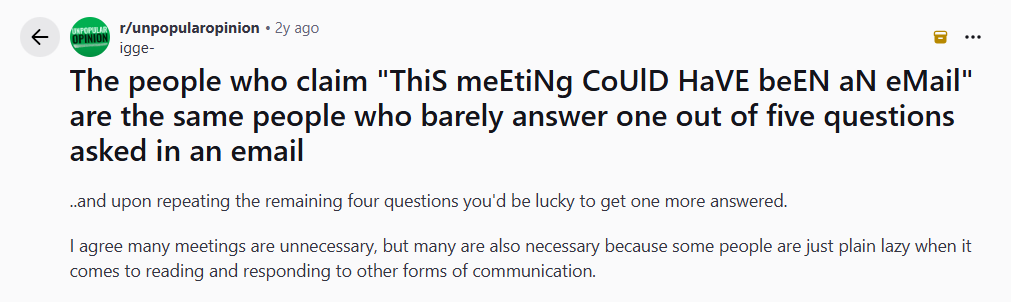
Yep, that thread is real, and it makes my blood boil just reading it.
According to this user, if you’re bold enough to mutter “this could’ve been an email,” you’re probably the kind of person who also ignores most of your emails.
That’s definitely not true. And that’s why the crowd did not agree with the statement.
Other users shared war stories of sitting in pointless meetings, like driving hours each way for a five-minute discussion that TRULY could’ve been a two-sentence email.
The reason I shared this thread specifically is that it captures beautifully the frustration that many of us feel when our calendars become full of redundant calls that have no purpose. This user has a point in theory, but completely misses the reality most of us are living in.
You’re not frustrated because you hate collaboration.
You’re frustrated because meetings have become the default.
You and 32% of employees who also sit through too many meetings they believe should’ve been an email.
When every update, clarification, or idea turns into a 30-minute call, it takes away your focus, energy, and actual working time. Context switching alone is exhausting. By the time the meeting ends, you’ve lost your train of thought, momentum, and even your patience.
So no, saying “this meeting could have been an email” doesn’t mean someone ignores their emails. It usually means they’re drowning in unnecessary meetings and desperately trying to protect the few hours they have left to actually get work done.
And that frustration needs to be taken seriously.
How to tell if a meeting truly could have been an email
The thing with meetings is that they aren’t evil, they’re just… overused. Yep, that’s the right word.
Like Reply-All. Or “quick syncs” and “circle backs”.
So, when your boss books another 30-minute block that actually steals an hour of everyone’s focus (thanks, context switching), you can look for these tattle-tale signs that the meeting should send an email instead.
#1 There’s no clear meeting goal
If the meeting description reads like “align”, “quick sync”, or “discussion”, know that it’s not a goal. It’s more of a *vibe*, and vibes don’t need calendar invites.
A meeting should exist for one of these 3 reasons:
- To make a decision.
- To solve a problem together.
- To handle something sensitive or complex.
If you can’t clearly say what will be different after the meeting ends, an email would do just fine and, probably, better.
#2 You are invited to verbally report
If the meeting consists of people taking turns saying, “Still working on it” and “No updates from my side”, that’s not collaboration; that’s just pure reporting.
And that’s what written reporting is for.
Status updates should be asynchronous so people can read them when they’re ready, skim what’s relevant, and stay productive.
#3 Most attendees don’t contribute
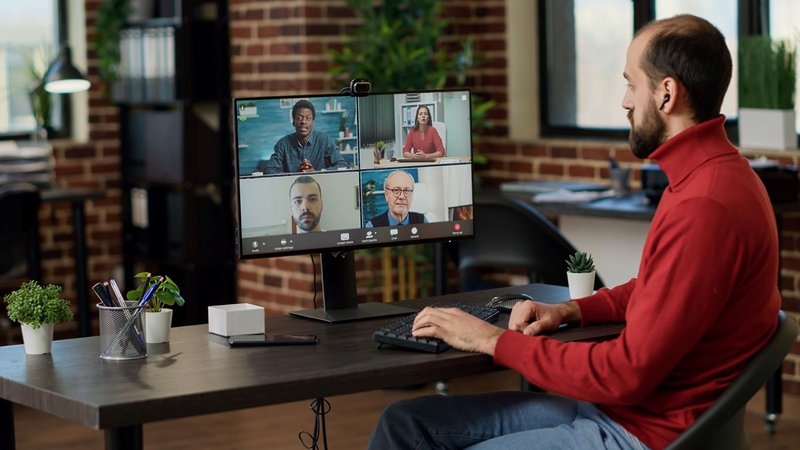
You know this type of meeting: one person presents, the other one responds. Everyone else is muted, cameras off.
If most attendees aren’t expected to contribute, ask questions, or make decisions, they don’t need to be there. That information can be shared—you guessed it—via email.
#4 The meeting exists “because it always has”
Recurring meetings are the most dangerous kind because they’re rarely questioned.
Is there actually new information every time? No.
Are we solving new problems, or just checking the box? Checking the box.
Would skipping this meeting once cause chaos or relief? Relief, for sure.
If the meeting exists because it always has, you and your team are just being compliant and motionless.
#5 Meeting decision could be made with a Yes/No reply
When a meeting’s entire purpose is to get approval, gather opinions or choose between options, an email could do just fine.
People can review information on their own time instead of reacting on the spot just to move things along.
#6 Quick meetings
“Just 15 minutes” is the biggest lie in calendar culture. Short meetings still require mental prep, context switching, and recovery time to refocus.
If the content of the meeting fits in a short paragraph, bullet list, or a screenshot, it belongs in an email.
Let’s play a game: Meeting vs. email
Alright, kick back in your chair, cuz it’s game time!
Below are 10 scenarios you might find on your schedule. Try to pinpoint the unnecessary meetings that could have been emails:
- Weekly update. Everyone just wants to know what everyone else is doing.
- Brainstorming session for a new campaign. Think collaboration, instant feedback, and spontaneous “aha!” moments.
- Sharing the latest policy update meeting. Discussing the specifics of the policy update.
- Client kickoff call. The client has questions and expectations that need to be aligned.
- Reminding the team of upcoming deadlines. A meeting in which you discuss deadlines.
- Emergency project coordination. The meeting is about next steps, assigning tasks, and clarifying who’s doing what.
- Budget approval. A manager needs to approve a straightforward budget, and everyone is expected to show up.
- Cross-department meeting. Different teams with conflicting priorities and technical constraints discuss recent matters.
- Office birthday party meeting. Reminding everyone about the party.
- Quarterly strategy review meeting. Think leadership discussion, alignment on goals, and decisions about next quarter.
Did you get it right?
Odd numbers are meetings that should’ve been emails.
Even numbers? Yup, real meetings.
I genuinely want to know how many times you thought, “Wait… I’ve actually been in that ‘email’ meeting”. 🙂
Let’s sum it all up. When should you have a meeting and when is an email enough?
Here’s a friendly guide to help you tell the difference between necessary and unnecessary meetings.
When an email is enough checklist
If you checked all 4, skip the meeting. Email is faster, reduces interruptions, and gives everyone written proof they can reference.

When you actually need a meeting checklist
All the points in the checklist have one thing in common: they can’t be explained or decided via email. Live meetings can speed up decision-making and focus on collaboration. All that would be impossible in writing.
How to talk to your boss/client about cutting down email-worthy meetings
Here comes the good part.
It’s time you bring all your frustration to your boss or a client. And you have to do it without sounding like you’re frustrated or losing your mind.
So, here’s a friendly and practical approach; they won’t be able to say “no” to you. 🙂
#1 Suggest you do an experiment
Your client or manager definitely won’t appreciate it if you barge in with something like, “We need to cut down those useless meetings!”
So, instead, keep your cool and say that you have been thinking about experimenting with meetings, specifically turning some status updates into emails to free up time for deeper work.
When you frame it as an experiment, your boss or client won’t be so defensive and you’ll be able to have real conversations with them. You can catch more flies with honey than with vinegar.
Also, when you talk about specific meeting replacements, explain why email is a superior solution. For example, for status updates mention that they don’t need interaction, and that reminders and announcements can also be done via email. Mention that your goal is not to eliminate communication but make it more efficient and less disruptive.
#2 Provide evidence
Nothing changes minds like data.
That’s where a tool like Memtime comes in.
Memtime is our automatic time tracker that captures real meeting time so you can compare it against planned calendar time, to get the actual impact of all your calls.
How does it all work? Glad you asked.
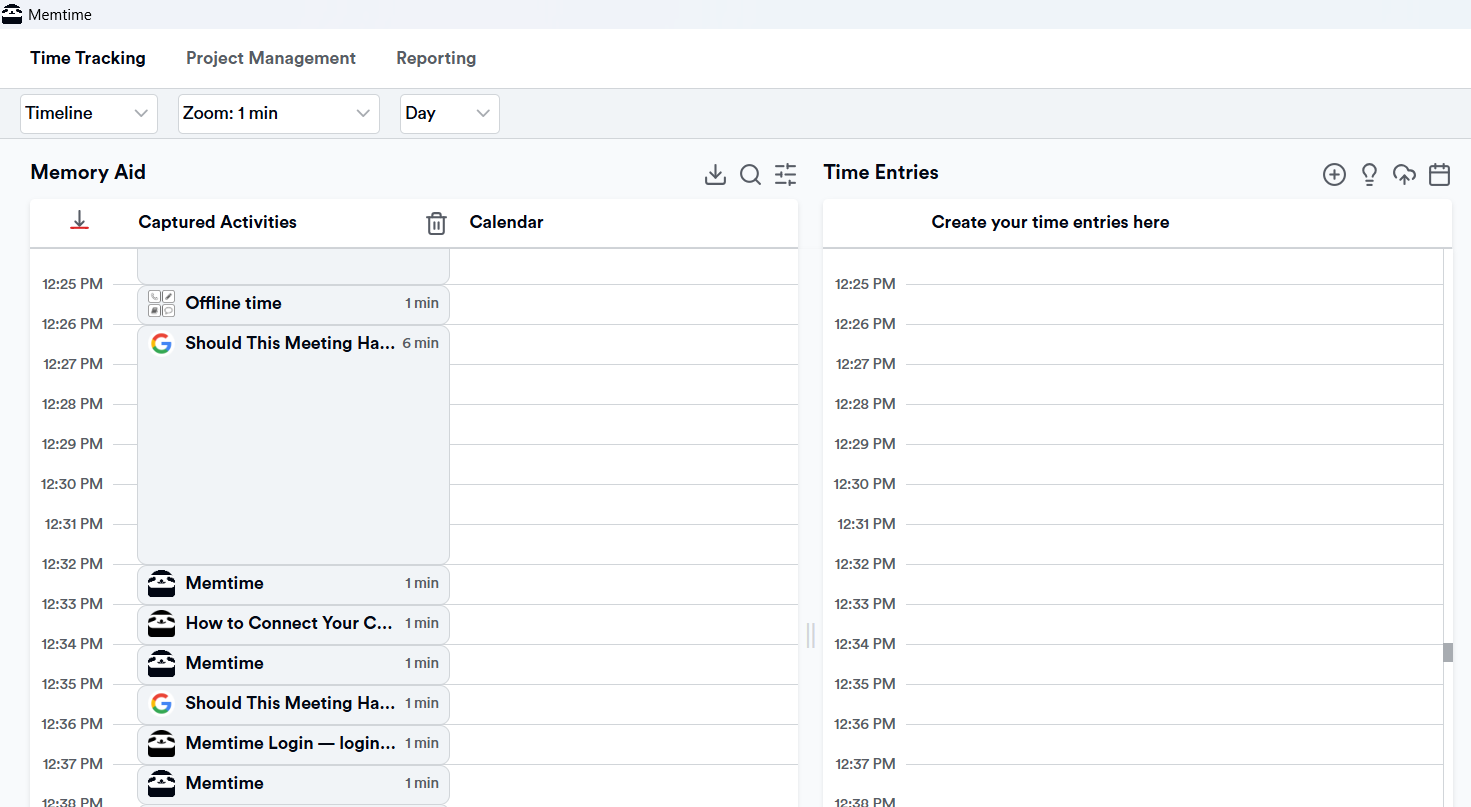
First of all, Memtime automatically captures your computer activity in the background, so you don’t have to remember what you did—it’s all logged for you. No manual timers. You then see all your activities in the Memory Aid timeline, like so:
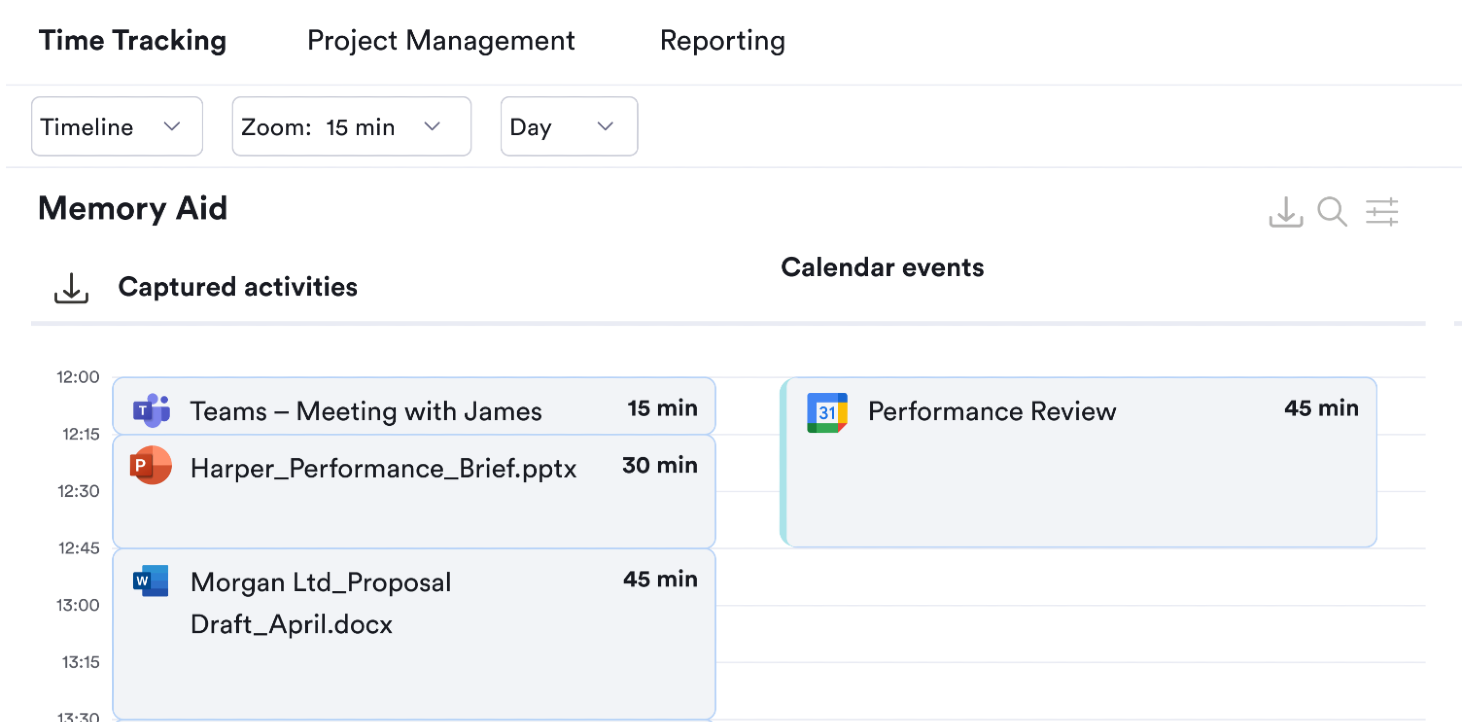
Second, Memtime allows you to sync your calendars, so planned appointments and actual captured time sit side by side.
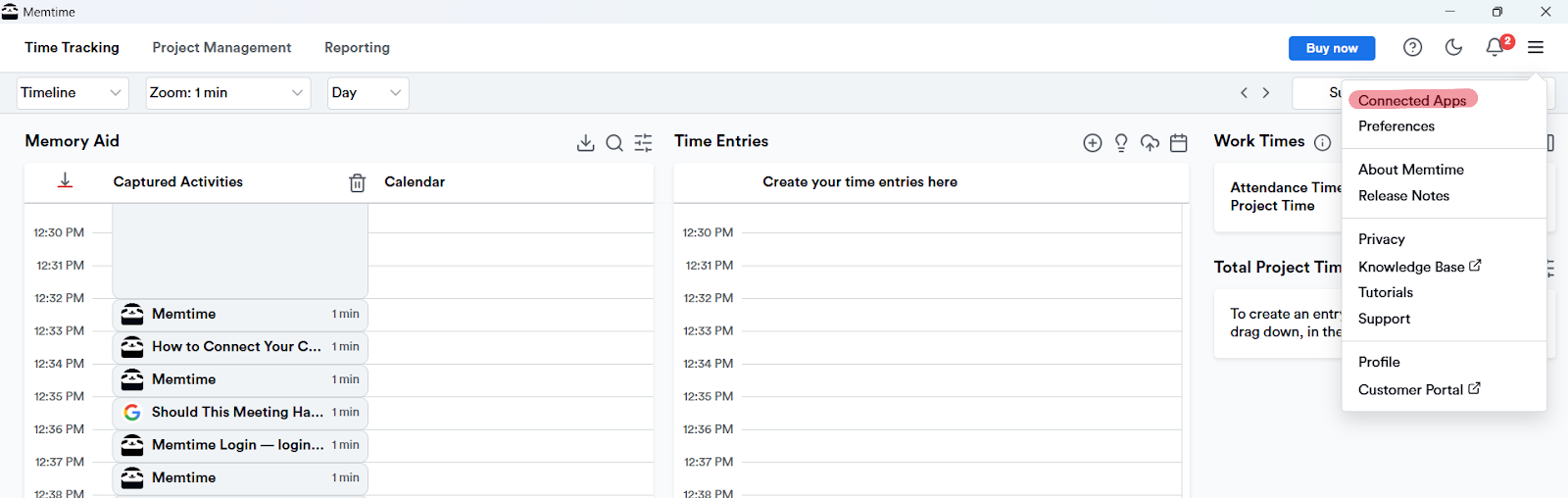
You download Memtime, open it, click the hamburger menu icon at the top right corner and choose Connected Apps:
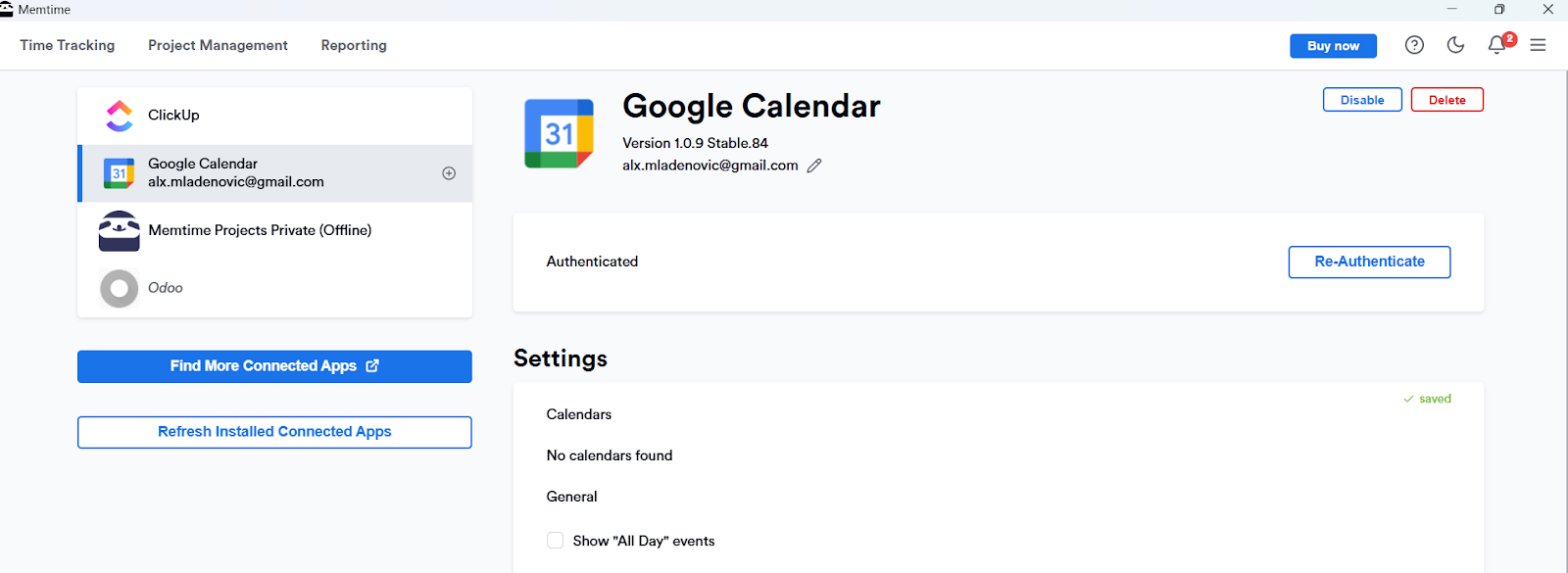
You then follow this simple tutorial on how to sync your calendars with Memtime, and you end up with a calendar listed under your connected apps. Like so:
For example, once your calendar is synced, scheduled meetings appear directly alongside the time Memtime actually captures during your day.
This makes it easy to compare what was planned with what really happened — without relying on memory or manual tracking:
And third, imagine walking into a conversation with something like, “We planned for 5 hours of meetings this week, but the actual meeting time ended up being 8 hours. Meaning, 3 hours of that was in meetings we could likely replace with email.”
Boom. You have their attention.
Bonus points if you can point to the exact meetings and show the captured time next to the calendar entry.
#3 Show the real cost of those meetings
Clients and managers love talking about costs and money. Use that to your advantage.
Point your boss or client to the meeting cost calculator, our calculator that quantifies how much a meeting really costs when you factor in participant count and hourly rates. Seeing the actual cost is often way more persuasive than just hours or your feelings.
#4 Suggest a trial period
You’ve made your request, but you can’t expect your manager or client to be fully on board.
That’s why I urge you to suggest a trial period; there’s no need to make a permanent change.
Propose a 4-week meeting experiment, where status updates go to email and only truly collaborative topics stay on the calendar. After the trial, compare productivity and feedback.
Memtime can come in handy during the trial, as it makes it easy to see planned vs. actual meeting time, and whether you (and your team?) gained time back.
Wrapping up
You’ve seen the warning signs, survived the Reddit rage, played the Meeting vs. email game, and even learned how to talk to your boss or client without being mad about meetings.
Good job!
Now, the next time your boss schedules a “quick sync” that looks like an email in disguise, arm yourself with Memtime and evidence to make your case. Show them the numbers, run the trial, and watch as your calendar clears out. ✌️
Is it really that bad to say “this meeting could’ve been an email”?
No, not at all. Most people say it because they’re overwhelmed, not because they hate collaboration. It’s usually a sign that meetings are being overused, not misused.
How do I know if a meeting actually needs to happen?
The quickest way to tell is to ask yourself what will change after the meeting. If there’s no decision, problem-solving, or real discussion involved, an email probably gets the job done faster.
Aren’t emails easier to ignore than meetings?
Sometimes, yes. But that doesn’t mean every update needs a calendar invite. Written updates let people respond when they’re focused, rather than forcing rushed reactions in real time.
What if my boss or client loves meetings?
You’re in a bit of a pickle, but that’s where data helps. Tools like Memtime show how much time meetings actually take, making it easier to suggest alternatives (like communicating via email) without sounding resistant.
How can Memtime help me cut down on unnecessary meetings?
Memtime automatically tracks real meeting time, so you can compare what was planned with what actually happened. Having those numbers makes conversations about fewer meetings way less awkward.

Aleksandra Mladenovic
Aleksandra Mladenovic is a copywriter and content writer with six years of experience in B2B SaaS and e-commerce marketing. She's a startup enthusiast specializing in topics ranging from technology and gaming to business and finance. Outside of work, Aleksandra can be found walking barefoot in nature, baking muffins, or jotting down poems.







