Punch In and Out Systems Are So 80’s: What to Use Instead

If you’ve ever stood in line behind a wall-mounted clock, with a badge in your hand, waiting to “punch in” like you’re about to start a shift at a 1985 auto plant, you know the struggle. And you’ve experienced a system that even time forgot.
Punch in and out systems had their moment. They helped factories run smoothly, ensured shifts were staffed, and gave managers an illusion of control.
But it’s not the 80s anymore.
Work doesn’t happen in blocks, and people don’t sit at 1 machine for 8 hours. Nowadays, productivity has very little to do with whether someone is physically there.
That all said, let’s talk about why punch in and out systems are outdated, what they actually measure, and why modern teams like yours should opt for alternatives. We’ll also shine a spotlight on automatic time tracking and a tool built specifically for how work happens today.
We’ve got no time to waste, so let’s roll.

Key Takeaways:
- Punch in/out systems made sense for factory floors, but they don’t work in modern, flexible, knowledge-based work environments.
- Attendance tells you who showed up, not what actually got done, so it’s a pretty weak signal for productivity.
- You don’t need timestamps on a clock; you need insight into outcomes, effort, and value.
- Results-based tracking motivates you to think about progress and deliverables.
- Project-based and automatic time tracking reveal where time really goes.
- Combining results, projects, and automatic tracking gives you an honest picture of work, and tools like Memtime make the entire process private and flexible.
- Memtime automatically tracks work, respects privacy, and helps teams understand how time is spent.
A superbrief history of punch in and out systems
When we say punch in and out systems are so 80s, we don’t specifically mean the 1980s. 🙂
Punch in/out systems first appeared in 1888. That year, William LeGrand Bundy, a New York inventor of mechanical devices, created the timekeeping clock. The patent, known as a time recorder, was granted by the US Patent Office and Trademark Office.
Coincidentally, that same year, across the ocean, Alexander Dey introduced his dial recorder.
Both devices had the same function: recording when employees clocked in and out.
Just 6 years later, in 1894, the first punch card machine saw the light of day. Daniel M. Cooper, the inventor, created the machine and built it with a punch card. The employees, as they started their shifts (like factory workers and hospital staff), slid the cards into the machine and received a time-coded hole punched in their cards.
Fast forward to the 1980s.
In the 80s, electronic time clocks took over, and the time clock industry was at its peak during the 70s and 80s.
The companies upgraded the old punch-card clocks. The newer machines used electronic time cards, so—technically speaking—they tracked when someone clocked in and out, and also sent that data to payroll, calculated overtime, and even factored in tax deductions. Basically, they did a lot of the math humans were tired of doing.
Back then, punch in and out systems truly worked
I think it’s pretty clear that punch in/out systems were designed for a very specific environment: physical workplaces, fixed shifts, and teams in which output is related to time on site. Think factory floors, warehouses, and assembly lines. Back then, if you weren’t present, the machine didn’t run.

Attendance equaled productivity, and the system was pretty clear: you arrive, you punch in; you leave, you punch out.
It was simple and effective. Until it wasn’t.
Nowadays, we have remote teams, knowledge work, and asynchronous collaboration. Not to mention a lot of creative and cognitive work. So, being there isn’t the same as working.
For example, imagine Alex (not me) logs in at 9 am and punches in on a punch clock, but spends the first 3 hours reading emails and scrolling social media. Meanwhile, Jamie starts at 10 am, dives straight into a complex project, and solves a problem in 20 minutes. Both were “present”, but the punch clock only sees hours, not impact.
Think I’m the only one that feels this way?
Nope. A recent thread in r/WorkReform roasted punch in/punch out systems. The overall tone was that clocking in creates distrust and treats adults like children on a leash. It punishes flexibility instead of rewarding results.
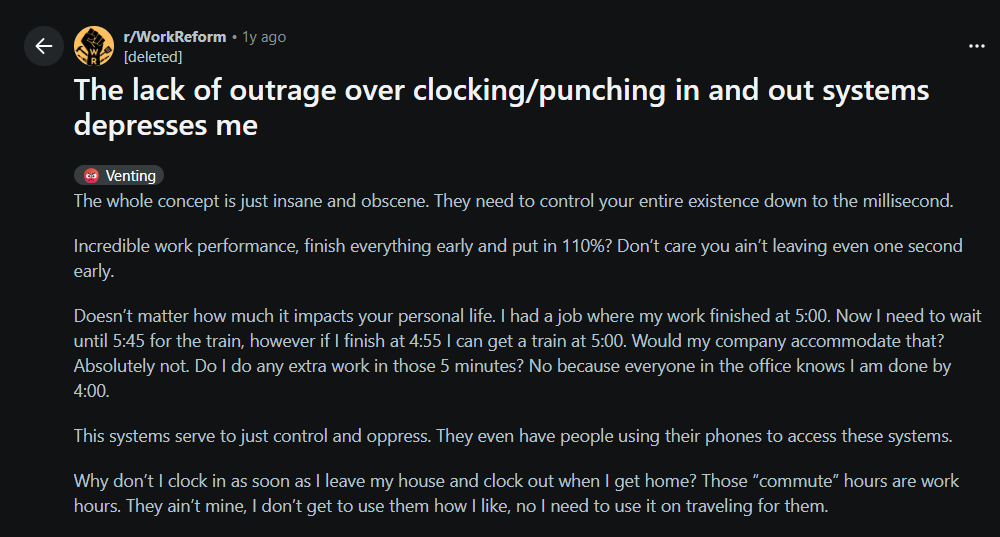
Many commenters pointed out the absurdity of being monitored while doing work that can’t be measured by time alone. Others shared stories of being slapped on the wrist for clocking in 2 minutes late, after answering work emails at home for free.
It’s all just a big mess.
The pros of punch in/out systems
To be fair, punch in/out systems aren’t evil by default; they have legitimate use cases and can provide:
- Clear attendance records.
- Simple payroll calculations.
- Compliance with labor laws.
So, if you’re running a restaurant, hospital, warehouse, or factory, these systems make sense. Attendance is a part of the job.
The cons of punch in/out systems
These physical systems are anything but flawless. Here are some of their cons:
- They measure presence, not productivity. Punch clocks don’t care what you did, only that you were there. Meaning, 8 hours of doomscrolling are the same as 8 hours of deep work. Baloney! Knowing someone was logged in from 9 to 5 tells you nothing about what they worked on, their priorities, efficiency, or results.
- They encourage performance. People can stay clocked in even when they’re mentally checked out.
- They kill autonomy. When adults are forced to prove they’re working every single minute, there’s no trust. And once trust is gone, so is engagement.
- They don’t reflect how work happens. Modern work is sliced between meetings, deep work, context switching, etc. Punch clocks flatten all of this into one pointless number.
- They create bad incentives. If time equals value, people focus on time, not their outcomes. That’s how you get long days and very little progress.
So, what should you use instead?
By now, I hope that you agree that “being there for 8 hours” is NOT business intelligence. Attendance tells you who showed up, not what happened.
Your goal should be to understand how work happens. And that means moving beyond presence and asking better questions like:
- What got done?
- Where did time actually go?
- What’s blocking progress?
- What creates value?
With that shift in mind, here are the most common alternatives to punch in/out systems.
#1 Results-based work tracking
This approach is pretty straightforward: instead of keeping tabs on attendance, you focus on deliverables, milestones, OKRs, project progress… You get the drill.
If the work is done well and on time, it doesn’t really matter whether it happened at 7 am or 11 pm. This method rewards results, encourages autonomy, and ties work directly to actual business goals. Time spent at a desk doesn’t really matter, and people can work when they’re most productive.
The only downside is that it requires crystal-clear expectations and strong management. Everyone needs to know exactly what success looks like, which deliverables matter most, and when they’re due. Without all these, results-based tracking gets pretty messy.
#2 Project-based time tracking
Rather than tracking when someone worked, you track what projects and tasks they worked on, how much time each took, and where effort is being spent.
Tracking time in this context helps you discover whether you’re underestimating projects, which clients consume the most time, which work is unprofitable, etc.

The thing about project-based time tracking is that it won’t work if you rely on daily summaries or weekly work logs from your team. If you only see time ranges, or rounded or guessed hours, not exact minutes, you won’t be able to base your decisions on reality.
Why?
Well, because, according to the Harvard Business Review study, Time is money, the more often time is tracked, the more accurate the results are. If your team logs their time at least once a day, they are 66% accurate; those who log their time weekly are 47% accurate, and people who fill out their timesheet less than once a week are only 35% accurate.
#3 Automatic time tracking
Automatic time tracking is just what it sounds like. Fully automatic, no manual work (which is what you get with Memtime, btw).
Instead of asking people to start and stop timers, automatic tools run quietly in the background, detect activity, and build a private timeline of work. As a result, you get accurate data and no performative clicking.
Now, the main concern with automatic time tracking tools is employee surveillance. They are often portrayed as “spying tools” that gather personal data behind the scenes. You can’t control them, and who knows where your data goes.
To that, I say: not all automatic tools are created equal.
The good ones help your team understand their work before reporting anything and allow them to review and decide what gets logged. No minute-by-minute surveillance or any type of control.
Bringing them all together
Individually, each of these approaches has its strengths.
- Results-based tracking keeps your team focused on meaningful work.
- Project-based tracking shows you where effort is going.
- Automatic tracking gives you accurate, real-time data without any manual work.
That’s why the real magic happens when you combine all 3. When you track results, projects, and time automatically, you get a complete picture of your team’s productivity.
You can see what work is being done, how long it takes, and whether it aligns with your goals. That’s the kind of insight that lets you make smarter decisions and actually support your team.
Shortly put, when you combine results, projects, and smart automatic tracking, you’ve got a system that actually works for and with your team. Now that’s an opportunity you can’t pass up. 🙂
Of course, to make this work, you need an automatic time tracking tool that truly understands your needs. It should integrate with projects and tasks, give actionable insights, and respect your team’s privacy.
Say hello to Memtime
Now let’s talk about Memtime.
Memtime is our automatic time tracking tool built specifically for knowledge-based work. It’s not a punch clock in digital form. In fact, it replaces such clocks and timers entirely.
Here’s what Memtime does differently:
- It tracks everything automatically. From the moment you turn your computer on, Memtime runs in the background and records your activity across apps, meetings and documents; there are no timers, buttons, or interruptions. It can even track your calls (made through voIP services or your iPhone).
- You get a 100% private timeline. Memtime has a Memory Aid, an activity timeline only you can see. You, as a user, decide what gets assigned to projects and shared. You can scroll back through your day (or week) and see exactly where time went. From this timeline, you can also assign time to projects or clients, merge or split activities, and add descriptions or notes where needed.

- It stores data on your computer. Memtime tracks locally on your device, not in the cloud, so raw activity data stays with you.
- You get calendar sync. Memtime can sync with your calendar to help you compare planned vs. actual meeting time and see how interruptions affect your day.
- You get streamlined project management. Memtime integrates with project management, accounting, and billing tools (over 100 of them) via a 2-way sync. The 2-way sync allows you to import projects and tasks into Memtime, assign time entries, and export time entries to your project management or billing software of choice. No copy-pasting needed.
- You get fully accurate reports. Once you review and assign time, Memtime gets you reliable reports. You can then generate project-based summaries, specific time breakdowns, daily, weekly, or monthly overviews, and whatever you feel like you need.
As you can see, Memtime focuses on real work. It really doesn’t care when you started your day; it shows you what you worked on, how long things actually took and where your time went.
There’s no live monitoring and no clocking in.
Like how that sounds?
Then allow me to invite you to start our 2-week free trial and see how Memtime fits in your daily workflow.
Or.
If you prefer a guided walkthrough first, let’s talk. You can book a demo with our team and see for yourself how Memtime can integrate in your team’s workflow. It’ll only take 15 minutes, but it’ll feel like 5—I promise.
It’s time for the punch clock to retire
Punch in and out systems had a good run. They helped scale physical labor in the industrial age. But now it’s time we let them go; they’re better off in a museum next to fax machines and overhead projectors.
Your team deserves better.
Their value comes from thinking, creating, solving, and collaborating. So, why would you measure just their attendance? It’s like judging a book by its weight.
Sign up for Memtime and see how and where your people spend their time. Once you see what real work looks like, there’s no going back.
FAQs
Are punch in/out systems completely useless now?
Hm, not entirely. They still work for factories, restaurants, and warehouses where attendance matters. But for knowledge work and remote/distributed teams, they measure just presence, not productivity.
What’s the difference between results-based and project-based tracking?
Results-based tracking focuses on deliverables and outcomes and whether the work gets done. Project-based tracking shows where effort goes, how long tasks take, and which projects need more attention. You get the best of both worlds when you combine them.
How does automatic time tracking work?
Automatic tracking runs in the background, recording your activity without timers. Such tools create a timeline of work that you can review and assign to projects. With Memtime, your timeline’s completely private, so you see only your own data and share what you want. Ditto for your team, as well.
Won’t automatic tracking feel like surveillance?
Not if it’s done right. Good automatic tracking tools focus on insight, not spying. Memtime, for example, stores data locally, lets you control what gets logged, and never tracks (no screenshot capture or video tracking) for micromanagement.
Can my team use Memtime without adding extra work?
Yes, of course! With Memtime, there are no timers to start or stop, and no interruptions. You just work as usual, and the tool gives you what you need (private timeline, tool sync, and reports). It’s all automated.

Aleksandra Mladenovic
Aleksandra Mladenovic is a copywriter and content writer with six years of experience in B2B SaaS and e-commerce marketing. She's a startup enthusiast specializing in topics ranging from technology and gaming to business and finance. Outside of work, Aleksandra can be found walking barefoot in nature, baking muffins, or jotting down poems.







