How to Make the Flowtime Technique Work (+ Free Timer)
Flowtime Technique, a flexible, focus‑based approach to time management helps you work in natural rhythms without any fixed intervals. In short, you simply work until your focus fades, then take a break based on how long you worked.
Let’s cut to the chase, we’re all busy peeps!
Below you’ll find our easy timer you can try right away 👇
How to use it:
- Hit the button and Start working
- Continue until your focus dips
- Stop and take a break
Why not give it a whirl right now? Or you could stick with me to read more details on how the timer can work, the Flowtime Technique itself, how it compares to the Pomodoro Technique, and examples of how you can use it for time management.
Key Takeaways
- Instead of using a regular timer, the Flowtime Technique allows you to work in flexible, focus-based sessions that end organically.
- The durations of your breaks are determined by the length of your work session, allowing you to recover without losing pace.
- For deep, creative, or variable-intensity tasks where strict intervals can feel constrictive, flowtime is particularly helpful.
- In contrast to the Pomodoro Technique, Flowtime eliminates countdown pressure and adjusts to the actual demands of your work.
- While the method works well, the burden of manually starting, stopping, and logging every session can be significant.
- The largest obstacle to using Flowtime regularly is eliminated by automatic time tracking, making the method much simpler to maintain over weeks and months.
- Automatic tools, like Memtime, can resolve the tracking issue as it records your work in the background while you work, making Flowtime easier to sustain over time.
What is the Flowtime Technique?
First brought to the public and subsequently working processes by Zoë Read‑Bivens, The Flowtime Technique is a flexible, focus‑driven approach to time management. As we touched on in the intro; instead of working in set intervals, it helps you work at your own rhythm. So, for instance, you select and name a task, start working on it, and keep going until your focus naturally dwindles toward thoughts of food (for me, it’s always food).
The length of your break (which shouldn’t be skipped as these reprieves are needed not only to relieve pressure but also to encourage deeper concentration) is then determined by how long you worked.
Behold how easy it is to use the Flowtime timer:
- Enter the task name in our “What are you working on?” box, then hit the “Start focus” button.
- Remember, there's no set time limit.
- When your concentration wanes, stop working.
- Your break is then calculated automatically.
- When the break is over, you'll hear an alert (a gentle “bing-bong’ type dealio, not jarring in the slightest) from our handy timer.
Break guidance:
While our timer calculates your break time automatically, there’s no harm in knowing how it gets there. Also, these guidelines ensure your breaks are long enough to help you refocus without disrupting your regular work schedule. Below is an outline of how it’s calculated.
- Under 5 min → 20% of your work time
- 5–25 min → 5 min
- 25–50 min → 8 min
- 50–90 min → 10 min
- 90+ min → 15 min
Examples of Flowtime Technique time management
Given that it allows you to focus on a task for as long as your natural concentration lasts, the Flowtime Technique adapts easily to various types of work. Need further convincing? Well, here are some real-world examples:
Innovative work
Imagine that you’re a designer, sketching concepts for a new campaign. You continue working on the task as ideas come to you, pausing only when your concentration wanes. In this case, you take an 8-minute break after a 42-minute session, come back rejuvenated, and better equipped to keep building on your momentum.
In-depth work
Another scenario might involve a developer. When working on a complicated feature, they start coding – without using a timer… When they glance at the clock, they realise they’ve been working for ninety‑three minutes (which, in my books, is an outstanding amount of focus time).

Using flowtime as a guide, they choose a fifteen‑minute break to reset, and return with sufficient mental clarity to tackle the next part of the issue!
Tasks related to administration
Email processing is done in shorter bursts. After spending eighteen minutes clearing the inbox and taking a five‑minute break, you might move on to scheduling or paperwork.
Research and education
It’s not just for professionals! For instance, when reading dense material, a student keeps reading until the content no longer makes sense. Using Flowtime as a guide, they take an 8-minute break after a 27-minute session, which helps them learn without becoming burned out.
In terms of specific examples as they may pertain to freelancers and/or knowledge workers, consider the following:
Consulting or client deliverables
When writing a proposal, a freelance consultant starts by summarizing the main points. They don't stop until they see themselves rearranging the same sentence, and they continue as long as their reasoning is clear. After working a 46-minute session, they get an 8-minute break, which gives them enough time to come back with more precise framing for the client.
UX or product research
When analyzing interview transcripts, a UX researcher works methodically through insights until they notice a slowdown in their interpretation. Following a 63-minute stretch, they take a 10-minute break before returning to group themes and spot patterns from a different angle.
Financial or operational analysis
When creating a cost model, an operations freelancer works through formulas and assumptions until they notice a decline in accuracy. They take an 8-minute break after a 29-minute session to help them refocus before verifying data or creating recommendations.
These basic illustrations demonstrate how the Flowtime Technique increases productivity by allowing work sessions to grow or shrink in response to task demands.
Flowtime Technique Vs. Pomodoro
While both the Pomodoro Technique and the Flowtime Technique are about increasing focus, they do so in rather different ways.
- Flowtime completely eliminates clockwatching while you work and allows your sessions to grow or shrink according to how long your focus lasts.
- Pomodoro, meanwhile, depends on rigid, repeated intervals.
Selecting the approach that best suits your workflow, energy levels, and task type is made simpler when you are aware of the contrast.
Although they support different working styles, both approaches can increase productivity.
Whether you prefer to work to your own cognitive rhythm or to the clock will determine which is best for you.
Limitations of the Flowtime Technique
The Flowtime Technique is effective, but like any system that relies on self-tracking, it has practical limits. These problems don't make the method any less effective; they just show how people really work in real life.
- One common problem is forgetting to set a timer in the first place. It's easy to start working on something and then realise halfway through that you didn't log anything when you're keen to get started. People also forget to stop the timer when they lose focus, which makes the recorded session longer and messes up the break calculation.
- Another problem with logging work is that it can break the focus that the technique is supposed to help with. Changing focus to name a task, check a timestamp, or fix a session can break the flow, especially when you're doing deep work.
These little unintentional breaks add up over time. Tracking becomes less reliable, sessions aren't recorded, and the data isn't as helpful for finding patterns or improving the workflow. The method's main problem is that it works – it’s just that, sometimes, the tracking method doesn't.
Flowtime still helps with meaningful focus, but how useful it is depends on how well someone keeps track of what's around it.
A better way to track Flowtime automatically
The Flowtime Technique isn't hard to use, but keeping track of it is. When you're trying to concentrate, you shouldn't have to worry about timers. Anything you do by hand, even something as simple as naming a task or pressing start, can break up the flow you're trying to build.
Timers may seem useful at first, but you may find you don't use them for very long. Why? Say it with me now: you forget to start them, you forget to stop them, or you just get tired of dealing with the process.
This is where an automatic method really helps… Why, yes, we’re at that portion of the blog where I point out that Memtime tracks your work in the background, so there’s no more friction around countdown timers. With Memtime, you don't have to start or stop anything, log sessions, compile reports, or recall what you did, ‘cause it literally does it all for you!
It creates a clear timeline by logging the apps, documents, and tasks you worked on during the day. Simply put; it brings you complete visibility into your workday with zero effort on your part.
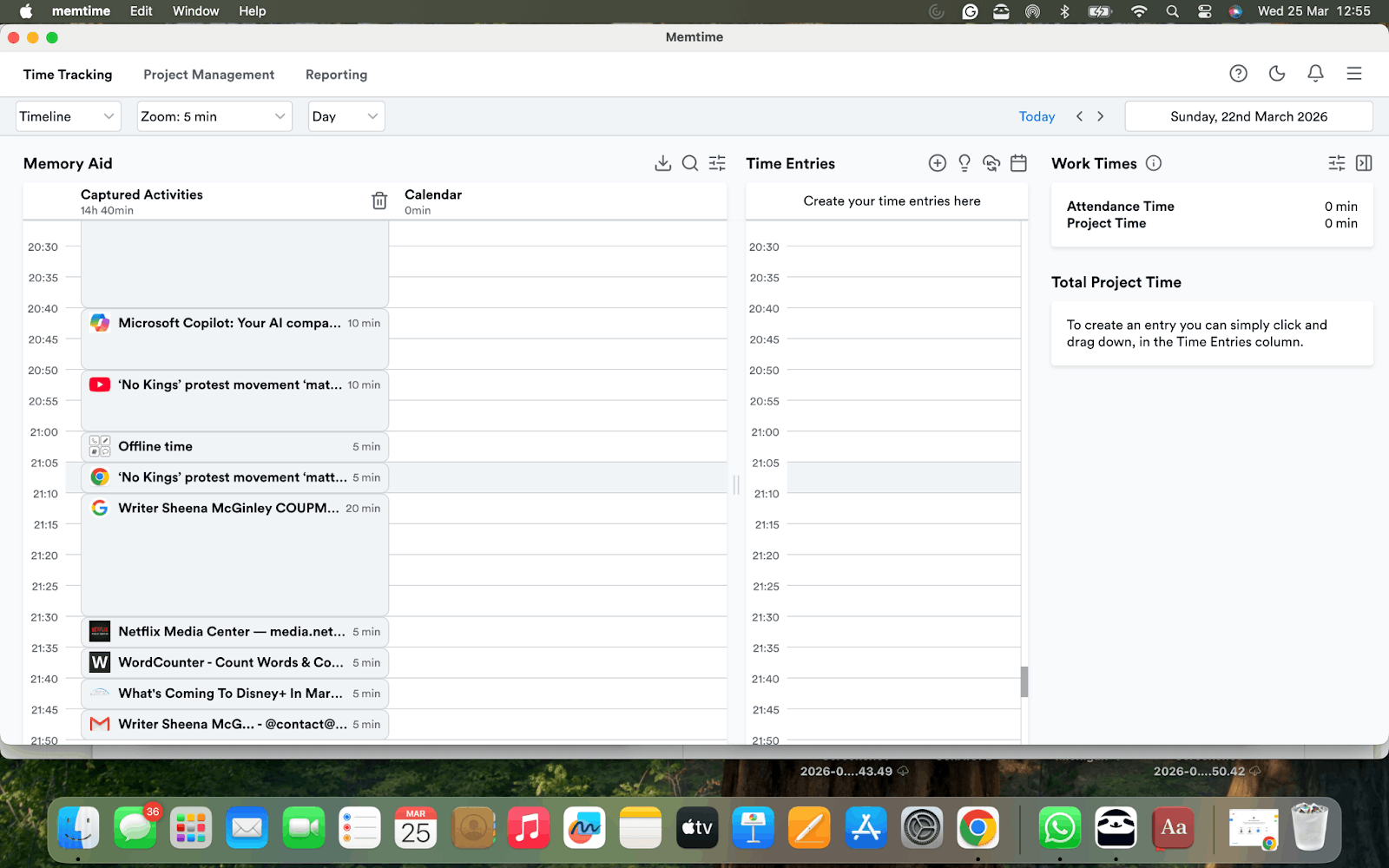
This addresses Flowtime's primary drawback: having reliable tracking. With Memtime, you can maintain the advantages of Flowtime – natural work sessions, deep focus, and flexible breaks – without the hassle of tracking timers or logs with automatic tracking.
There's a straightforward next step if you want to see how your time really adds up – and you’ll never guess what it is…
FAQs
What makes the Flowtime Technique different from other time management methods?
Flowtime is unique in that it doesn't force you into predetermined blocks; instead, it adjusts to the natural rise and fall of your concentration. Flowtime is based on internal cues, whereas many systems rely on external structure. This makes it great for tasks requiring creativity, problem solving, or full immersion.
Do I need a timer to use the Flowtime Technique effectively?
Although it's not entirely necessary, many people use timers to record their sessions and breaks. The problem with manual timers is that they rely on regular habits, which can change over time. Without a timer, the method still functions, but you can't examine trends or gauge how long tasks truly take.
Can Flowtime help if my workday is full of interruptions?
The short answer is “Yes.” It can facilitate a more seamless recovery from disruptions. Sessions aren't set in stone, so you become used to picking up where you left off. The method doesn’t punish you for context switching; it simply picks up where your attention naturally returns.
Is Flowtime suitable for collaborative or team‑based work?
Yes – as long as your team is aware that the duration of your work sessions varies. For individual tasks, many knowledge workers use Flowtime; for meetings, stand-ups, or shared deadlines, they use more structured methods.
How long should a Flowtime session last?
There is no perfect amount of time. You might be able to focus on some tasks for ten minutes or more than an hour. The benefit of Flowtime is that it shows your actual trends over time, assisting you in determining how long various kinds of work actually take.
What if I struggle to notice when my focus drops?
At first, this is typical. Rereading the same sentence, slowing down, experiencing mental fog, or straying into unrelated tasks are some indicators. As you get better at identifying these cues, your sessions will inevitably become more precise.

Sheena McGinley
Sheena McGinley is a columnist and features writer for the Irish press since 2008. She’s also a business owner that is conscious of how time tracking can foster progress. She wrote for SaaS companies and businesses that specialize in revenue optimization by implementing processes. She has the unique ability to digest complex topics and make them easy to understand. She shares this precious skill with Memtime readers. When she's not making words work for people, Sheena can be found taking (very) brisk dips in the Irish Sea.







