Freelance Hours: What Days Look Like & Where Income Disappears

Freelancing promises freedom. And it does get you that freedom.
You get freedom from meetings (mostly), commutes, and all the Karens who always have something to say.
But.
You also, paradoxically, don’t have that much freedom. You often work just as much—if not more—than corporate employees. And a decent amount of that work never turns into income.
We freelancers tend to have busy days in which we barely bill anything.
So, let’s talk freelancing and freelance hours. Let’s see what freelance days actually look like, why hours don’t equal income, and where your money simply evaporates. Most importantly, let’s find you a way to stop losing money in the background, ‘cuz nobody wants that.
We’ve got a lot to cover here, so let’s roll.
Key Takeaways:
- Freelancers often work long hours, but not all of that time is billable. That’s why knowing where your time goes is key to getting paid for your real work.
- Your most productive hours are limited; most creatives hit peak focus for 3-5 hours a day, so working longer doesn’t always mean earning more.
- Invisible tasks like admin, client emails, and project management eat into your time and income.
- Understanding your utilization rate (billable hours / total hours) reveals where your income leaks happen, so you can stop leaving money on the table.
- Automatic time tracking (Memtime) can capture every minute of work, helping you see exactly how much time is billable vs. unbillable.
- By combining real data from time tracking with market rates, you can confidently set rates, avoid undercharging, and make every hour count toward your income goals.

How many hours do you actually work?
How many hours do you work per day?
I bet your answer is “it depends”. Because it does.
Studies from 2015, like this one, showed that freelancers worked an average of 36-43 hours per week, translating to roughly 5-7 hours per day of productive time.
Fast forward almost 10 years.
According to this 2024 survey, freelancers work various amounts of time per week:
- Over 41 hours, 38% of freelancers.
- 39-40 hours, 31% of freelancers.
- 31-38 hours, 11% of freelancers.
- 21-30 hours, 11% of freelancers.
- 11-20 hours, 5% of freelancers.
- Less than 10 hours, just 4% of freelancers.
Moreover, a 2025 survey of freelance writers found that most work 5-6 hours per day, with very few working more than 9 hours regularly.
That seems balanced, right?
Sure, but what about those days when you work for 10+ hours? During those days, you technically “work” all day. That’s your reality, and the reality of many other freelancers (including myself).
Just check this Reddit thread from 3 years ago. A freelance graphic designer wanted to know how many hours other creatives work per day. They mentioned that they hit “several consecutive days of 5 to 6h of work” and their brain feels like jelly.

The responses were supportive.
- A user mentioned, “Graphic designer here. I aim for 5 hours a day of billable creative work.”
- Another user explained, “I usually do between 4 and 5 hours of actual work whilst billing for a full day.”
- And one summed it up perfectly: “Depending on the deadline it could be 2 hours or 12 hours.”
As you can see, all freelancers tend to have inconsistent schedules. They work long days occasionally while working far fewer hours on others. It’s a part of their business model.
A freelancer’s typical day
Let’s try to imagine your “normal” freelance day (whatever that is).
It might look like this:
- It’s 8:30 am. You get coffee and read emails. Respond to 3. And one client says, “Let’s circle back next week,” which translates to unpaid delay.
- At 9:30, your deep work begins. This is your peak focus window, and because you’re human, you only have 3-4 hours per day of true peak productivity. You know this so you get to work.
- At 12:00 pm, you get lunch. And most likely think about whether you did enough, and whether you should do more.
- Around 1:00 is when admin work begins. Invoices, contracts, follow-ups, and client hunting. All necessary, yet all unpaid.
- At 2:30, you get to Slack, hop on a client call, and encounter a scope change. Scope creep just entered the chat.
- It’s 4:00 pm. You still work, not so much billing. You’re tweaking your portfolio, learning, and marketing. Yadda, yadda.
- At 6:30, you officially stop working. Mentally, you’re still working; thinking, planning, stressing, waiting, and switching context. And all these invisible activities consume your mental energy and produce no direct income (can’t be invoiced).

Did I guess right?
If I did, I have a new question: what can we learn from this somewhat realistic schedule?
Well, the main thing is that you don’t get paid for working; you get paid only for your billable work (which is just a portion of your day). You spend a significant amount of time on marketing and finding clients, admin and accounting, email and communication, and business management. And all of these tasks are essential but non-billable.
And you’re not alone in this. Surveys like this one show freelancers spend around 6 hours per week on admin tasks alone, which generate no direct income. And that’s almost a full unpaid workday every week, like working every Friday for free.
Mind-boggling, but hey—that’s freelancing.
A word on utilization rate
Now that we touched on billable work, let’s talk about the metric you’ll never hear freelancers talk about (but they should).
Consulting firms and agencies often measure something called the utilization rate. It’s the percentage of available time spent on billable work.
The formula is pretty simple: Utilization rate = Billable hours ÷ Total available hours
So, for example, if you have a 40-hour work week and 24 billable hours, your utilization rate is 60%. In other words, even if you work 40 hours, you ONLY bill 24, and that gap is where income disappears.
(For reference, consulting averages are around 67.7% billable utilization, so it’s more than okay if you operate lower than that.)
Now, to understand the correlation between available hours, billable hours, and utilization rate for you, the freelancer, you need to stop viewing these terms from a corporate employee’s POV.
Those employees trade their time for money.
You trade outcomes for money, and that’s why working more hours doesn’t always increase income.

Where your income quietly disappears
Now that you understand the utilization rate, I think you can see the real problem.
It’s not that you’re not working enough freelance hours; it’s more that a big chunk of those hours never becomes billable.
That gap—the space between the hours you work and the hours you actually get paid for—is where your income goes out the window.
And the worst part is that it doesn’t feel like you’re losing money. You’re busy, and you’re doing things that feel productive.
But busy doesn’t equal billable.
These small, necessary tasks slowly eat into your utilization rate.
But admin tasks are the only ones to blame. Here are some of the biggest income leaks you tend to face.
#1 Untracked time
Here’s the thing with time and freelance hours.
You might think, “Oh, that 10‑minute email doesn’t really matter”. But it does!
Minutes accumulate.
And if you don’t track time, you can end up spending most of your workday on distracting or low‑value tasks. Just imagine working for 8+ hours, and producing billable value for approximately 4 of them. Yikes.
That’s why you need to track time.
If untracked time is your silent leak, then Memtime is the plug. 🙂
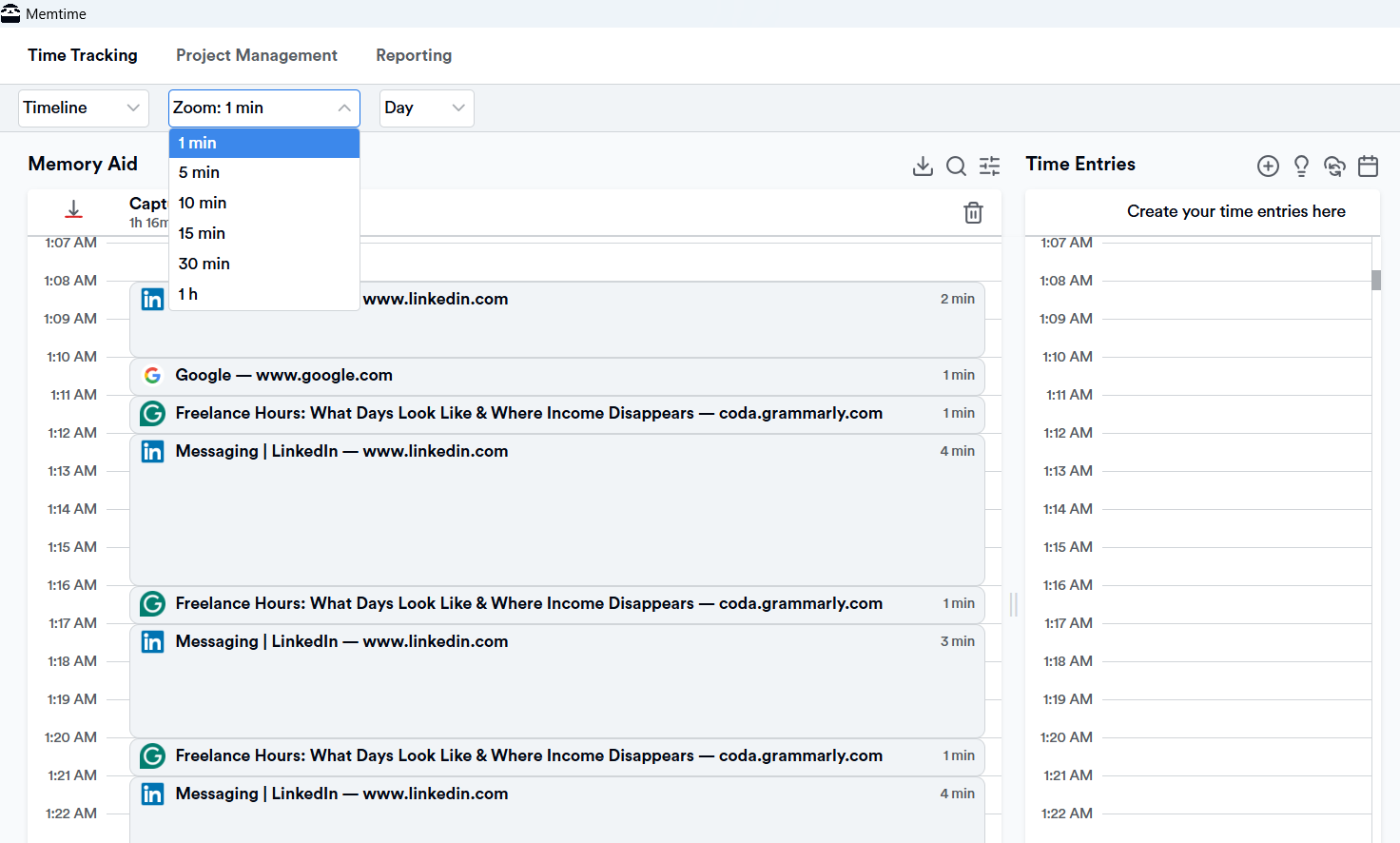
Memtime is our automatic time tracking tool designed specifically for freelancers. It quietly runs in the background on your desktop, while you work, recording what you actually spend your minutes on (every app, document, meeting, email, and browser tab you actively use).
And that’s how you can see exactly how much of your day is spent on things that earn you money vs. things that don’t.
You turn on your computer, and Memtime starts logging your work. It’s that simple.
From that point forward, you get:
- A clear timeline of your day (Memory Aid). Your workday is displayed in clear chunks (1 to 60 minutes). You can zoom in and review what you did at any minute.
- Full on integrations. Got project management software or billing you swear by? That’s great because Memtime integrates a bunch of tools. It does it via a 2-way sync that allows you to import your projects and tasks into Memtime and then export time entries back into the systems you already use.
- Your privacy. Memtime doesn’t send your tracked activities to the cloud or to other people’s dashboards (your client’s) unless you choose to export them. All activity data lives locally on your device, so no client can get to it.
Not thinking about tracking your time.
Capturing all your billable and unbillable minutes accurately.
No more guessing, no more spreadsheets, no more lost income.
You get to focus on creative work while Memtime makes sure your time—and your money—isn’t getting lost.
I bet you wanna try it now. And you can do it for free, for 2 weeks. Just click the button below.
#2 Context switching
Have you ever started deep work, then switched to paying your bills, then replied to emails, then jumped in to fix a client problem, AND then tried to get back to deep work? Yeah, it’s impossible.
But that’s context switching, and it kills productivity.
A 2005 study by the University of California, Irvine, found that it takes an average of 23 minutes to return to a task after an interruption. When you multiply that across a day, that’s HOURS of lost focus. Not to mention the increase in cognitive fatigue and reduced quality, which means your billable work becomes even less efficient.
So, remember it like this: every time you switch tasks, you lose money. You need to stop switching tasks.
#3 Client delays
In corporate jobs, you’re paid for waiting for someone else’s approval. That’s not the case in freelancing.
You finish work. You ask for feedback. And then you’re met with crickets. And if your feedback loop is longer than 24 hours, it actually reduces your productivity because momentum gets lost.
Plus, while you wait for answers, you can’t always bill a client for your time, even if your schedule stalls. And that’s how your income stays put.

#4 Undercharging
According to the International Journal of Research Publication and Reviews (Vol. 6, Issue 5), a large share of freelancers bid below market prices (which is similar to undercharging) just to win work.
And the common reasons are fear of rejection, uncertainty about value, comparing themselves to cheaper competitors, and no clear pricing strategy. That’s why you might work a lot, but profit remains low.
Undercharging is dangerous. It increases pressure to work more hours to earn the same income; it’s like running on a treadmill that slows the harder you press.
Time tracking can help here, believe it or not, specifically Memtime.
By automatically capturing every minute of work—billable and unbillable—you start seeing exactly where your time goes. There are no more lost hours hidden in emails, research, or small admin tasks.
Once you know how long tasks actually take, you can price your work more confidently. You can justify rates based on real data and even identify areas where you’re undercharging without realizing it.
#5 Irregular schedules
Freelancing promises freedom from 9-5 routines, and I’m sure you love that. But irregular schedules have downsides; they can lead to reduced overall productivity, greater difficulty sustaining deep focus, poor sleep, and greater emotional stress.
According to this study, people with irregular work schedules (think nights, variable shifts, or all over the place hours) tend to have more sleep problems, worse physical and mental health, and are more likely to report health issues or feel depressed later on. Basically, a stable schedule equals stable health, as well.
Moreover, that irregular schedule can translate to very productive days followed by very low-income days, unpredictable cash flow, and uneven workload distribution.
So, just keep all of this in mind, and try to find a routine.
No work is invisible
You’re a freelancer. You sell your time, but you also sell your skills, brainpower, and your whimsical magic. That’s why your income shouldn’t depend on how many hours you grind, but on billable hours and the real impact you deliver.
And that’s where automatic time tracking comes in. Let it quietly capture every minute of work, so no billable hour gets lost in emails, research, or tiny tasks you forget about. With it, you’ll see exactly where your time, and money, is going, and you can start making more profitable decisions.
The freelance paradox finally makes sense: it’s not about working more but about working better. And tracking all that work. 🙂
FAQs
Do I really need to track every minute of my work?
It’s not mandatory, but we highly recommend it, as tracking all billable and unbillable tasks helps you see where your time goes. Many freelancers underestimate how much time is lost to admin, emails, and context switching. With automatic tracking, it’s effortless; you just work while a tool (like Memtime) quietly logs your activity.
How does tracking time help me earn more?
By knowing which tasks are actually billable, you can focus on what brings in income instead of busywork. It also helps you set rates based on real data, so you stop undercharging. Basically, your hours start translating directly into money.
Will this slow me down or make work feel like a spreadsheet?
No, not at all! Automatic tracking runs in the background, so you don’t have to click anything or manually log hours. You still do your creative work, while a tool captures everything for you.
Can I protect my privacy while tracking?
Absolutely. With Memtime, all data stays on your device by default; you choose if and when to export it. No one sees your work unless you want them to, so your clients don’t have access to your every move.
How do I know if my freelance hours are “enough”?
Move away from thinking about hours worked; instead, think about billable output and impact. Most freelancers have 3-5 peak productive hours per day, and that’s usually enough if focused. Tracking your time helps you see patterns and plan smarter work windows.
I struggle with irregular schedules. Can time tracking help?
Yes, definitely. By logging your actual work hours, you can spot your most productive periods and plan around them. Over time, you can create predictable windows for deep work, avoid burnout, and stabilize income and productivity.

Aleksandra Mladenovic
Aleksandra Mladenovic is a copywriter and content writer with six years of experience in B2B SaaS and e-commerce marketing. She's a startup enthusiast specializing in topics ranging from technology and gaming to business and finance. Outside of work, Aleksandra can be found walking barefoot in nature, baking muffins, or jotting down poems.







