7 Timesheet Reminder Email Templates (Plus a Better Approach)
I know you don’t like chasing down timesheets. No one does.
It feels like you’re the parent and employees are your kids refusing to eat their veggies; the more you ask for compliance (“just one tiny bite”), the less cooperative they are (shaking their heads and screaming “NO!”).
And because you’re the adult (and parent) here, you know how important accurate time tracking is. After all, you’ve got studies to back you up.
Like this research by the Harvard Business Review. It suggests that daily time tracking can improve productivity and project accuracy, but the longer employees wait to log their hours, the more leaky the data becomes.
So, how do you get your team to submit their timesheets without sounding like a broken record or a Marvel villain?
Well, for starters, you use the right template for the right moment.
In this article, we’ll give you 7 timesheet reminder templates, ranging from a gentle Friday nudge to a more serious final warning. At the end, we’ll also mention a different solution that eliminates the need for chasing timesheets altogether (you’re gonna love it!).
We’ve got no time to waste, so let’s roll.
Key Takeaways:
- Most people delay timesheets because memory and priorities don’t align in real working life.
- Filling out timesheets feels like low-reward work, so employees naturally push it aside for more satisfying tasks.
- Timesheets often get pushed aside in favor of more urgent tasks, even though they’re important for billing and planning.
- Reminder emails help, but they’re only a temporary fix for a deeper issue with manual tracking systems.
- Automated tools like Memtime reduce all this friction by capturing activity in the background, making timesheets easier and more accurate.

Why your team forgets to submit their timesheets
Technically speaking, nobody actually forgets that timesheets exist.
It’s not like your team suffers from a specific type of amnesia that only strikes on Friday before 5 pm. They remember to fill them out and submit; they just choose to remember it later.
And that doesn’t mean they’re lazy or that they are testing your limits, purposely agitating you.
Something totally different is at play, and once you see the real reasons, the behavior starts to make a lot more sense.
Here are those reasons.
#1 Employees deal with memory tax
The biggest reason people don’t submit their timesheets is the manual tracking process. It’s a total nightmare because it requires people to rely on their memory.
And that working memory, according to research on Cognitive Load Theory, is unbelievably fragile.
Just try remembering on a Friday what you did on a Tuesday morning. No luck? That’s because your brain can’t pull that information out; it feels like trying to catch water with a sieve.
But that’s not the worst part.
The problem gets even worse the longer you wait to log it, because working memory gets overloaded by the stress of trying to recall what you’ve already done.
This mental stress and exhaustion is what experts call the memory tax. Think of it as a fee your brain charges every time you try to reconstruct the past; the more time that passes between the work and the logging, the higher the tax (fewer accurate memories).
Now, when you add the fact that employees who log time weekly are only 47% accurate, compared to 66% for those who log daily (according to the previously mentioned HBR study), it all makes sense. By the time Friday rolls around, those little Tuesday tasks—like a 10-minute client call or a quick Slack thread—have evaporated into the ether.
#2 Employees hate low-reward, high-effort tasks
Our brains are wired to crave dopamine; it’s that little hit of satisfaction we get from completing a task.
So, when your team completes a milestone, they get dopamine.
Finishing a big project? Dopamine.
Closing a deal? Dopamine.
Filling out a timesheet? Ummm… no dopamine.
In behavioral economics, filling out timesheets is a classic low-reward, high-effort task. There’s no immediate win for the employee, and the benefits (like billing accuracy and good company health) feel too abstract and distant to even conceptualize. All while the pain (remembering if that meeting lasted 30 or 46 minutes) is very immediate and annoying. So, they avoid filling out their timesheets as much as possible.
#3 There’s no Zeigarnik effect
The Zeigarnik effect is a psychological phenomenon in which our brains remember incomplete tasks better than completed ones. (This is why you can’t stop thinking about that half-finished report at 11:30 pm.)
However, when it comes to timesheets, there’s no such effect.
It’s because time tracking is often seen as non-work. In the mind of a developer or designer, the work was the code they wrote or the deck they designed. Once that’s done, their brains want to “close the file”. Timesheets are just the annoying ghosts of tasks that’ve already been finished.

#4 Timesheets are never the priority
You know I’m right about this.
Timesheets are rarely urgent (until they are critically overdue), so they are constantly bumped to the bottom of the priority list. This psychological quirk has a name, and it’s called time discounting. It happens when we overvalue the importance of immediate tasks and undervalue the importance of future ones. And, based on the number of unsubmitted timesheets, it’s more common than you think.
Learning the art of the nudge
Now that you know that your team isn’t trying to be difficult—they’re just battling biology, you still need a way to bring them back to reality. Preferably, with reminder emails.
Why those emails specifically, you may ask?
Well, reminders work because they break time discounting by making the task immediate again. They simply make timesheets more urgent.
But that doesn’t mean *any* reminder could work. To ensure you get a response, each of your reminders needs to have these 4 things:
- A clear subject line. Tell them exactly what you expect of them or what’s inside.
- The why. A brief mention of the consequence does wonders.
- The link to the timesheet portal. Put the login link right in the email; the fewer clicks they have to make, the better.
- The hard deadline. Be sure to insert a specific time, not just “ASAP”.
Now, before we dive into actual templates, let me preface this by saying you won’t find any “Happy Friday! 🌈” or “Hope you’re having a magical week! ✨” type of emails here. No one wants an email from an over-caffeinated cheerleader.
The following templates are designed to be realistic, objective, and friendly. We’re all adults here.
We’ve organized them by intensity—starting with more casual check-ins and escalating to the “this is serious” for those who seem to skip your emails entirely.
7 timesheet reminder email templates
Here are 7 templates you can copy and paste, or tweak to fit your team’s culture. They go from a low-key nudge to a more serious we-need-to-talk type of reminder.
#1 The pre-weekend email
This reminder should be sent on Friday afternoon, before your team’s brains officially check out.

#2 The Monday morning cleanup
If a team member hasn’t submitted their timesheets from the previous week, now is the time to get to it.
#3 The “Help me help you”
This is one of those mid-week reminders when delays are affecting the team.
#4 The “I know, I know”
This reminder is a friendly but firm poke for a genuinely good employee who is just busy.
#5 The neutral and direct one
This reminder keeps it strictly professional without any personal flavor.
#6 The serious one
Use this reminder when the deadline has long passed, and it’s actually causing a problem.

#7 The final call
This reminder is best sent to chronic late-submitters who have ignored all previous nudges.
Can reminders fail?
In theory, reminders do work. In reality, not always.
You can write the world’s most clever reminder email, but that won’t ensure you’ll get a response.
You’re fighting a battle against human nature, not unresponsiveness. All that memory tax, low-reward, high-effort tasks—it’s all real. That’s why a better approach isn’t necessarily a new email template, but removing the need for the email entirely.
How does one do that?
Glad you asked. 🙂
Meet Memtime, your memory assistant
Memtime = memory + time
Clever, ha?
Well, that’s how Memtime changes the game.
Memtime is our automatic desktop time tracker that runs quietly in the background.
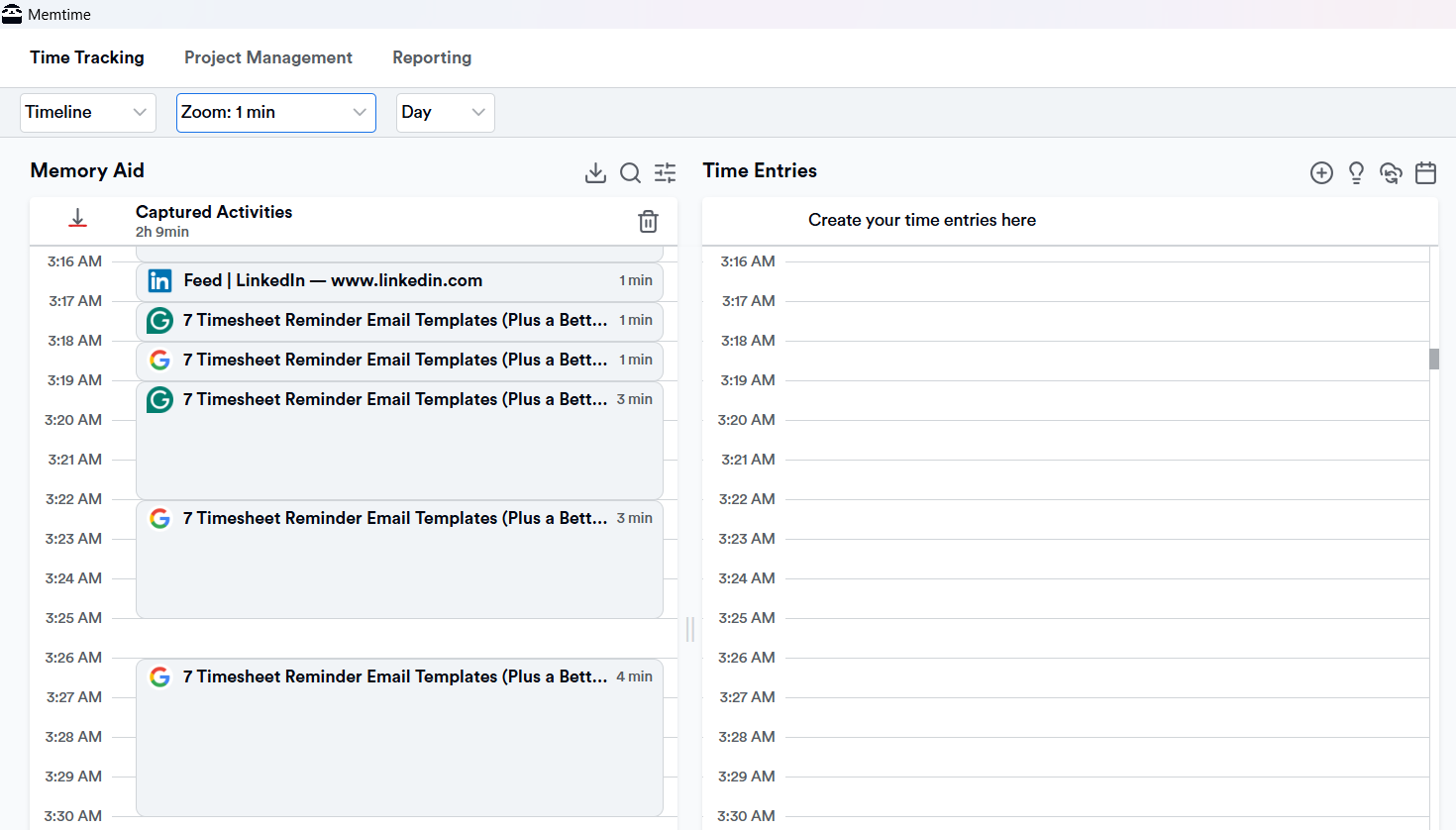
It automatically records every minute you or your team spend in different apps, files, browser tabs, meetings, and even calls. It then organizes all activity into a chronological timeline, the Memory Aid, like so:
How cool?
Now, let’s talk privacy.
I know your team doesn’t want you seeing their activity data. And that’s great because, with Memtime, that data is only visible to them. A user’s raw activity data (think URLs and file names) is invisible to anyone but them and stored locally on their computer.
The only way you, the manager, can see what your team worked on is if they turn these tracked activities into time entries for tasks, projects, and clients and send them to project management or billing apps you already use. Your employees remain in total control of what they actually log to a project.
Now, besides being big on activity capture and privacy, Memtime also gets you:
- Automation for time entry creation. Your employees can turn captured activity into project time in a few clicks, or let Memtime do it for them. They can set rules so Memtime suggests time entries for them; anytime Memtime suggests, they simply accept, edit, or decline that suggestion.
- A 2-way sync with 100+ tools. Memtime allows 2-way integration, meaning your team can import your projects and tasks into Memtime and export time entries back to them.
- Detailed reports. Your workers can access their timesheets, work times overviews, project times, and breakdowns of visited websites and programs used.
As you can see, Memtime is all about a capture-and-log system:
- It automatically logs time spent in every program (Word, Slack, Zoom, etc.),
- Your employees group these activities and assign them to specific project tasks imported from their integrated tools.
- Once they sync them, those entries are instantly pushed to the central PM system, including descriptions and precise durations.
Here’s what that means for you:
- You can forget nudging. You can finally retire from your job as a professional timesheet chaser and stop sending those awkward reminder emails.
- Your billing becomes more accurate. Because the entries are based on recorded activity, your project burn rates and client invoices become 100% reliable.
- You’re no longer taking the role of a parent. You shift the dynamic from a parent-child standoff to a more professional partnership (hopefully, based on trust).
Sounds like a tool both you and your team would love. Amiright?
If I’m right, try Memtime for yourself for 2 weeks. No need to involve your team; just do it yourself.
See how it works, what it gets you.
If you end up liking it, introduce it to your team. If not, feel free to bash me on LinkedIn (seriously!).
Wrapping up
Reminders are a band-aid for a broken, manual time tracking process.
Ditch them. And your time tracking process, as well.
Try something more automated, like Memtime. It’ll get you better data, privacy, and almost automatically populated timesheets. Doesn’t get better than that.
FAQs
Why don’t employees submit timesheets on time?
Well, it usually comes down to memory gaps and low priority, not their lack of effort. People genuinely forget details of their week faster than you’d expect. That’s why the manual tracking process fails most of the time.
Is it just that employees are being careless or unorganized?
No, not really; most people aren’t ignoring timesheets on purpose. It’s more about cognitive overload and competing priorities during the workday. Even the best employees struggle with remembering everything accurately at the end of the week.
Why does manual time tracking cause so many issues?
Because it relies heavily on memory, which gets less reliable over time. The longer you wait, the harder it is to reconstruct your actual workday. Tools like Memtime help reduce this friction by automatically capturing activity in the background.
Do reminder emails actually help with timesheet submission?
Yes, but only to a point; they mainly address timing, not the root cause. They make the task more urgent, but don’t solve the memory problem itself. That’s why many teams combine reminders with automated tracking tools like Memtime.
What’s a better long-term solution than chasing timesheets?
Reducing the need to remember everything manually is the win. Automated activity tracking tools like Memtime capture work in real time and help build accurate timesheets effortlessly. This makes the whole process smoother for employees and managers.

Aleksandra Mladenovic
Aleksandra Mladenovic is a copywriter and content writer with six years of experience in B2B SaaS and e-commerce marketing. She's a startup enthusiast specializing in topics ranging from technology and gaming to business and finance. Outside of work, Aleksandra can be found walking barefoot in nature, baking muffins, or jotting down poems.







