Passive & private Revit time tracking

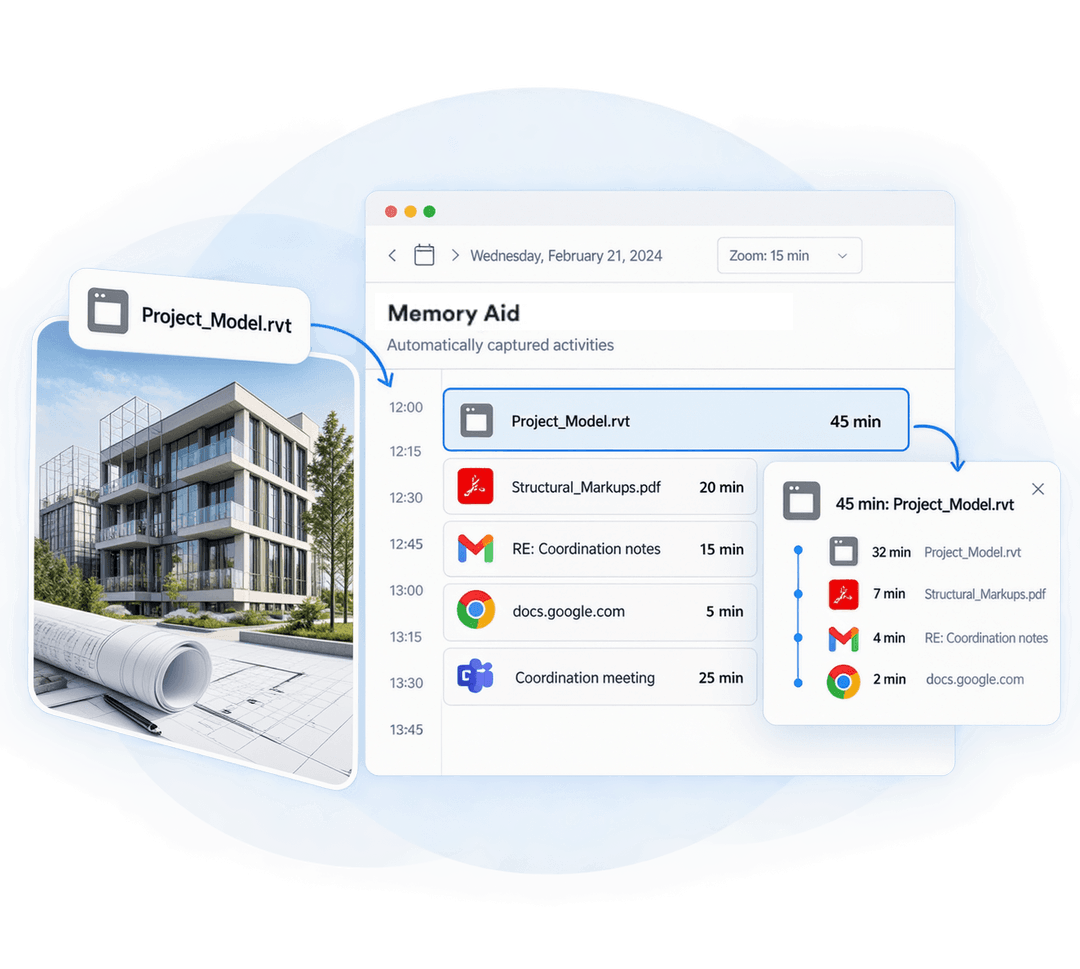
Memtime is an automatic Revit time tracker that runs quietly in the background. It captures your model work, sheet prep, PDF reviews, emails, and calls, so you can bill every hour and estimate your next job based on actual time spent.

No credit card required
No credit card required

Revit time tracking with Memtime

Plug-in free

There’s no add-in to install in Revit, and nothing to break after a version update. Install Memtime, open your model and carry on with your work.
Passive

Passive

Memtime tracks in the background while you work. There are no start/stop buttons; you just model, and our tool keeps count.
Private

Private

Your activity timeline is visible only to you, and it’s stored on your device. You decide what becomes an exportable time entry and what stays yours.

Why track time in Revit?

Revit work is easy to underestimate. Here’s why an honest record of your hours pays off

See how much time your Revit projects actually take

Modeling, family editing, sheet prep, coordination, and revisions are all phases you go through, and an honest timeline can show how much time you spend in each. You can spot the phases that take more hours than you planned and fix them before the next project.
Bill all the hours

Bill the hours that seem to disappear

A quick family fix can turn into an hour of nested-family cleanup. The same goes for a clash you chased after a coordination meeting. Small jobs like these are the first to go missing from a timesheet, and a timeline brings them back.
Quote accurately

Quote the next job using accurate data

How long does a sheet set really take? What does a DD-to-CD push cost in hours? Once you have real data from past projects, your fee proposals will start to reflect reality.

Keep fixed fee projects profitable

Revision rounds and scope creep are part of the job. When you can show how many hours went into each revision, it’s much easier to sit down with the client, talk it through, and adjust the scope, agree on additional services, or update the fee.

How automatic Revit time tracking works

Here's how Memtime turns your Revit activity into project time entries in 4 steps

1

Install Memtime & work as usual

Set up Memtime on your computer, open Revit, and get on with it. There’s nothing to configure in your model or your template.

2

Memtime tracks in the background

While you work, Memtime quietly records the apps and windows you use. That covers editing families, adjusting views and filters, preparing sheets, updating revisions and schedules, reviewing markups in a PDF, answering emails and hopping on calls.

3

Check your private activity timeline

At the end of the day (or week), open your private timeline. You see a clear picture of where hours went, and only you can see it.

4

Turn your activity into project time entries

Select the activities you want to log and assign them to the right project and client. Your Revit sessions, PDF reviews, and coordination meetings can all contribute to the same project. You can also set up automation rules to speed things up. Send the resulting time entries to Memtime Projects or your connected project management software.

What Memtime users say

Here’s why Memtime is the tracker people stick with
Quote
The best auto tracker of time on the market.
David A. review of Memtime
David A.
Business Manager
Quote
It gives me accurate insights into how I actually spend my time.
Aaron K. review of Memtime
Aaron K.
CTO
Quote
I easily map my work to the right client with accuracy.
Azryl A. review of Memtime
Azryl A.
Small business founder
Quote
Seeing the detailed timeline showed me I was undercharging for certain types of work.
Laura B. review of Memtime
Laura B.
CEO
Read more reviews
Memtime free demo

Preguntas frecuentes

¿Puedo hacer seguimiento del tiempo en la app móvil de Slack?
¿Hace seguimiento de los mensajes directos?
¿Necesito integrar o configurar algo?
¿Hace seguimiento de otras apps de mensajería?
¿Funciona para Slack en escritorio y web?
¿Cuánto cuesta Memtime?
How does project assignment work?
Which desktop platforms are supported?
Is Memtime useful if I only track a few projects?
Can I try Memtime before committing?