I accidentally worked
$15k for free as a senior dev – don’t make the same mistake
I quit tracking time for a year as a freelancer — here’s what happened

By Maya Skye
Advertorial last updated:
10 December 2025
Advertorial last updated: 12 March 2026
.png)
I hated time tracking so much I decided to stop doing it for a year to see what would happen.
The world kept spinning… but my bank account was running dry.
This is what came out of my year of stress and estimation.
A short history of me vs. time tracking (I lost)
Time tracking has always been my least favorite part about freelancing. A necessary evil of the job – is what freelancers say.
With my first projects, I committed to tracking every minute like my paycheck depended on it (it actually did).
My freelancer software came with a timer, perfect. Except I always forgot to turn it off.
As I signed more clients, tracking overlapping projects became a nightmare. I figured I’d rather lose a couple bucks than my sanity over the stupid stopwatch.
So I quit tracking time cold turkey, letting the future-me worry about what to put in the timesheet. (Spoiler – the future-me was NOT happy)
My timesheet: a work of fiction
Without the timer, I needed to come up with what to put in my timesheet for invoicing and estimates. Come Friday, and I’d get crippling anxiety knowing how much time I’d waste on guessing what I did all week.
%201%20(1)%20(1)%20(1).png)
I tried going through my calendar, emails, and calls to reconstruct my hours.
It took forever but at least there was a record.
The problem is, most of my work happens in docs and local files. To estimate those, I only had my memory and gut feeling.
The app that changed everything
I was desperate and ranting about time tracking to a freelancer friend.
“I wish there was a browser history but for all I did on my computer,” I said to her.
If this isn’t proof that your phone is listening…
Because the next day I get an ad for this app that tracks time in all programs. Definitely everything a freelancer uses:
• Email and messengers,
• Meeting software,
• Anything in browser tabs,
• Local files, docs, sheets, etc.
• Meeting software,
• Anything in browser tabs,
• Local files, docs, sheets, etc.
Best part – there’s no timer. I log on and it’s already recording in the background.
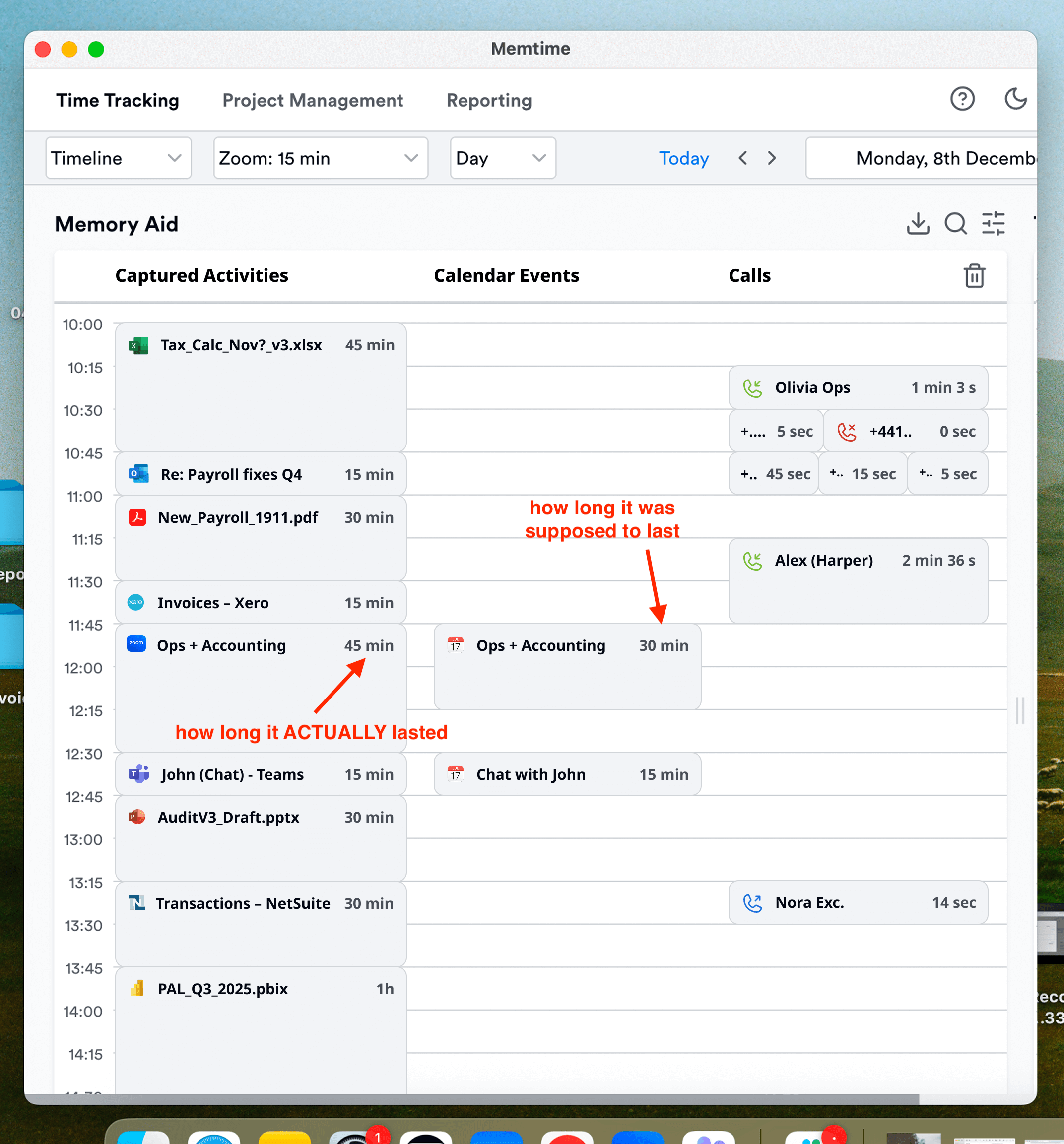
Memtime shows exactly what I did and for how long
The truth hits harder than an outstanding invoice
I didn’t open my activity list until it was time to send an invoice to a client. Here’s what the app revealed:
• Half of my client meetings ran 5-10 minutes longer than scheduled
• Even simple revisions took 20+ minutes, not the 15 I swore they did
• Ambush requests stole 10+ minutes a day – and I never tracked them
• Even simple revisions took 20+ minutes, not the 15 I swore they did
• Ambush requests stole 10+ minutes a day – and I never tracked them
All these sneaky extra minutes added up into one brutal equation:
Just 15 minutes a day = 60 hours a year = more than a week of time I was giving away for free!
Calculate how much you’re underbilling
Here’s a simple calculator you can use to estimate how much time you’re underbilling per year.
All from not tracking the small stuff like extra time in calls and revisions.
Check how much billable time you’re missing out on
The lesson: your memory is not a timekeeping tool
If you’re a freelancer who bills by the hour, here’s the simple truth:
• Do NOT eyeball your time
• Do NOT trust your memory
• Do NOT ignore the “small stuff”
• Do NOT trust your memory
• Do NOT ignore the “small stuff”
Every minute counts. Get a system that backs you up. Your future self (and your bank account) will thank you.
P.S. The app I used is called Memtime, here’s how it tracks your time automatically.
%20(2)%201.png)
